Distributed LLM Inference on Kubernetes: Configuring KServe and llm-d
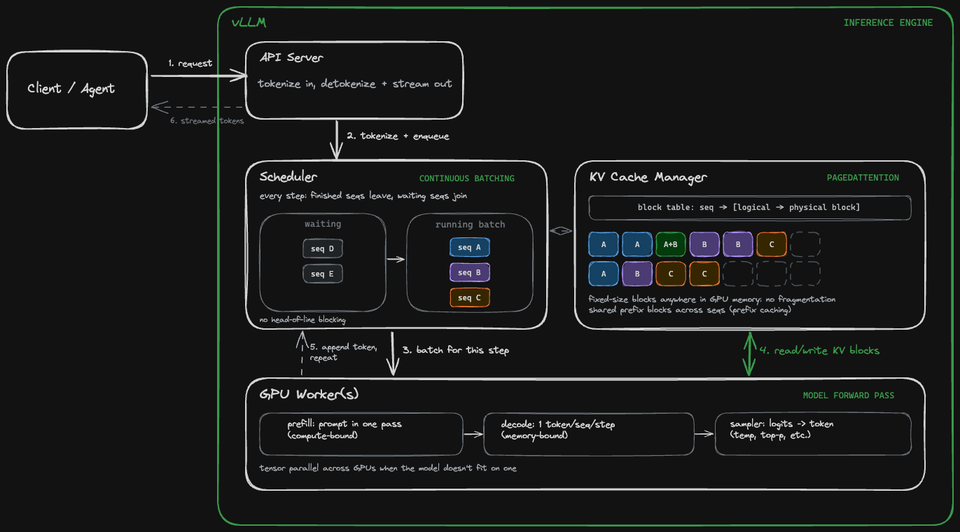
Open Weight Models (Qwen, DeepSeek, Kimi) need a place to run that gives the ability to have shareable GPUs, a first-class orchestration/scheduler, and traffic routing capabilities that engineers are comfortable with.
The orchestration platform of choice for over a decade has been k8s, which, ironically enough, gives all the capabilities needed to successfully and efficiently host LLMs.
Combined with KServe and vLLM, you'll learn how to route, scale, and deploy AI inference on Kubernetes.
Prereqs
To follow along from a hands-on perspective, you will need:
- A k8s cluster
- Cert Manager, which you can learn how to install here.
- Agentgateway, which you can learn how to install here.
Putting The Platforms Together
Before jumping into the hands-on portion of KServe, it's important to double-click on other tools/technologies you'll hear in the same category and how they're different.
- KServe
- vLLM
- llm-d
KServe is the model deployment and scaling layer that runs on Kubernetes. It uses inference engines like vLLM to run (route to) the LLM, and takes care of things like traffic routing, scaling, canary deployments, etc. It's the Control Plane.
vLLM is the inference engine. Without an inference engine like vLLM, you wouldn't be able to run/host Models in Kubernetes.
llm-d is the scheduling layer. It routes incoming LLM requests to instances (Pods) of vLLM (the inference engine that loads your LLMs).
vLLM is the inference engine. It's what loads your LLMs that are running in a Pod.
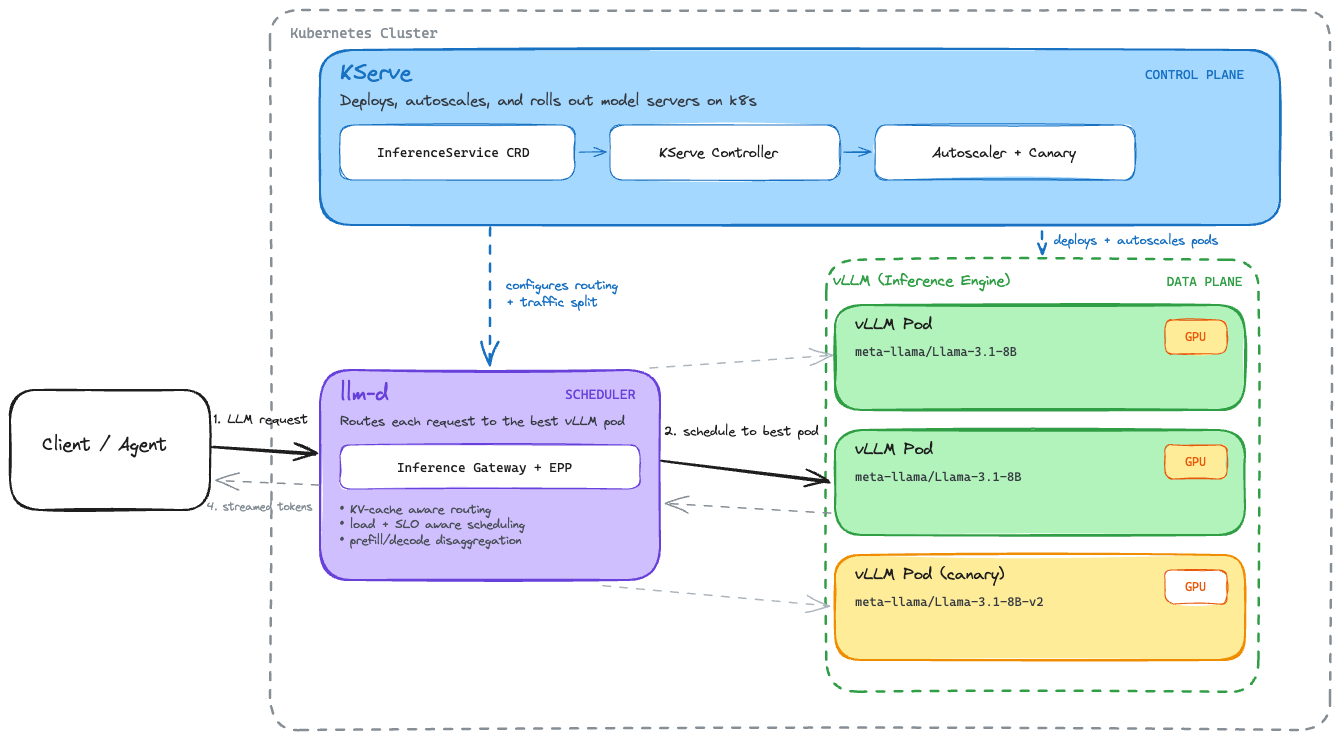
KServe integrates llm-d into its architecture to handle LLM deployments/scheduling. They work at different layers of the stack. KServe is the Control Plane and llm-d is the LLM scheduler that routes LLM traffic (e.g - asking your Agent to act) to vLLM.
Is vLLM or llm-d A Prereq?
vLLM is not a prereq for installing KServe. When you deploy an LLM using KServes InferenceService configuration, KServe automatically provisions/manages the vLLM Pod for you. You can see that on vLLMs docs, it has a section that says "vLLM can be deployed with KServe on Kubernetes for highly scalable distributed model serving": https://docs.vllm.ai/en/stable/deployment/integrations/kserve/
llm-d is not a prereq either. However, if you want to use KServe at scale, you'll need llm-d because without it, you're just duplicating LLM containers. That means duplicate chat history/context, wasting a massive amount of vRAM. With llm-d, the requests will be intercepted, and it'll check which GPU already has the chat history/context in KV-cache.
How To Deploy KServe
There are a few methods/configuration options for deploying KServe:
- Standard: Generative + Predictive AI (statistical algorithms to analyze historical data and forecast future outcomes).
- Serverless (Knative): Predictive AI. The Serverless configuration type gives you scale-to-zero/cost optimization capabilities.
- LLM: Generative AI
In today's world, there's a high likelihood that you'll end up using the LLMInferenceService for the majority of workflows you're dealing with. For this blog post, however, we're going to use Standard, but you can find how to install knative/serverless and LLM here.
KServe Deployment
There are two necessary installations for KServe to work:
- A Secret for HTTPs termination
- The Gateway for routing
- KServe itself
The Secret is needed for HTTPS termination at the Gateway:
Client – HTTPS --> Gateway – HTTP --> KServe InferenceService
kubectl apply -f - <<EOF
apiVersion: cert-manager.io/v1
kind: Issuer
metadata:
  name: kserve-selfsigned
  namespace: kserve
spec:
  selfSigned: {}
---
apiVersion: cert-manager.io/v1
kind: Certificate
metadata:
  name: kserve-ingress
  namespace: kserve
spec:
  secretName: my-secret
  issuerRef:
    name: kserve-selfsigned
    kind: Issuer
  dnsNames:
    - "*.example.com"
    - "example.com"
EOF
Next, deploy KServe:
helm install kserve-crd oci://ghcr.io/kserve/charts/kserve-crd -n kserve --create-namespace --version v0.18.0

helm install kserve oci://ghcr.io/kserve/charts/kserve-resources -n kserve --version v0.18.0 \
  --set kserve.controller.deploymentMode=Standard \
  --set kserve.controller.gateway.ingressGateway.enableGatewayApi=true \
  --set kserve.controller.gateway.ingressGateway.kserveGateway=kserve/kserve-ingress-gateway \
  --set kserve.controller.gateway.disableIstioVirtualHost=true
You'll notice that it points to a Gateway called kserve-ingress-gateway, which isn't deployed yet. To deploy a Gateway object with that name, use the following:
kubectl apply -f - <<EOF
apiVersion: gateway.networking.k8s.io/v1
kind: Gateway
metadata:
  name: kserve-ingress-gateway
  namespace: kserve
spec:
  gatewayClassName: agentgateway
  listeners:
    - name: http
      protocol: HTTP
      port: 80
      allowedRoutes:
        namespaces:
          from: All
    - name: https
      protocol: HTTPS
      port: 443
      tls:
        mode: Terminate
        certificateRefs:
          - kind: Secret
            name: my-secret
            namespace: kserve
      allowedRoutes:
        namespaces:
          from: All
  infrastructure:
    labels:
      serving.kserve.io/gateway: kserve-ingress-gateway
EOF
Ensure everything is up and operational:
kubectl get all -n kserve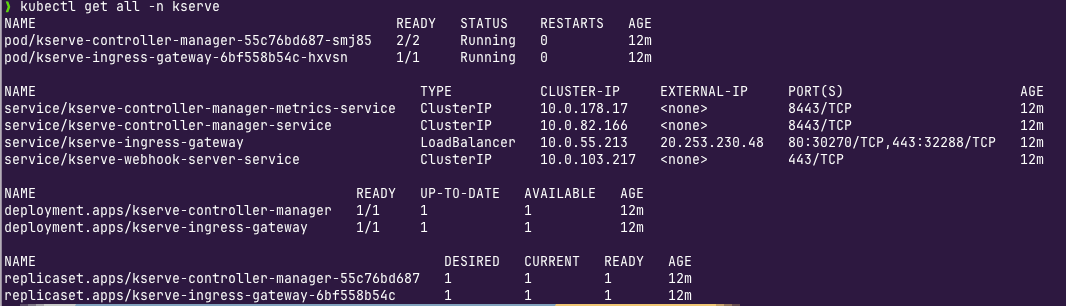
Deploy An LLM
With all of the prereqs and KServe components up and operational, you can now deploy an LLM using KServes InferenceService object. You'll see below that Hugging Face is used, and the LLM is actually being downloaded and deployed inside your k8s cluster.
- Specify the Model serving runtime. In this case, Hugging Face is used.
kubectl apply -f - <<EOF
apiVersion: serving.kserve.io/v1alpha1
kind: ClusterServingRuntime
metadata:
  name: kserve-huggingfaceserver
  annotations:
    serving.kserve.io/server-type: huggingfaceserver
spec:
  annotations:
    prometheus.kserve.io/path: /metrics
    prometheus.kserve.io/port: "8080"
  containers:
    - name: kserve-container
      image: kserve/huggingfaceserver:latest
      args:
        - --model_name={{.Name}}
      resources:
        limits:
          cpu: "2"
          memory: 4Gi
        requests:
          cpu: "1"
          memory: 2Gi
  supportedModelFormats:
    - name: huggingface
      version: "1"
      autoSelect: true
      priority: 1
  protocolVersions:
    - v2
    - v1
EOF- Create an
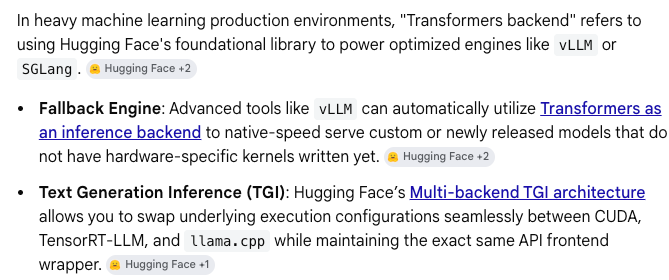
InferenceServiceto specify what LLM will be used/deployed. KServes Hugging Face runtime serves supported Models either with vLLM when available or the standard Hugging Face backend. You'll often see the Hugging Face Backend for general-purpose compatibility, CPU support, and a fallback for any models that aren't supported on vLLM.
kubectl apply -f - <<EOF
apiVersion: serving.kserve.io/v1beta1
kind: InferenceService
metadata:
  name: qwen-llm
  namespace: kserve
spec:
  predictor:
    model:
      modelFormat:
        name: huggingface
      args:
        - --model_name=qwen
        - --gpu-memory-utilization=0.5
        - --max-model-len=4096
      storageUri: "hf://Qwen/Qwen2.5-0.5B-Instruct"
      resources:
        limits:
          cpu: "2"
          memory: 6Gi
        requests:
          cpu: "1"
          memory: 4Gi
EOF--gpu-memory-utilization=0.5 limits vLLM to roughly 50% of the container’s memory for model execution and KV cache. This is needed because vLLM defaults assume more memory than what's available in a typical/small/demo cluster.When you use storageUri: "hf://Qwen/Qwen2.5-0.5B-Instruct", KServe downloads the LLM files from the Hugging Face Hub. In then puts the files in the Pods local storage. The Hugging Face runtime loads the LLM into CPU memory and inference requests are then processed locally by that Pod.
- Check that the Inference Service was deployed and running.
kubectl get inferenceservices -n kserve- Check that the Pod is initializing. The Pod should look something like
qwen-llm-predictor-xxxx-xxxx
kubectl get pods -n kserve- Retrieve your Gateway's IP address for step 5. If you don't have a Gateway with a public ALB IP attached, you can
port-forwardthe LB and uselocalhostinstead of the IP.
kubectl get gateway -n kserveThe certificate created previously covers *.example.com. KServe generates service hostnames using -.example.com, which matches that wildcard. For the lab, curl --resolve maps this hostname to the Gateway IP without requiring a DNS record (e.g - <object-name>-<namespace>.example.com)
curlyour Gateway.
curl -k \
  -H "Host: qwen-llm-kserve.example.com" \
  -H "Content-Type: application/json" \
  https://20.253.230.48/openai/v1/chat/completions \
  -d '{
    "model": "qwen",
    "messages": [
      {
        "role": "user",
        "content": "Write a short poem about artificial intelligence."
      }
    ],
    "max_tokens": 100
  }'
You should see an output similar to the below:
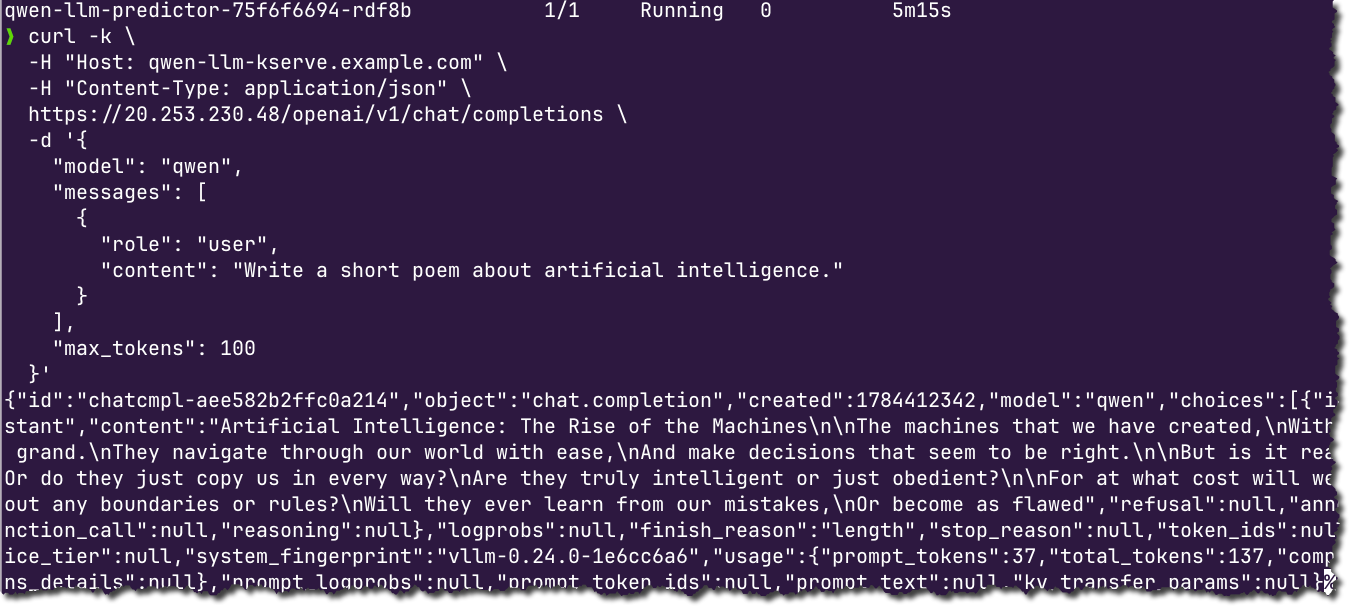
Congrats! You are successfully serving inference and routing via agentgateway to local/open weight LLMs on your k8s cluster.

Comments ()