Human Presence in Agentic Workflows
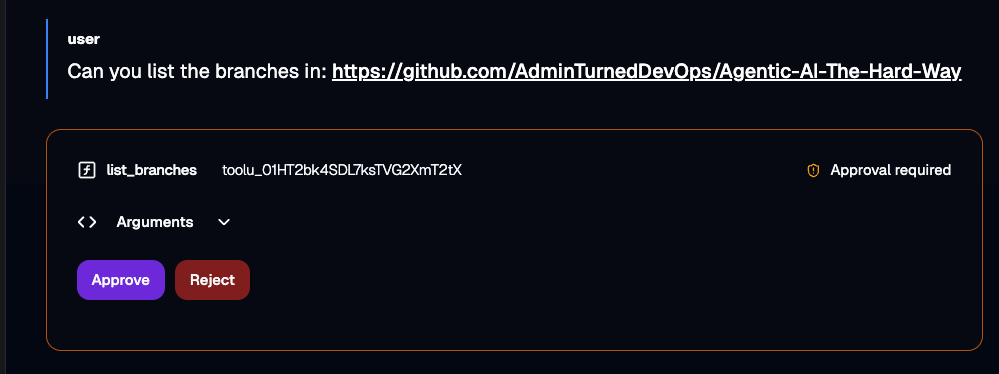
Where does a person come into an AI workflow today? Is it during code creation? PRs? Quantifying business output? This is the question that every organization using AI is trying to figure out right now. Where is there, if at all, a human in the loop.
In this blog post, you'll learn how to implement the human into your Agent with kagents human-in-the-loop feature.
Prerequisites
To follow along with this blog post, you will need:
- A Kubernetes cluster running. Anything from a managed service k8s cluster or a cluster running locally (as long as your environment isn't air gapped) will work.
- Kagent installed, and you can learn how to do that here.
What Is Human-in-the-Loop (HITL)
As the name suggests, human-in-the-loop is where the human gets put in a workflow. For example, a lot of large organizations have Agents writing code and putting in PRs, but a human is the decision maker. At the last stop of the deployment process, a human is there to look at and verify what the Agent did and if it's correct or not.
The question for most companies is WHERE does the human go, and that will vary across organizations. It could be right at the beginning of an application stack creation/deployment process or at the end. Realistically, there's no right or wrong answer. It all depends on how much your organization trusts Agents and where Agents, for your workflows, seem to be failing the most. Depending on where Agents are failing, that's where you'd put a human in.
Deploying An HITL-Enabled Agent
With the definition of HITL above, let's learn one method of implementing it with ensuring that humans have to approve particular MCP Server tools that are used. If your Agent is connected to an MCP Server, it'll have various tools. If it has access to specific tools, the question is, should it be able to use those tools freely?
For this example, you'll deploy an Agent that's using the GitHub Copilot MCP Server.
- Create environment variables for your LLM provider of choice and a GitHub personal access token (PAT). This example uses Anthropic, but you can set up any LLM provider that's available in kagent. You can find the full list here.
export GITHUB_PERSONAL_ACCESS_TOKEN=
export ANTHROPIC_API_KEY=- Create a secret with the PAT.
kubectl apply -f - <<EOF
apiVersion: v1
kind: Secret
metadata:
  name: github-pat
  namespace: kagent
type: Opaque
stringData:
  GITHUB_PERSONAL_ACCESS_TOKEN: $GITHUB_PERSONAL_ACCESS_TOKEN
EOF- Create a
RemoteMCPServerobject which will allow the kagent Agent to connect to the GitHub Copilot MCP Server.
kubectl apply -f - <<EOF
apiVersion: kagent.dev/v1alpha2
kind: RemoteMCPServer
metadata:
  name: github-mcp-remote
  namespace: kagent
spec:
  description: GitHub Copilot MCP Server
  url: https://api.githubcopilot.com/mcp/
  protocol: STREAMABLE_HTTP
  headersFrom:
    - name: Authorization
      valueFrom:
        type: Secret
        name: github-pat
        key: GITHUB_PERSONAL_ACCESS_TOKEN
  timeout: 5s
  terminateOnClose: true
EOF- Implement a Model config, which sets up the LLM provider for the Agent to use. In the example below, it's Anthropic.
kubectl apply -f - <<EOF
apiVersion: kagent.dev/v1alpha2
kind: ModelConfig
metadata:
  name: anthropic-model-config
  namespace: kagent
spec:
  apiKeySecret: kagent-anthropic
  apiKeySecretKey: ANTHROPIC_API_KEY
  model: claude-sonnet-4-6
  provider: Anthropic
  anthropic: {}
EOF- Create an Agent, and this is where human-in-the-loop comes into play. Notice how at the bottom of the Manifest, there's a
requireApprovalparameter. This is where you can set the MCP Server tools that need a human to approve.
kubectl apply -f - <<EOF
apiVersion: kagent.dev/v1alpha2
kind: Agent
metadata:
  name: super-tester
  namespace: kagent
spec:
  type: Declarative
  declarative:
    modelConfig: default-model-config
    systemMessage: |-
      You're a friendly and helpful agent that is an agentgateway expert. You know all things about agentgateway open source and agentgateway enterprise

      # Instructions

      - If user question is unclear, ask for clarification before running any tools
      - Always be helpful and friendly
      - If you don't know how to answer the question DO NOT make things up
        respond with "Sorry, I don't know how to answer that" and ask the user to further clarify the question

      # Response format
      - ALWAYS format your response as Markdown
      - Your response will include a summary of actions you took and an explanation of the result
    tools:
    - type: McpServer
      mcpServer:
        name: github-mcp-remote
        kind: RemoteMCPServer
        toolNames:
        - get_latest_release
        - get_commit
        - get_tag
        - list_branches
        requireApproval:
        - list_branches
        - get_tag
EOF
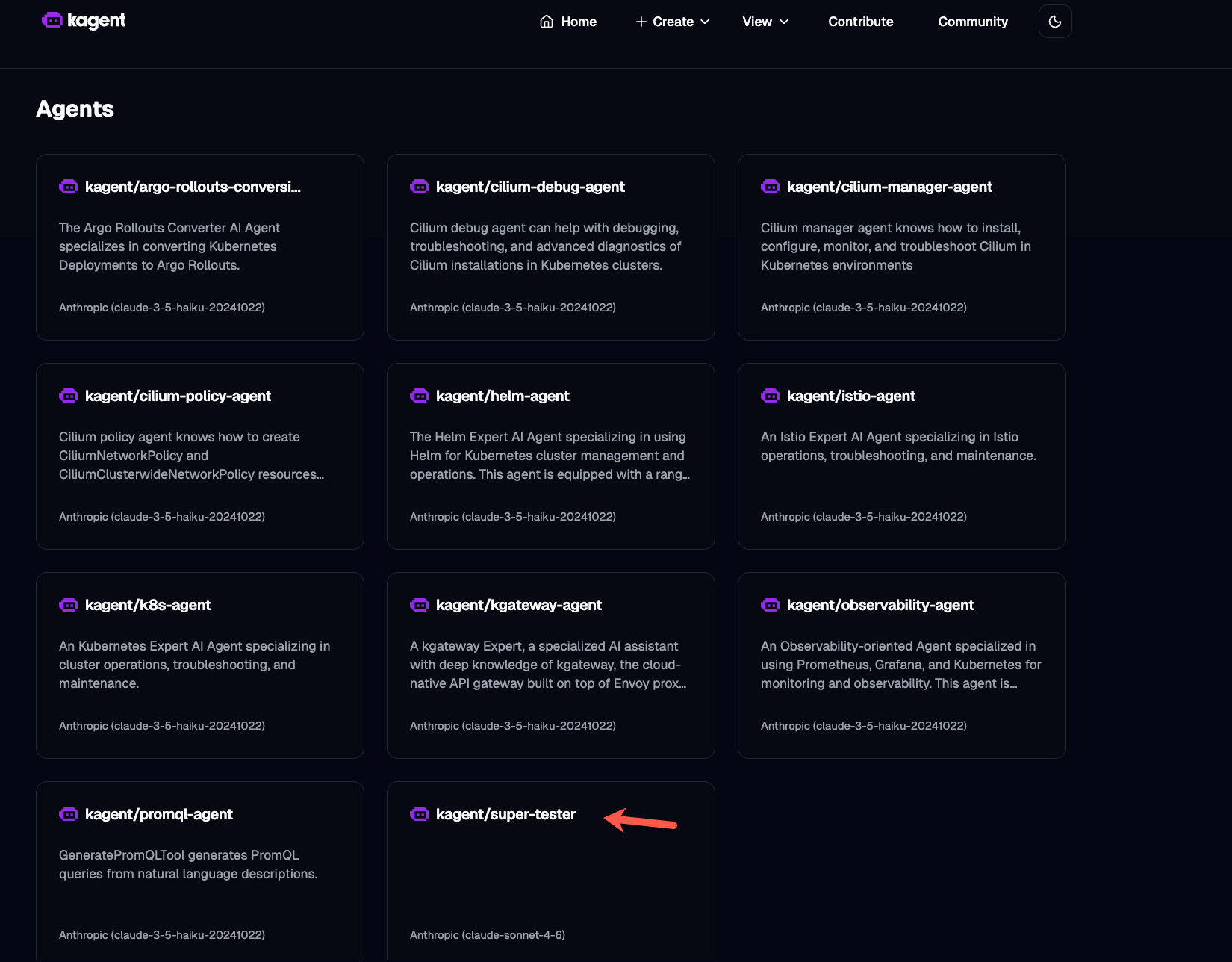
Once deployed, you should see the Agent running.
Using The Agent
With the Agent deployed, you can now begin to use it with human-in-the-loop capabilities.
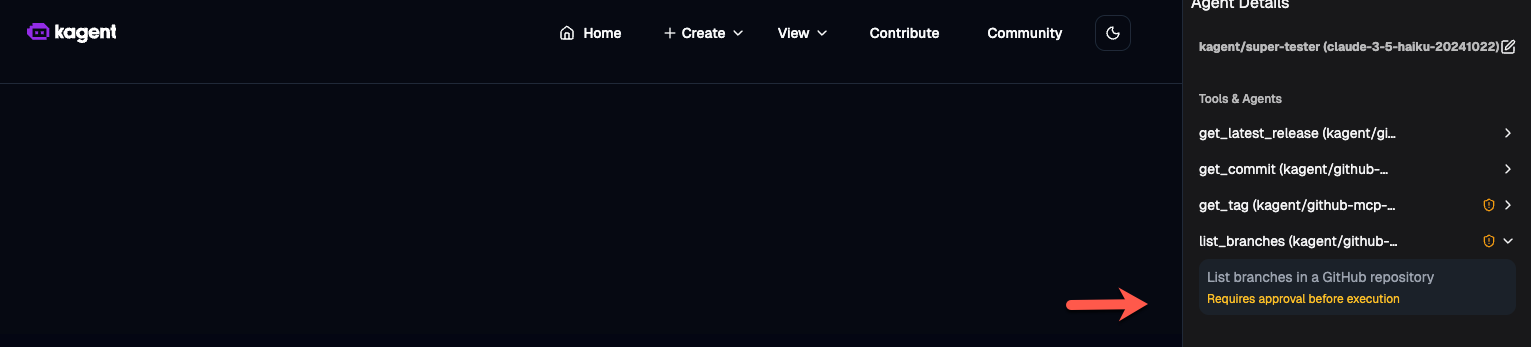
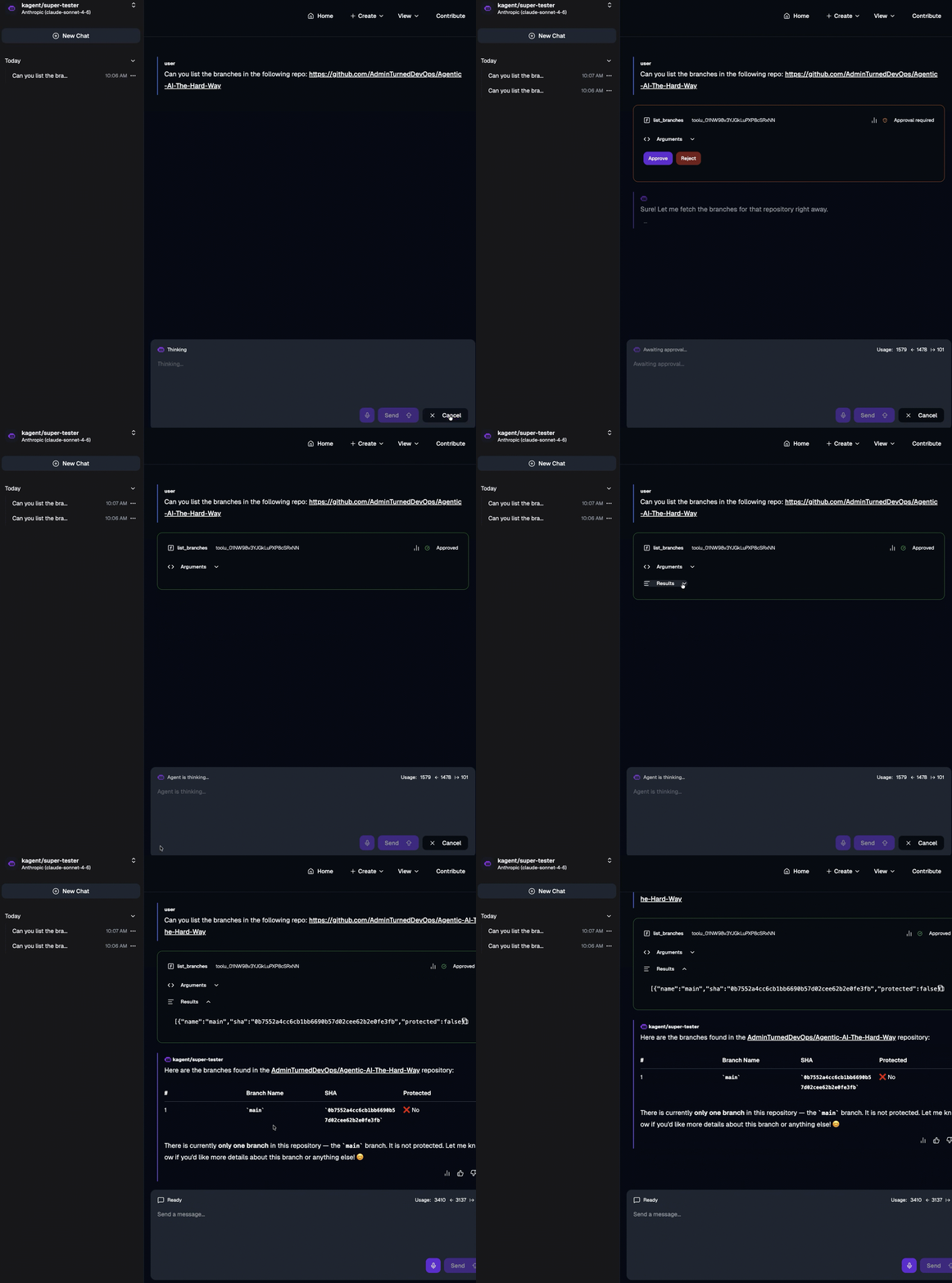
- Open the Agent and you'll see that the
list_branchestool requires approval.
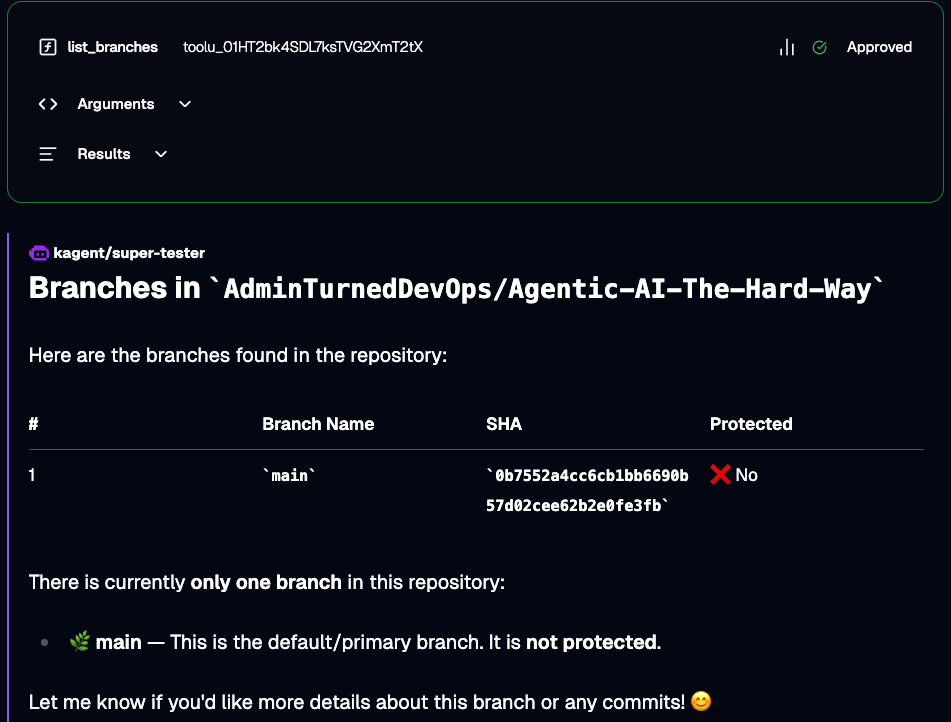
- Prompt the Agent with a "Can you list the branches in" a specific repository, like in the example below. When you run it, you'll see an "Approve" button and a "Reject" button. Click the Approve button.
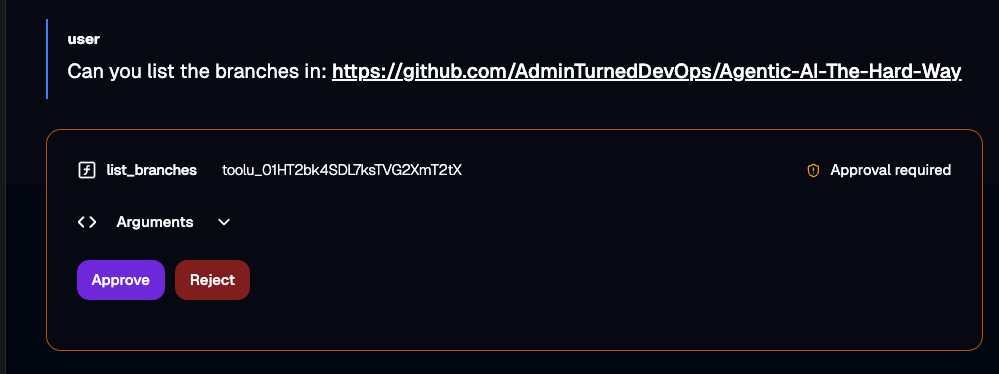
- You'll now see the Agent run successfully.
The entire workflow in a nutshell

Comments ()