Implementing An ML Open-Source AI Runtime
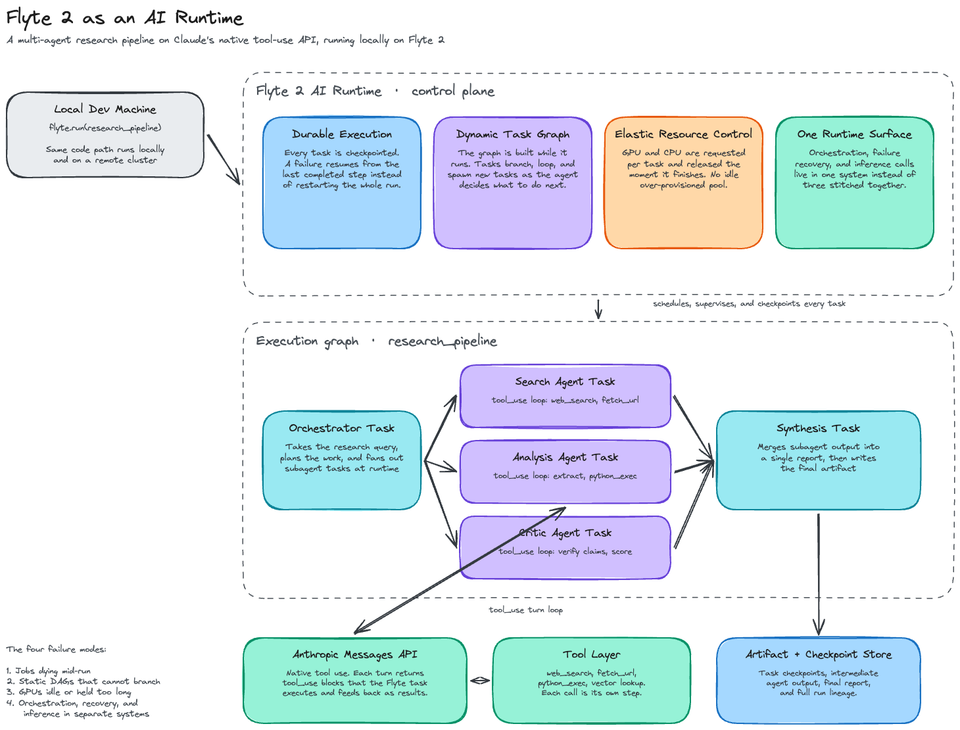
In the majority of conversations around ML workflows, the same four problems come up:
- Long-running jobs that die halfway through and need to be restarted from scratch
- DAGs that can’t dynamically branch, loop, or call tools at runtime
- GPUs sitting over-provisioned or running longer than needed
- Separate systems stitched together for orchestration, failure recovery, and inference
Traditional orchestrators weren't built for any of this. They were built for linear, deterministic pipelines where step one feeds step two and the DAG is known before the run starts. Agentic workloads don't work that way, and that's the gap the AI runtime category exists to fill.
In this blog post, you will learn what an AI runtime is, why Flyte 2 is positioned as the first open-source runtime, and how to run a real multi-agent research pipeline (built on Claude's native tool-use API) locally on Flyte 2.
Prerequisites
To follow along in a hands-on fashion, you will need:
- Python 3.11+ and uv installed
- An Anthropic API key
- A Tavily API key for web search
- Docker engine (e.g - Docker Desktop) installed if you want to run the Flyte 2 devbox for the full cluster experience
Everything in this post runs locally first, so no cluster is required to start.
What Is An AI Runtime
As I was diving into what an "AI runtime” is in this case, my initial thought was that it was another name for an agent runtime. Turns out that’s not the case at all. It's the infrastructure that gets AI workloads from experiment to production.
An agent runtime is scoped to Agents. An AI runtime is the execution layer for the entire AI stack: ML training jobs, data processing, batch inference, real-time serving, and agentic workflows all run on it. In fact, agentic workflows can run, manage, and deploy all of the workload types that preceded it.
The way I think about it: an orchestrator schedules work. An AI runtime executes work and takes responsibility for what happens while it's executing so that it succeeds despite failures that may occur at runtime. That means:
- Durability. Long-running jobs recover from both code-level failures and infrastructure failures like OOM errors, without losing progress.
- Dynamic execution. Workflow logic that adapts at runtime instead of following a fixed DAG. Branching, looping, fan-out based on LLM output.
- Native inference. Real-time and batch inference in the same layer, so you're not bolting on a separate serving stack.
Flyte has been around for a while as an ML and data pipeline orchestrator. Flyte 2 is the rebuild of that foundation into a full AI runtime, and it's open source, running on your own infrastructure.
Let's dive in from a hands-on perspective.
A Multi-Agent Agentic Research Pipeline With Claude
The best way to understand what "dynamic, agent-native execution" actually means is to run a workload that a traditional orchestrator can't express cleanly.
The Claude agent research pipeline from the Union workshops repo is a great example. It's a research system where:
- Claude plans subtopics from a research query
- Each sub-topic fans out to a parallel Flyte task, and each task runs a full ReAct-style Agent loop using Claude's native tool-use API
- A synthesis task combines the reports
- A quality-check task scores the result and identifies gaps
- If gaps are found, the pipeline loops back and researches the gaps
That last part is the important one. The workflow doesn't know how many iterations it will run or what topics it will research in round two. Claude decides at runtime. The DAG is generated by the LLM while the pipeline is executing.
Callout: there's no agent framework in this project (LangGraph, CrewAI, etc.). Claude's tool-use protocol is already a ReAct loop (Reason, Act, Observe), and Flyte 2 handles the orchestration, so the Agent code is plain Python against the Anthropic SDK. This is intentional on Flyte's part as the team has been clear that Flyte 2 isn't the 101st agent framework. It sits underneath whichever framework you use (or none at all) and provides the durability, data flow, and resource-awareness layer.
Installation & Configuration
- Clone the workshops repo and set up the environment.
git clone https://github.com/unionai/workshops.git
cd workshops/tutorials/claude_agent_research

uv venv .venv --python 3.11
source .venv/bin/activate
uv pip install -r requirements.txt
- Add your API keys to a .env file in the project directory.
ANTHROPIC_API_KEY=your-key-here
TAVILY_API_KEY=your-key-here
Flyte 2 ships with a local run mode, so there's no cluster, control plane, or Helm chart between you and the first run.
How The Pipeline Is Built
Before running the pipeline, let’s take a look at how little Flyte-specific code there is.
The environment definition in config.py declares the container image, secrets, and resources for every task:
base_env = flyte.TaskEnvironment(
    name="claude-research-env",
    image=flyte.Image.from_debian_base().with_requirements("requirements.txt"),
    secrets=[
        flyte.Secret(key="ANTHROPIC_API_KEY", as_env_var="ANTHROPIC_API_KEY"),
        flyte.Secret(key="TAVILY_API_KEY", as_env_var="TAVILY_API_KEY"),
    ],
    resources=flyte.Resources(cpu=1, memory="1Gi"),
)
Tasks are async Python functions with a decorator. Here's the fan-out inside the orchestrator, where each sub-topic becomes its own parallel Flyte task:
research_coros = [
    research_topic.override(short_name=f"research-{i}")(
        topic, max_searches
    )
    for i, topic in enumerate(topics)
]
new_results = await asyncio.gather(*research_coros)
This is standard asyncio.gather, except every coroutine is a real Flyte task with its own container, retries, and UI visibility. Because the topics list comes from Claude's planning step, the number of parallel tasks isn't known until runtime, which is the dynamic execution in practice.
The quality loop at the bottom of the orchestrator is just a while loop:
if not gaps or score >= 8 or iteration >= max_iterations:
    break

topics = gaps[:num_topics]
No special looping construct and no conditional DAG syntax. If Claude finds gaps, the pipeline investigates them.
Data between tasks flows as Pydantic models (TopicReport, QualityResult, PipelineResult), and Flyte serializes them natively. No manual JSON wrangling between steps.
Running The Pipeline
1. Run it locally with the TUI to watch the execution live:
flyte run --local --tui workflow.py research_pipeline \
  --query "Compare quantum computing approaches: superconducting vs trapped ion"
You'll see the plan step fire, three research tasks fan out in parallel, each Agent making its own web searches, then synthesis and the quality check. If the score comes back under 8 with gaps identified, you'll watch a second iteration kick off with new topics you never defined.
A few flags to keep in mind:
flyte run --local workflow.py research_pipeline \
  --query "What are the latest advances in fusion energy?" \
--num_topics 2 --max_searches 2 --max_iterations 2Callout: because each step is its own task, each step can use its own model. The repo defaults everything to claude-haiku-4-5 for speed, but you can run Haiku for the fast search loops and a bigger model like Sonnet for the final synthesis. Per-task model selection is the kind of cost optimization that's painful when your whole Agent runs as one process and trivial when every step is a first-class task.
Running It On The Full Runtime
As we've tested in local mode, which runs everything in your local Python process, let's now take a look at the same pattern with the devbox. The devbox is a self-contained Flyte cluster that runs on your local machine via Docker, or on a cloud VM like an AWS EC2 instance. The idea is this; local mode proves the code, and the devbox proves the runtime. The Flyte 2 devbox spins up the full backend, UI, and object storage locally in Docker.
- Start the devbox.
flyte start devbox- Create the secrets on the cluster.
flyte create secret ANTHROPIC_API_KEY --project flytesnacks --domain development
flyte create secret TAVILY_API_KEY --project flytesnacks --domain development- Ensure that the --local flag is dropped as you’re running this on the devbox.
flyte run workflow.py research_pipeline \
  --query "Compare quantum computing approaches" \
  --num_topics 3 --max_searches 3 --max_iterations 2
Now you get the production UI out of the box: every task runs with its inputs, outputs, logs, and execution history, plus live HTML reports that each task publishes while it runs (the research tasks in this pipeline stream their findings to the UI as they work).
This is also where the durability story shows up. Flyte 2 is infrastructure-aware, meaning it can recover from infra failures like OOM crashes, not just logical bugs. It goes further than a blind retry because the runtime manages your compute. Flyte 2 surfaces infra failures like OOM as catchable errors, so your workflow code can try/except the failure and rerun the task with more memory via an override. The runtime doesn't do this for you automatically. What it does is make the pattern possible: infrastructure-aware means an OOM becomes something your code can catch and respond to instead of a dead run you restart by hand.
In the UI, a failed task shows up with a red dot, retries, and succeeds, and the rest of the pipeline never knew anything happened. Completed tasks don't re-run. For a pipeline where each Agent run is burning API tokens and each training-style task is burning GPU time, not re-running completed work is the difference between a hiccup and a bill. Flyte 2 also autoscales the underlying compute, including scale-to-zero, so fan-outs that spike to thousands of containers don't leave you paying for idle infrastructure afterward.
The Same Runtime Handles More Than Agents
Although the Agent pipeline is the “neat demo”, the "AI runtime, not agent runtime" claim only holds if the same layer handles the rest of the AI stack. The good news is that it does, and two other projects in the ecosystem prove it.
The distributed LLM pretraining tutorial runs FSDP training for a 30B-parameter GPT-style model across 8 H200 GPUs (with presets up to 65B), using the exact same TaskEnvironment pattern you saw in the research pipeline. The details worth noticing:
- Per-task resource isolation. The data prep task runs on 5 CPUs, training runs on 8 H200s with 512Gi of memory and explicit shared memory for NCCL, and the driver task coordinating everything runs on 2 CPUs and 4Gi. Expensive GPUs are only provisioned while training is actively running.
- Caching as a fault boundary. The tokenization step is cached on its inputs. If training fails on day two, data prep doesn't re-run. Combined with checkpoint uploads through Flyte's File abstraction and resume_checkpoint, a failed multi-day run picks up where it left off with the same optimizer state and LR schedule position.
- Live training dashboards through Flyte Reports in the UI. No Grafana, no Prometheus, no TensorBoard server to babysit for a multi-day run.
The GRPO fine-tuning project is the other end of the spectrum: RL fine-tuning a model to write correct Python, where the reward function is sandboxed code execution against test cases. CPU tasks for data prep, GPU tasks for training and eval, cached learnability filtering, live reward charts streaming to the UI. The whole pipeline runs on a single T4 in about 20 to 30 minutes.
An Agent research pipeline, 30B-parameter distributed pretraining, and RL fine-tuning with code-execution rewards, all on the same runtime with the same primitives. That's the difference between an agent runtime and an AI runtime.
Wrapping Up
The "AI runtime" framing is new, but the problem it solves isn’t. Every team moving Agents and ML workloads to production ends up building the same things by hand; retry logic, checkpointing, a serving layer, observability glue. An AI runtime pulls that into a single execution layer, and Flyte 2 is the first open-source implementation that covers ML, data, and agentic workloads together on your own infrastructure.
What stood out to me when building with it was that the Agent code is actually plain Python, not a DSL built on Python syntax and semantics. Claude's tool-use loop is the Agent framework, Pydantic models are the data contract, and Flyte 2 handles everything an orchestrator alone can't, which is runtime-generated DAGs, durable long-running tasks, and infra-level failure recovery.
The fastest way to see it for yourself is the devbox. Head to flyte.org, install the SDK, and run flyte start devbox to get the full runtime (backend, UI, and object storage) running locally in Docker. The research pipeline from this post is a real workload to throw at it.
If you want to explore before installing anything, there's an in-browser interactive demo that runs Flyte 2 without any local setup, and a solid walkthrough video on Flyte 2 as an agent runtime that covers the durability model in more depth. But the devbox is the real thing, so start there.

Comments ()