Intercept, Inspect, Secure: Proxying Claude Code CLI Traffic
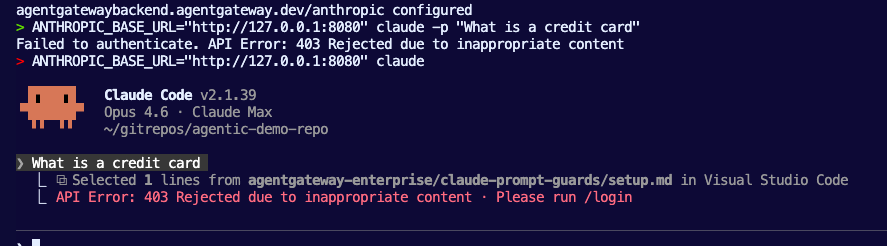
Architecture diagrams always look something like this:
Agent -> Gateway -> LLM (or MCP Server).
The Agents that organizations are typically referring to are Agents that perform an action via prompts by a user or autonomously, and those Agents are usually running in a system somewhere in production. That is, however, not where the majority of Agentic traffic originates. The larger chunk of traffic comes from Agentic clients (Claude Code CLI, Cursor, Copilot, etc.) and because of that, we now must think about Agents not only running in production systems, but on someone's laptop.
In this blog post, you'll learn how to secure that traffic within an Agentic client with agentgateway.
Gateway Configuration
The first thing to ensure is that you have a proper AI Gateway configured so traffic from the Agentic CLI client can get from point A to point B securely. In this case, you can use agentgateway, which is an AI Gateway built from the ground up specifically for AI traffic.
- Generate an API key and put it into an environment variable so a k8s Secret can be created with it later.
export ANTHROPIC_API_KEY=- Create the Gateway object.
kubectl apply -f- <<EOF
kind: Gateway
apiVersion: gateway.networking.k8s.io/v1
metadata:
  name: agentgateway-route
  namespace: agentgateway-system
  labels:
    app: agentgateway
spec:
  gatewayClassName: enterprise-agentgateway
  infrastructure:
    parametersRef:
      name: tracing
      group: enterpriseagentgateway.solo.io
      kind: EnterpriseAgentgatewayParameters
  listeners:
  - protocol: HTTP
    port: 8080
    name: http
    allowedRoutes:
      namespaces:
        from: All
EOF- Create the secret for Anthropic. This way, you have proper access to Anthropic via your Gateway for LLM calls.
kubectl apply -f- <<EOF
apiVersion: v1
kind: Secret
metadata:
  name: anthropic-secret
  namespace: agentgateway-system
  labels:
    app: agentgateway-route
type: Opaque
stringData:
  Authorization: $ANTHROPIC_API_KEY
EOF- Create an Agentgateway Backend.
Two things to keep in mind with the AgentgatewayBackend config.
The first is that notice the routes are going through /v1/messages and not /v1/chat/completions like you'd normally see in an OpenAI API format spec route. The reason is that Agentgateway can handle the translation (from Anthropic spec to OpenAI spec), but because you're routing traffic directly through Claude, no translation occurs, which is why the Anthropic spec is needed.
The second thing is with the two configurations below, you'll see either a Model specified (Opus) or an open bracket to specify any Model you want. The reason why is because if you specify a Model in your AgentgatewayBackend and then use a different Model in Claude Code CLI, you will get a 400 error that says something along the lines of "thinking mode isn't enabled", which isn't the error that Claude Code should be showing you, but that's what you'll most likely see. If you specify Opus, you must use Opus in your Claude Code CLI configuration. If you specify no Model and just a Provider (anthropic: {}), you can use any Model you'd like.
kubectl apply -f- <<EOF
apiVersion: agentgateway.dev/v1alpha1
kind: AgentgatewayBackend
metadata:
  labels:
    app: agentgateway-route
  name: anthropic
  namespace: agentgateway-system
spec:
  ai:
    provider:
        anthropic:
          model: "claude-opus-4-6"
  policies:
    ai:
      routes:
        '/v1/messages': Messages
        '*': Passthrough
    auth:
      secretRef:
        name: anthropic-secret
EOF
Or without a specified Model
kubectl apply -f - <<EOF
apiVersion: agentgateway.dev/v1alpha1
kind: AgentgatewayBackend
metadata:
  labels:
    app: agentgateway-route
  name: anthropic
  namespace: agentgateway-system
spec:
  ai:
    provider:
      anthropic: {}
  policies:
    auth:
      secretRef:
        name: anthropic-secret
    ai:
      routes:
        '/v1/messages': Messages
        '*': Passthrough
EOF- Create the routing configurations that point to your Gateway and use the Agentgateway Backend you created in the previous step as the reference.
kubectl apply -f- <<EOF
apiVersion: gateway.networking.k8s.io/v1
kind: HTTPRoute
metadata:
  name: claude
  namespace: agentgateway-system
  labels:
    app: agentgateway-route
spec:
  parentRefs:
    - name: agentgateway-route
      namespace: agentgateway-system
  rules:
  - matches:
    - path:
        type: PathPrefix
        value: /
    backendRefs:
    - name: anthropic
      namespace: agentgateway-system
      group: agentgateway.dev
      kind: AgentgatewayBackend
EOF
Test Connectivity
With the Gateway, Backend, and Route configured, let's ensure that the Claude Code CLI traffic can successfully go through agentgateway.
- Grab your ALB IP from the Gateway within an environment variable. If you're running this locally and don't have access to an ALB IP, you can skip this test and just use
localhostafter port-forwarding the Gateway service.
export INGRESS_GW_ADDRESS=$(kubectl get svc -n agentgateway-system agentgateway-route -o jsonpath="{.status.loadBalancer.ingress[0]['hostname','ip']}")
echo $INGRESS_GW_ADDRESS- Test the LLM connectivity through your Gateway with a single prompt.
ANTHROPIC_BASE_URL="http://$INGRESS_GW_ADDRESS$:8080" claude -p "What is a credit card"Or with localhost.
ANTHROPIC_BASE_URL="http://127.0.0.1:8080" claude -p "What is a credit card"You can also go into Claude Code CLI if you just run ANTHROPIC_BASE_URL="http://127.0.0.1:8080" claude or ANTHROPIC_BASE_URL="http://$INGRESS_GW_ADDRESS$:8080" and you'll be able to prompt it with whatever you'd like.
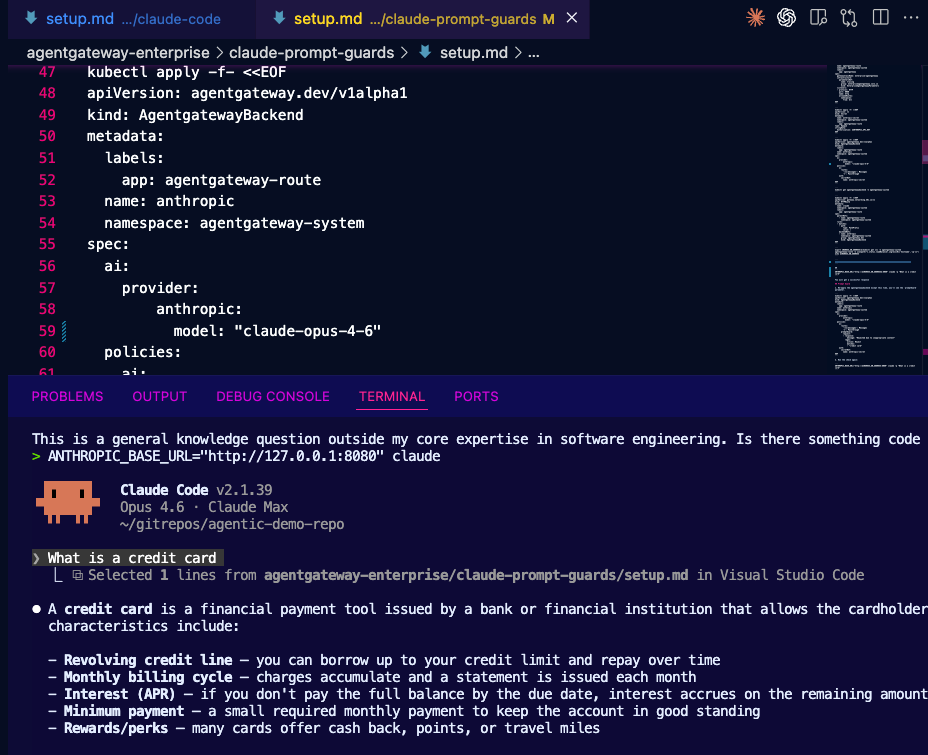
With the traffic connectivity tested, let's implement Prompt Guards.
Prompt Guards
Connectivity through agentgateway with Claude Code CLI has been tested and confirmed, so now, let's move into the security piece.
The number 1 thing organizations want to be able to secure is what can actually get prompted via an Agent. For example, the last thing you want is to have someone prompt an Agent with Delete all of the Kubernetes clusters in production and it actually does it. To avoid this, you need to ensure that what a user can prompt is something that they should be able to prompt.
- Modify the
AgentgatewayBackendwith a prompt guard. Notice how this is a regex and for the test, we want to block any traffic that has the wordscredit cardin it.
kubectl apply -f- <<EOF
apiVersion: agentgateway.dev/v1alpha1
kind: AgentgatewayBackend
metadata:
  labels:
    app: agentgateway-route
  name: anthropic
  namespace: agentgateway-system
spec:
  ai:
    provider:
        anthropic:
          model: "claude-opus-4-6"
  policies:
    ai:
      routes:
        '/v1/messages': Messages
        '*': Passthrough
      promptGuard:
        request:
        - response:
            message: "Rejected due to inappropriate content"
          regex:
            action: Reject
            matches:
            - "credit card"
    auth:
      secretRef:
        name: anthropic-secret
EOF
You can also do the same thing without a Model specified:
kubectl apply -f - <<EOF
apiVersion: agentgateway.dev/v1alpha1
kind: AgentgatewayBackend
metadata:
  labels:
    app: agentgateway-route
  name: anthropic
  namespace: agentgateway-system
spec:
  ai:
    provider:
      anthropic: {}
  policies:
    auth:
      secretRef:
        name: anthropic-secret
    ai:
      routes:
        '/v1/messages': Messages
        '*': Passthrough
      promptGuard:
        request:
        - response:
            message: "Rejected due to inappropriate content"
          regex:
            action: Reject
            matches:
            - "credit card"
EOF
Run the check again by running either of the following:
ANTHROPIC_BASE_URL="http://$INGRESS_GW_ADDRESS:8080" claude -p "What is a credit card"ANTHROPIC_BASE_URL="http://$INGRESS_GW_ADDRESS:8080" claude -pand then prompting within Claude CodeWhat is a credit card
You'll get an output similar to the one below.
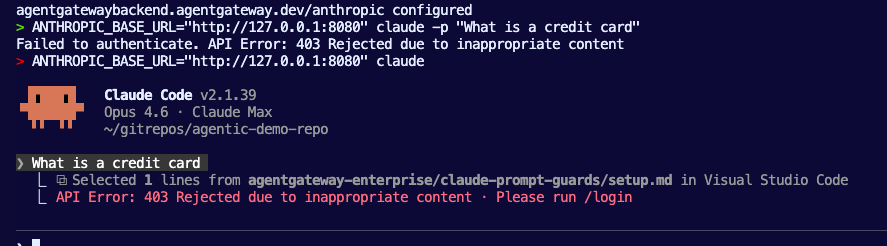
With traffic routing through agentgateway from Claude Code CLI and the knowledge of how prompt guards can work in this scenario, you can now secure traffic from anyones laptop/desktop when they're using an Agentic CLI client.

Comments ()