Making Your AI Agent Model Aware With Inference Extension & Routing
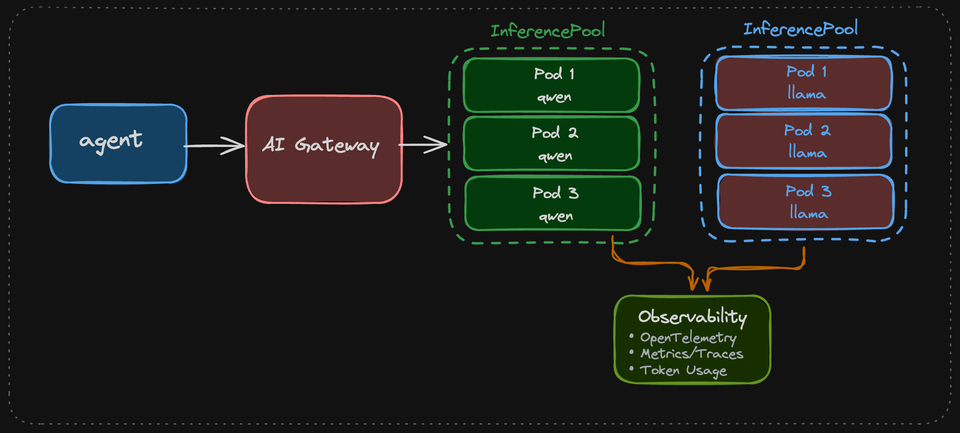
Your Agent has a "mind of its own" (well, it was programmed to act a particular way). For example, Claude Code is known to downgrade your Model for particular tasks to save on processing power based on the difficulty of said task.
This, in many ways, is model-aware routing.
Now, model-aware routing doesn't have to be all bad. In fact, it allows organizations to prioritize Models based on tasks, Agents that are using the tasks, and limits that are set.
In this blog, you'll learn about inference extensions, routing, plugins, where vLLM fits in, and how to configure it all in a hands-on fashion while using agentgateway as your AI gateway of choice.
Prerequisites
To follow along in a hands-on fashion, you will need:
- A Kubernetes cluster with at least 12 vCPUs and 16GB memory.
The High-Level Flow
When testing this workflow, it will look like the below if you think of it from a diagram perspective. The curl goes through a gateway, the httproute specifies the backend (the InferencePool), and then forwards to the Pod running vLLM.
User/Curl Request
    ↓
Gateway (port 80) ← External entry point
    ↓
HTTPRoute ← Routes based on path prefix "/"
    ↓
InferencePool ← Selects available model server
    ↓
llm-d/epp (via the installed helm chart. selects the best backend endpoint)
    ↓
vLLM Pod (port 8000) ← Runs the actual model inference
    ↓
Response back through the stack
This entire workflow ensures:
- Load balancing across multiple model replicas
- Centralized routing and traffic management
- Health-aware routing (only send to healthy pods)
- Easy scaling and model versioning
How It All Works
Let's now break down each part of the configuration and installation, which when it all comes together, allows you to have a pool of LLMs resources and the ability for your Gateway to route to them. Without all of these pieces working together, this would not be possible.
Inference Extension
The goal of using Inference Extension is to proxy/load balance to local Models. These Models can be anything from and to llama to nemotron. The idea, however, is as the name suggests, they are local Models. These aren't Models that would be running in a provider (e.g - a Claude or GPT Model, unless its OSS and downloadable). A major goal is to enable the ability to perform inference routing for controlling which Models an Agent can access by providing routing capabilities, centralized management, and prioritization of LLMs.
Inference Plugin
Although Inference Plugins aren't used in this setup, it's good to call them out because you may hear Inference Plugin and Inference Extension used interchangably. That's because there's a fair amount of overlap between the two as they're trying to solve similar problems (inference traffic routing, choosing healthy backends, model-aware behavior, etc.). The key difference is the abstraction, with an Inference Plugin usually lives inside the gateway itself, and it exposes inference behavior through a plugin vs an extension/CRDs.
vLLM
When running an LLM in Kubernetes, it needs to be selected by the InferencePool (more on the Inference Pool in the llm-d section). Without it, the LLM wouldn't be able to be used in the pool of LLM resources. vLLM itself is the Model server. You could, technically, deploy an LLM as a Deployment object in k8s and use it, but it would just be one endpoint without any high availability, effectively making it a single point of failure.
llm-d
This is the "brains of the operation" behind an InferencePool. llm-d is what, in this configuration, implements the endpoint-picker (epp) and the intelligent choosing of where the routing should go. It's the engine behind inference routing and distributed LLM inference. For example, if you have three vLLM Pods and two of them are at 95% capacity, the traffic will be routed to the third vLLM Pod with 0% capacity. That's able to be done due to llm-d.
The Gateway
The above configurations (vLLM, llm-d, inference extension) is absolutely needed because without it, none of the routing works, and that's where your AI Gateway comes into play. Without a proper AI Gateway, Agents wouldn't be able to route to vLLM and therefore, local LLMs wouldn't be able to be used by the Agent. It's the entry point that ties the inference stack together.
Installation and Configuration
With the theory above in our minds, let's dive into the hands-on implementation to see how it all works.
- Create a
Deploymentobject that uses a vLLM container with the proper arguments to pull down a Qwen Model. Notice the resource requirements here.
kubectl apply -f - <<EOF
apiVersion: apps/v1
kind: Deployment
metadata:
  name: llm-qwen25-15b-instruct
spec:
  replicas: 1
  selector:
    matchLabels:
      app: llm-qwen25-15b-instruct
  template:
    metadata:
      labels:
        app: llm-qwen25-15b-instruct
    spec:
      containers:
        - name: vllm
          image: "vllm/vllm-openai-cpu:v0.18.0" # official vLLM CPU image from Docker Hub; pin a concrete tag to avoid drift from latest
          imagePullPolicy: IfNotPresent
          command: ["python3", "-m", "vllm.entrypoints.openai.api_server"]
          args:
          - "--model"
          - "Qwen/Qwen2.5-1.5B-Instruct"
          - "--port"
          - "8000"
          env:
            - name: PORT
              value: "8000"
            - name: VLLM_CPU_KVCACHE_SPACE
              value: "4"
          ports:
            - containerPort: 8000
              name: http
              protocol: TCP
          livenessProbe:
            failureThreshold: 240
            httpGet:
              path: /health
              port: http
              scheme: HTTP
            initialDelaySeconds: 180
            periodSeconds: 5
            successThreshold: 1
            timeoutSeconds: 1
          readinessProbe:
            failureThreshold: 600
            httpGet:
              path: /health
              port: http
              scheme: HTTP
            initialDelaySeconds: 180
            periodSeconds: 5
            successThreshold: 1
            timeoutSeconds: 1
          resources:
             limits:
               cpu: "11"
               memory: "10Gi"
             requests:
               cpu: "11"
               memory: "10Gi"
          volumeMounts:
            - mountPath: /data
              name: data
            - mountPath: /dev/shm
              name: shm
      restartPolicy: Always
      schedulerName: default-scheduler
      terminationGracePeriodSeconds: 30
      volumes:
        - name: data
          emptyDir: {}
        - name: shm
          emptyDir:
            medium: Memory
EOF- Ensure that the Pod came up successfully. You'll have to give it about 2-3 minutes as it needs to download the Qwen Model.
kubectl get pods- Install the CRDs for the Kubernetes Gateway API Inference Extension.
kubectl apply -f https://github.com/kubernetes-sigs/gateway-api-inference-extension/releases/download/v1.4.0/manifests.yaml- Install the Kubernetes Gateway API CRDs, agentgateway, and agentgateway CRDs, ensuring that the inference extension is enabled on agentgateway.
kubectl apply --server-side -f https://github.com/kubernetes-sigs/gateway-api/releases/download/v1.5.0/standard-install.yaml

helm upgrade -i --create-namespace \
  --namespace agentgateway-system \
  --version v1.1.0 agentgateway-crds oci://cr.agentgateway.dev/charts/agentgateway-crds

helm upgrade -i -n agentgateway-system agentgateway oci://cr.agentgateway.dev/charts/agentgateway \
--version v1.1.0 \
--set inferenceExtension.enabled=true- Deploy the below Helm chart, which installs the
InferencePooland llm-d/epp.
export IGW_CHART_VERSION=v1.1.0
export GATEWAY_PROVIDER=none

helm install llm-qwen25-15b-instruct \
--set inferencePool.modelServers.matchLabels.app=llm-qwen25-15b-instruct \
--set provider.name=$GATEWAY_PROVIDER \
--version $IGW_CHART_VERSION \
oci://registry.k8s.io/gateway-api-inference-extension/charts/inferencepool- Deploy a
Gatewayand `HTTPRoute` object for Inference Routing. This will route to theInferencePoolthat was created in the previous step via the Helm Chart.
When setting inferencePool.modelServers.matchLabels.app in the Helm Chart installation via step 5, it ensures that the Inference Pool matches any app running the vllm-qwen2.5-1.5b-instruct label, which was deployed in step 1 (the Deployment object).
kubectl apply -f - <<EOF
apiVersion: gateway.networking.k8s.io/v1
kind: Gateway
metadata:
  name: inference-gateway
spec:
  gatewayClassName: agentgateway
  listeners:
  - name: http
    port: 80
    protocol: HTTP
---
apiVersion: gateway.networking.k8s.io/v1
kind: HTTPRoute
metadata:
  name: llm-route
spec:
  parentRefs:
  - group: gateway.networking.k8s.io
    kind: Gateway
    name: inference-gateway
  rules:
  - backendRefs:
    - group: inference.networking.k8s.io
      kind: InferencePool
      name: vllm-qwen25-15b-instruct
    matches:
    - path:
        type: PathPrefix
        value: /
    timeouts:
      request: 300s
EOF- Test and confirm that everything is working as expected (the routes, Model download, inference routing, inference pool).
IP=$(kubectl get gateway/inference-gateway -o jsonpath='{.status.addresses[0].value}')
PORT=80

curl -i ${IP}:${PORT}/v1/completions -H 'Content-Type: application/json' -d '{
"model": "Qwen/Qwen2.5-1.5B-Instruct",
"prompt": "What is the warmest city in the USA?",
"max_tokens": 100,
"temperature": 0.5
}'
You should see an output similar to the following:
HTTP/1.1 200 OK
date: Sat, 11 Apr 2026 12:34:15 GMT
server: uvicorn
content-type: application/json
x-went-into-resp-headers: true
transfer-encoding: chunked

{"choices":[{"finish_reason":"length","index":0,"logprobs":null,"prompt_logprobs":null,"prompt_token_ids":null,"stop_reason":null,"text":" The warmest city in the United States, according to historical data and weather records, is Phoenix, Arizona. However, it's important to note that temperature can vary significantly from year to year due to factors such as El Niño events or La Niña conditions.\n\nPhoenix has a desert climate with hot summers and mild winters. Its average high temperatures range from around 104°F (40°C) during July and August to about 78°F (26°C) in January.","token_ids":null}],"created":1775910856,"id":"cmpl-d2adb336-3113-416e-9f03-c52746bbc15f","kv_transfer_params":null,"model":"Qwen/Qwen2.5-1.5B-Instruct","object":"text_completion","service_tier":null,"system_fingerprint":null,"usage":{"completion_tokens":100,"prompt_tokens":10,"prompt_tokens_details":null,"total_tokens":110}}%

Comments ()