Multiplexing MCP Servers For Agentic Specialization
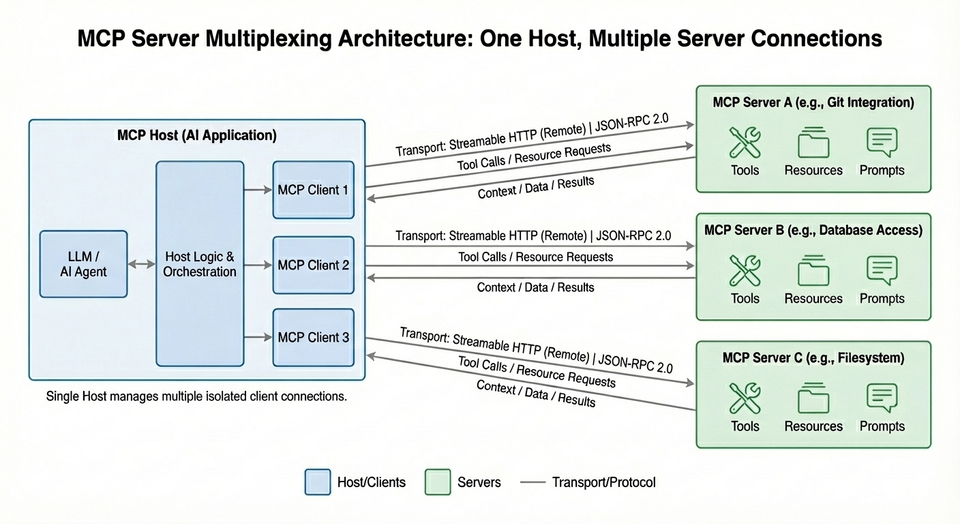
Ensuring that Agents have the proper tools and information they need to perform a specialized action on behalf of a user or a system will be necessary for AI to meet the needs within enterprises. Without an Agent having specific instructions on what it needs to do, it's no better than "clicking a button and hoping for the best". Agents need the tools to accomplish expected results. MCP Servers give the tools to do that. The problem is that there are thousands of them.
In this blog post, you'll learn about multiplexing MCP Servers to simplify the connection to various tools within MCP Servers at the same time.
Prerequisites
To follow along with this blog post in a hands-on fashion, you need the following:
- A Kubernetes cluster.
- kgateway/agentgateway installed, which you can learn how to do here.
Why Multiplexing
What Agents using LLMs give us is the ability to implement actions on our behalf. For example, instead of having to look through multiple lines of logs, traces, and metrics, we can ask an Agent to do it for us.
The problem with LLMs that are used in most Agents is that the LLMs are trained on a wide range of data. That's why you can ask an Agent to write Terraform code for you or write you the best chicken parm recipe. The data is generalized, not specialized. That's where MCP Serers shine. They give you the ability to implement specific tools for your use case. If you have an Agent thats acting as a GitHub expert, you can use the GitHub Copilot MCP Server. If you're using an Agent that's a k8s expert, the Kubernetes MCP Server can be used.
There are, however, many (thousands) MCP Servers, which can make it complex to interact with them all at once based on what you're trying to do. If an Agent is an SRE expert, it may need to interact with both the GitHub Copilot and Kubernetes MCP Server to extend it's capibilities with particular tools.
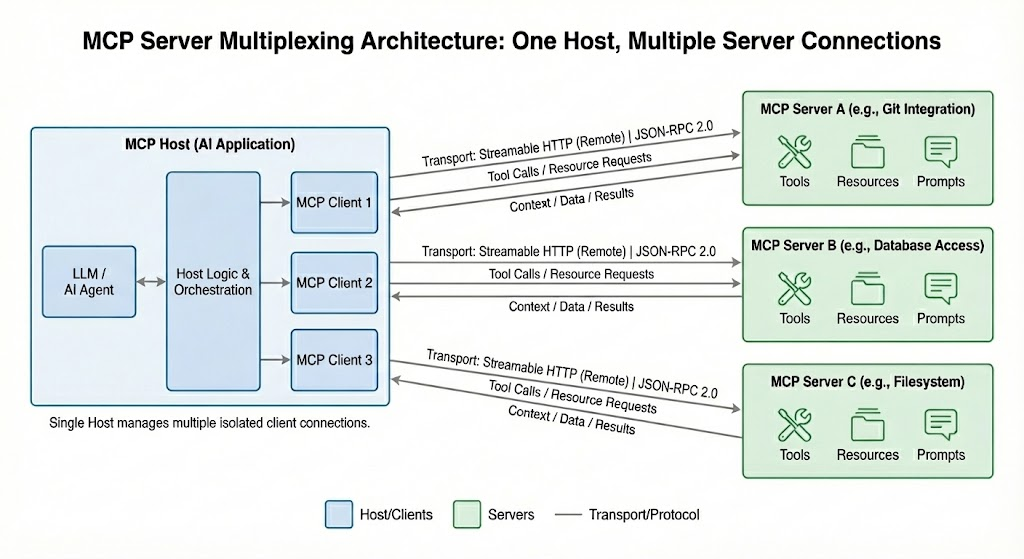
With multiplexing, multiple MCP Servers can be used over a gateway in a single interaction. As Agents become more specialized, they'll need access to more tools via MCP Servers instead of just one MCP Server. That sounds counter-productive, but the truth is there shouldn't be one MCP Server to rule them all. There should be multiple based on what the specialized Agent needs to do. Taking the SRE Agent as an example again, it will need access to different tools across MCP Servers because there are different stacks, clouds, applications and frameworks needed for an SRE specialist.
Deploying MCP Servers
Below, you are going to see two configurations. Each configuration/MCP Server contains three pieces:
- A ConfigMap which is where the Python app lives. Instead of deploying an entire Python app, ensuring dependencies exist, packaging the Python app into a container image, pushing the container image to a container registry, and deploying the container image, it's easier for demonstration purposes to package it into a config map.
- A Deployment object for the MCP Server to run.
- A Service object to sit in front of the Deployment.
- Deploy MCP Server number 1 (its functionality is math).
kubectl apply -f - <<EOF
apiVersion: v1
kind: ConfigMap
metadata:
  name: mcp-math-script
  namespace: default
data:
  server.py: |
    import uvicorn
    from mcp.server.fastmcp import FastMCP
    from starlette.applications import Starlette
    from starlette.routing import Route
    from starlette.requests import Request
    from starlette.responses import JSONResponse

    mcp = FastMCP("Math-Service")

    @mcp.tool()
    def add(a: int, b: int) -> int:
        return a + b

    @mcp.tool()
    def multiply(a: int, b: int) -> int:
        return a * b

    async def handle_mcp(request: Request):
        try:
            data = await request.json()
            method = data.get("method")
            msg_id = data.get("id")
            result = None

            if method == "initialize":
                result = {
                    "protocolVersion": "2024-11-05",
                    "capabilities": {"tools": {}},
                    "serverInfo": {"name": "Math-Service", "version": "1.0"}
                }

            elif method == "notifications/initialized":
                return JSONResponse({"jsonrpc": "2.0", "id": msg_id, "result": True})

            elif method == "tools/list":
                tools_list = await mcp.list_tools()
                result = {
                    "tools": [
                        {
                            "name": t.name,
                            "description": t.description,
                            "inputSchema": t.inputSchema
                        } for t in tools_list
                    ]
                }

            elif method == "tools/call":
                params = data.get("params", {})
                name = params.get("name")
                args = params.get("arguments", {})

                # Call the tool
                tool_result = await mcp.call_tool(name, args)

                # --- FIX: Serialize the content objects manually ---
                serialized_content = []
                for content in tool_result:
                    if hasattr(content, "type") and content.type == "text":
                        serialized_content.append({"type": "text", "text": content.text})
                    elif hasattr(content, "type") and content.type == "image":
                         serialized_content.append({
                             "type": "image",
                             "data": content.data,
                             "mimeType": content.mimeType
                         })
                    else:
                        # Fallback for dictionaries or other types
                        serialized_content.append(content if isinstance(content, dict) else str(content))

                result = {
                    "content": serialized_content,
                    "isError": False
                }

            elif method == "ping":
                result = {}

            else:
                return JSONResponse(
                    {"jsonrpc": "2.0", "id": msg_id, "error": {"code": -32601, "message": "Method not found"}},
                    status_code=404
                )

            return JSONResponse({"jsonrpc": "2.0", "id": msg_id, "result": result})

        except Exception as e:
            # Print error to logs for debugging
            import traceback
            traceback.print_exc()
            return JSONResponse(
                {"jsonrpc": "2.0", "id": None, "error": {"code": -32603, "message": str(e)}},
                status_code=500
            )

    app = Starlette(routes=[
        Route("/mcp", handle_mcp, methods=["POST"]),
        Route("/", lambda r: JSONResponse({"status": "ok"}), methods=["GET"])
    ])

    if __name__ == "__main__":
        print("Starting Fixed Math Server on port 8000...")
        uvicorn.run(app, host="0.0.0.0", port=8000)
---
apiVersion: apps/v1
kind: Deployment
metadata:
  name: mcp-math-server
  namespace: default
spec:
  replicas: 1
  selector:
    matchLabels:
      app: mcp-math-server
  template:
    metadata:
      labels:
        app: mcp-math-server
    spec:
      containers:
      - name: math
        image: python:3.11-slim
        command: ["/bin/sh", "-c"]
        args:
        - |
          pip install "mcp[cli]" uvicorn starlette &&
          python /app/server.py
        ports:
        - containerPort: 8000
        volumeMounts:
        - name: script-volume
          mountPath: /app
        readinessProbe:
          httpGet:
            path: /
            port: 8000
          initialDelaySeconds: 5
          periodSeconds: 5
      volumes:
      - name: script-volume
        configMap:
          name: mcp-math-script
---
apiVersion: v1
kind: Service
metadata:
  name: mcp-math-server
  namespace: default
spec:
  selector:
    app: mcp-math-server
  ports:
  - port: 80
    targetPort: 8000
EOF- Deploy MCP Server number 2 (its functionality is giving the date).
kubectl apply -f - <<EOF
apiVersion: v1
kind: ConfigMap
metadata:
  name: mcp-date-script
  namespace: default
data:
  server.py: |
    import uvicorn
    import datetime
    from mcp.server.fastmcp import FastMCP
    from starlette.applications import Starlette
    from starlette.routing import Route
    from starlette.requests import Request
    from starlette.responses import JSONResponse

    mcp = FastMCP("Date-Service")

    @mcp.tool()
    def get_current_date() -> str:
        """Returns the current date in ISO format (YYYY-MM-DD)."""
        return datetime.date.today().isoformat()

    async def handle_mcp(request: Request):
        try:
            data = await request.json()
            method = data.get("method")
            msg_id = data.get("id")
            result = None

            if method == "initialize":
                result = {
                    "protocolVersion": "2024-11-05",
                    "capabilities": {"tools": {}},
                    "serverInfo": {"name": "Date-Service", "version": "1.0"}
                }
            elif method == "notifications/initialized":
                return JSONResponse({"jsonrpc": "2.0", "id": msg_id, "result": True})
            elif method == "tools/list":
                tools_list = await mcp.list_tools()
                result = {
                    "tools": [{"name": t.name, "description": t.description, "inputSchema": t.inputSchema} for t in tools_list]
                }
            elif method == "tools/call":
                params = data.get("params", {})

                # 1. Call the tool
                tool_result = await mcp.call_tool(params.get("name"), params.get("arguments", {}))

                # 2. FIX: Manually Serialize the Pydantic Objects
                serialized_content = []
                for content in tool_result:
                    # Check if it's the TextContent object causing the crash
                    if hasattr(content, "type") and content.type == "text":
                        serialized_content.append({"type": "text", "text": content.text})
                    elif isinstance(content, dict):
                        serialized_content.append(content)
                    else:
                        serialized_content.append(str(content))

                result = {"content": serialized_content, "isError": False}

            elif method == "ping":
                result = {}
            else:
                return JSONResponse({"jsonrpc": "2.0", "id": msg_id, "error": {"code": -32601, "message": "Method not found"}}, status_code=404)

            return JSONResponse({"jsonrpc": "2.0", "id": msg_id, "result": result})

        except Exception as e:
            # Catch serialization errors and print them
            import traceback
            traceback.print_exc()
            return JSONResponse({"jsonrpc": "2.0", "id": None, "error": {"code": -32603, "message": str(e)}}, status_code=500)

    app = Starlette(routes=[
        Route("/mcp", handle_mcp, methods=["POST"]),
        Route("/", lambda r: JSONResponse({"status": "ok"}), methods=["GET"])
    ])

    if __name__ == "__main__":
        print("Starting Fixed Date Server...")
        uvicorn.run(app, host="0.0.0.0", port=8000)
---
apiVersion: apps/v1
kind: Deployment
metadata:
  name: mcp-date-server
  namespace: default
spec:
  replicas: 1
  selector:
    matchLabels:
      app: mcp-date-server
  template:
    metadata:
      labels:
        app: mcp-date-server
    spec:
      containers:
      - name: date-server
        image: python:3.11-slim
        command: ["/bin/sh", "-c"]
        args:
        - |
          pip install "mcp[cli]" uvicorn starlette &&
          python /app/server.py
        ports:
        - containerPort: 8000
        volumeMounts:
        - name: script-volume
          mountPath: /app
        readinessProbe:
          httpGet:
            path: /
            port: 8000
          initialDelaySeconds: 5
          periodSeconds: 5
      volumes:
      - name: script-volume
        configMap:
          name: mcp-date-script
---
apiVersion: v1
kind: Service
metadata:
  name: mcp-date-server
  namespace: default
spec:
  selector:
    app: mcp-date-server
  ports:
  - port: 80
    targetPort: 8000
EOF
You should now have two Pods deployed, each Pod containing an MCP Server. The protocol used, as you can see in the Python config via the ConfigMap, is using the Streamable HTTP protocol.

Implementing A Gateway and Backend
With the MCP Servers deployed and using the Streamable HTTP protocol, you can now connect to them over an AI gateway. This allows multiple people and teams to be able to use the MCP Servers for an easier interaction to them instead of the tools being local, but it also enhances the ability to create a security footprint with stateless auth (think JWT), On Behalf Of (OBO) for Agents to act autonomously, and the ability to specify what tools via an MCP Server are available for use.
- Create the Gateway, ensuring that the
agentgatewayGateway Class is selected.
kubectl apply -f - <<EOF
apiVersion: gateway.networking.k8s.io/v1
kind: Gateway
metadata:
  name: agentgateway
  namespace: kgateway-system
spec:
  gatewayClassName: agentgateway
  listeners:
  - name: http
    port: 8080
    protocol: HTTP
    allowedRoutes:
      namespaces:
        from: Same
EOF- Create a Backend object, which tells the gateway what to route to. In this case, it's two MCP Servers (this is the multiplexing piece).
kubectl apply -f - <<EOF
apiVersion: gateway.kgateway.dev/v1alpha1
kind: Backend
metadata:
  name: mcp-backend
  namespace: kgateway-system
spec:
  type: MCP
  mcp:
    targets:
    - name: math-mcp-server
      static:
        host: mcp-math-server.default.svc.cluster.local
        port: 80
        protocol: StreamableHTTP
    - name: date-mcp-server
      static:
        host: mcp-date-server.default.svc.cluster.local
        port: 80
        protocol: StreamableHTTP
EOF- Create a route so the MCP Servers are reachable over the Gateway.
kubectl apply -f - <<EOF
apiVersion: gateway.networking.k8s.io/v1
kind: HTTPRoute
metadata:
  name: mcp-route
  namespace: kgateway-system
spec:
  parentRefs:
  - name: agentgateway
  rules:
  - backendRefs:
    - name: mcp-backend
      group: gateway.kgateway.dev
      kind: Backend
EOF- Retrieve the IP from the Gateways ALB. If you're running a k8s cluster locally without the ability to create external IPs with something like metallb, skip this step.
export GATEWAY_IP=$(kubectl get svc agentgateway -n kgateway-system -o jsonpath='{.status.loadBalancer.ingress[0].ip}')
echo $GATEWAY_IP- Open the MCP inspector (a client to interact with MCP Servers).
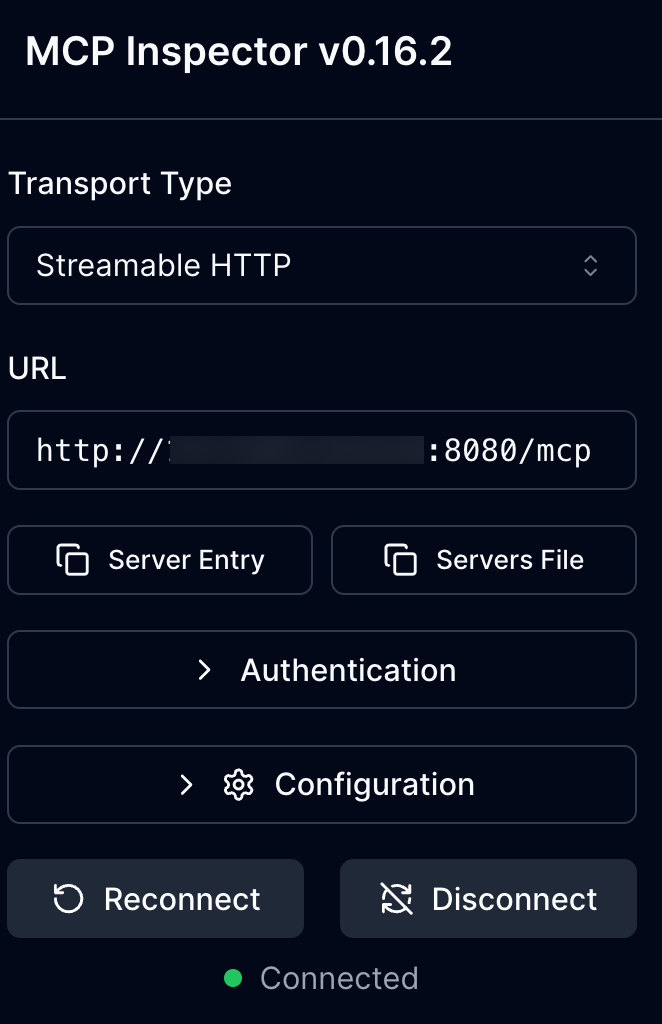
npx modelcontextprotocol/inspector#0.16.2The URL to put into Inspector is: http://YOUR_ALB_LB_IP:8080/mcp OR if you're running locally, it's localhost instead of the ALB IP.
Ensure to use the Streamable HTTP protocol like in the screenshot below:
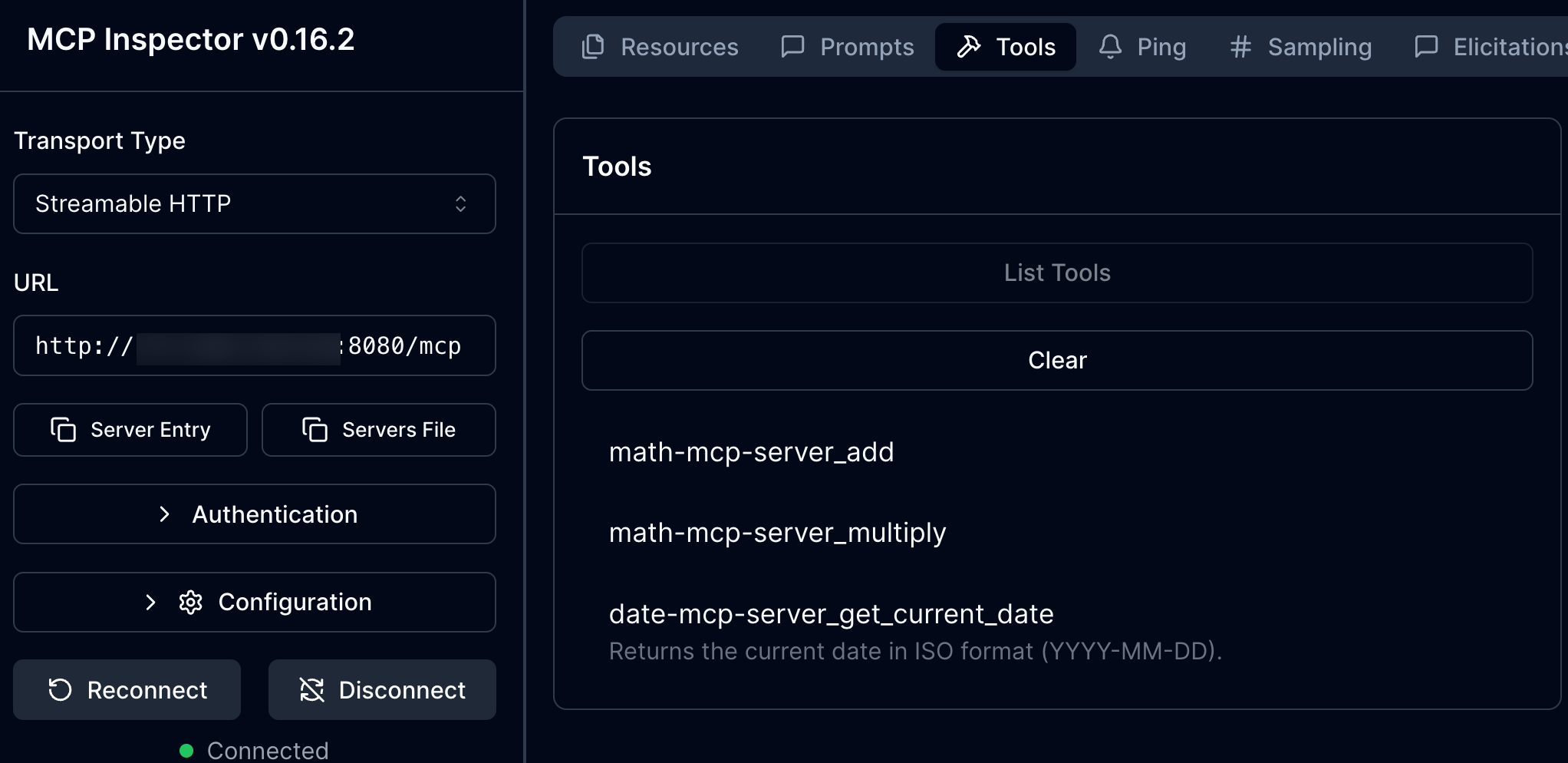
- Go to Tools and select List Tools. You can now see all of the tools available across the two MCP Servers.
Wrapping Up
MCP Server multiplexing give us the ability to connect to multiple MCP Servers to use various tools needed for the Agent to perform specific actions on our behalf without having to have multiple gateways/routes for each MCP Server. This makes auth, tool lockdown, and OBO much more efficient instead of having to set each of those up for every MCP Server that's being connected to.

Comments ()