NemoClaw + Agentgateway: Inference Routing For LLMs
With any agent sandbox or client that you use for interacting with LLMs, the same question will always arise: how can I securely, and in an observable fashion, connect to endpoints (LLMs, MCP Servers, other Agents). The same rule applies for an OpenClaw-based client and orchestration platform like NemoClaw.
That's where agentgateway comes into play.
In this blog post, you will learn how to onboard NemoClaw with agentgateway as your preferred AI Gateway.
NemoClaw Installation
Installation for NemoClaw is pretty straightforward, as it's simply a client and it's built on top of OpenClaw.
- Run the following command:
curl -fsSL https://www.nvidia.com/nemoclaw.sh | bash- Run the version command to ensure NemoClaw was installed successfully.
nemoclaw --versionYou'll see an output similar to the below.
❯ nemoclaw --version
nemoclaw v0.0.38
Gateway Setup
With NemoClaw installed, the next step is to configure your agentgateway proxy to route traffic through. For the purposes of this blog, Anthropic is the provider used, but you can use any provider that is OpenAI API compatible.
- Set an env variable with your provider API key.
export ANTHROPIC_API_KEY=- Create a k8s secret.
kubectl apply -f- <<EOF
apiVersion: v1
kind: Secret
metadata:
  name: anthropic-secret
  namespace: agentgateway-system
type: Opaque
stringData:
  Authorization: $ANTHROPIC_API_KEY
EOF- Build a gateway using the agentgateway OSS gateway class.
kubectl apply -f - <<EOF
apiVersion: gateway.networking.k8s.io/v1
kind: Gateway
metadata:
  name: agentgateway-openshell
  namespace: agentgateway-system
spec:
  gatewayClassName: agentgateway
  listeners:
    - name: http
      port: 8080
      protocol: HTTP
      allowedRoutes:
        namespaces:
          from: Same
EOF- Create a backend so your Gateway knows what to route to. In this case, it's an Opus Model.
kubectl apply -f - <<EOF
apiVersion: agentgateway.dev/v1alpha1
kind: AgentgatewayBackend
metadata:
  name: anthropic
  namespace: agentgateway-system
spec:
  ai:
    provider:
        anthropic:
          model: "claude-opus-4-6"
  policies:
    auth:
      secretRef:
        name: anthropic-secret
  ai:
    routes:
      /v1/chat/completions: completions
      /v1/models: passthrough
EOF- Implement a route so an endpoint exists for interacting with the Model.
kubectl apply -f - <<EOF
apiVersion: gateway.networking.k8s.io/v1
kind: HTTPRoute
metadata:
  name: openshell-openai
  namespace: agentgateway-system
spec:
  parentRefs:
  - name: agentgateway-openshell
    namespace: agentgateway-system
  rules:
  - matches:
    - path:
        type: PathPrefix
        value: /v1/chat/completions
    - path:
        type: Exact
        value: /v1/models
    backendRefs:
    - group: agentgateway.dev
      kind: AgentgatewayBackend
      name: anthropic
      namespace: agentgateway-system
EOF
The reason why /v1/models: passthrough and value: /v1/models needs to be added is because NemoClaw automatically searches/probes for Models that are available using that endpoint.
NemoClaw Onboarding
With the Gateway configured and the NemoClaw CLI installed, you can begin the onboarding process. There are two ways to do it.
The first is with the below command, in which you will see an output similar to the screenshot below.
nemoclaw onboard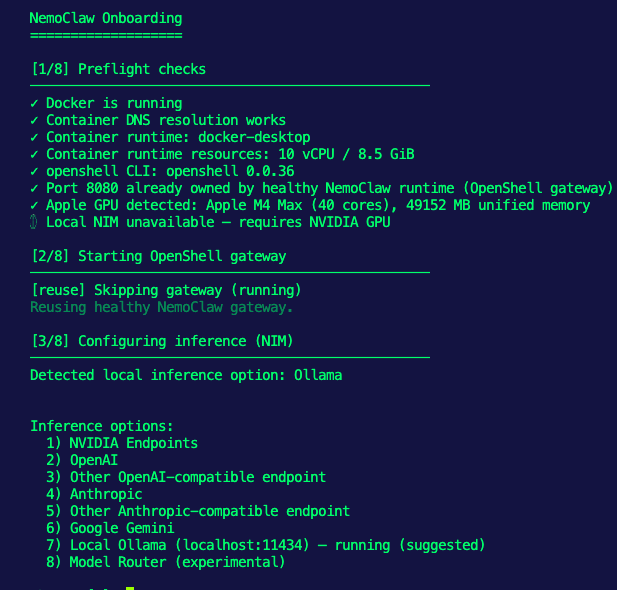
You can also do it with a non-interactive installation.
  NEMOCLAW_GATEWAY_PORT=8081 \
  NEMOCLAW_PROVIDER=custom \
  NEMOCLAW_ENDPOINT_URL=http://20.253.171.166:8080/v1 \
  NEMOCLAW_MODEL=placeholder-model \
  COMPATIBLE_API_KEY=agentgateway-placeholder \
  NEMOCLAW_POLICY_TIER=balanced \
  nemoclaw onboard \
    --non-interactive \
    --yes \
    --yes-i-accept-third-party-software \
    --name agentgateway-assistant
You have to specify a model and API key even if they're placeholders because NemoClaw expects those parameters to be passed in.
Confirming The Workflow
The onboarding is complete and agentgateway was used for NemoClaw to route agentic traffic through. Now, let's test it and confirm that it works as expected.
The command below shows you the full output and health of NemoClaw.
nemoclaw agentgateway-assistant doctor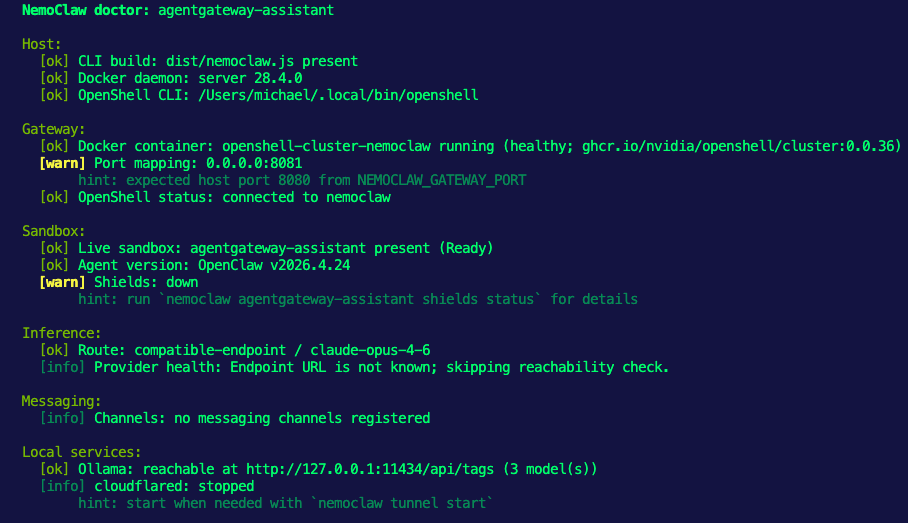
You can now connect via NemoClaw.
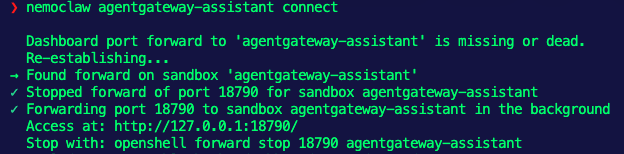
nemoclaw agentgateway-assistant connectYou'll see an output similar to the below:
8081 as the port instead of 8080, which is what NemoClaw expects. It really shouldn't be an error as functionally its perfecting fine.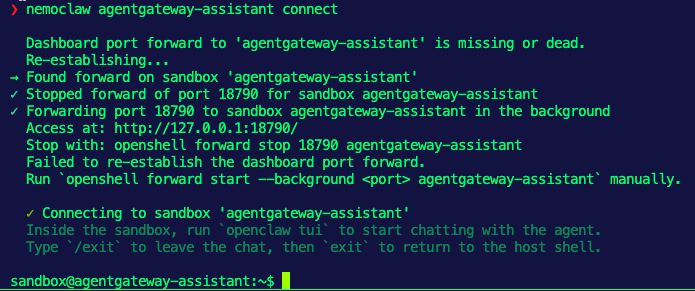
You can also check the logs from your agentgateway Pod by running kubectl logs your-agw-pod-name -n agentgateway-system.
2026-05-10T15:16:07.118334Z info request gateway=agentgateway-system/agentgateway-openshell listener=http route=agentgateway-system/openshell-openai endpoint=api.anthropic.com:443 src.addr=10.224.0.4:19129 http.method=GET http.host=20.253.171.166 http.path=/v1/models http.version=HTTP/1.1 http.status=200 protocol=llm duration=160msCongrats! You can now route traffic through a specialized AI gateway to ensure security and observability along with customization of Model selection, policies, and rate limiting.

Comments ()