Prompt Enrichment with Agentgateway: Injecting Context at the Gateway Layer
Quality output from an LLM is the make-or-break between a task that performs well and a hallucination. The level of accuracy that's output is top of mind for everyone using Agents.
The best place to start for accuracy is a clean prompt.
In this blog post, you’ll learn how to implement prompt enrichment for system and user-level prompts with agentgateway.
Prerequisites
To follow along with this blog post from a hands-on perspective, you will need the following:
- A Kubernetes cluster. It can run locally or on your k8s platform of choice (AKS, EKS, GKE, etc.).
- A method of interacting with an LLM provider. In this blog, Anthropic will be used, but you can implement any of the providers here.
What Is Prompt Enrichment
LLMs are trained with a massive amount of information. If you think about it as a whole, with 750 billion parameters, it's pretty hard to expect an LLM to be a "specialist" in a particular area (imagine if you had to keep that amount of info in your head).
Because of that, tools with MCP Servers, Agent Skills, RAG, and fine-tuning exist. All of them, although very different from a technical perspective, have the same goal - ensure that the LLM has what it needs to perform a particular task. The one place to start, however, which is great for refining the output of an Agent is by modifying your prompt.
There are two methods of prompts to think about:
- System Prompts
- User Prompts
System Prompts are things like your CLAUDE.md file or Agent Skills. It's instructional prompts for how the Agents you're working with perform actions on your system. User prompts are the prompts that you create and run on your Agent.
Configuring An Open-Source AI Gateway
The first step is to ensure that you have a proper control plane and proxy ready to receive AI-related requests. To accomplish this, you'll install the Kubernetes Gateway API CRDs and agentgateway.
Gateway Components
- Install the Kubernetes Gateway API CRDs.
kubectl apply -f https://github.com/kubernetes-sigs/gateway-api/releases/download/v1.4.0/standard-install.yaml- Install the agentgateway CRDs.
helm upgrade -i --create-namespace \
  --namespace agentgateway-system \
--version v2.2.1 agentgateway-crds oci://ghcr.io/kgateway-dev/charts/agentgateway-crds- Install the latest
helm upgrade -i -n agentgateway-system agentgateway oci://ghcr.io/kgateway-dev/charts/agentgateway \
--version v2.2.1
AI Gateway (agentgateway) Configuration
- Create an environment variable for your LLM provider API key.
export ANTHROPIC_API_KEY=- Create a Gateway that's listening on port
8080.
kubectl apply -f- <<EOF
kind: Gateway
apiVersion: gateway.networking.k8s.io/v1
metadata:
  name: agentgateway-route
  namespace: agentgateway-system
  labels:
    app: agentgateway
spec:
  gatewayClassName: agentgateway
  listeners:
  - protocol: HTTP
    port: 8080
    name: http
    allowedRoutes:
      namespaces:
        from: All
EOF- Store the LLM provider API key in a secret.
kubectl apply -f- <<EOF
apiVersion: v1
kind: Secret
metadata:
  name: anthropic-secret
  namespace: agentgateway-system
  labels:
    app: agentgateway-route
type: Opaque
stringData:
  Authorization: $ANTHROPIC_API_KEY
EOF- Create a Backend so the Gateway knows what to route to.
kubectl apply -f- <<EOF
apiVersion: agentgateway.dev/v1alpha1
kind: AgentgatewayBackend
metadata:
  labels:
    app: agentgateway-route
  name: anthropic
  namespace: agentgateway-system
spec:
  ai:
    provider:
        anthropic:
          model: "claude-sonnet-4-5-20250929"
  policies:
    auth:
      secretRef:
        name: anthropic-secret
EOF- Implement an HTTPRoute so there are proper paths for the Gateway to route traffic to both externally (the routes a user hits) and internally (the routes that the backend hits).
kubectl apply -f- <<EOF
apiVersion: gateway.networking.k8s.io/v1
kind: HTTPRoute
metadata:
  name: claude
  namespace: agentgateway-system
  labels:
    app: agentgateway-route
spec:
  parentRefs:
    - name: agentgateway-route
      namespace: agentgateway-system
  rules:
  - matches:
    - path:
        type: PathPrefix
        value: /anthropic
    filters:
    - type: URLRewrite
      urlRewrite:
        path:
          type: ReplaceFullPath
          replaceFullPath: /v1/chat/completions
    backendRefs:
    - name: anthropic
      namespace: agentgateway-system
      group: agentgateway.dev
      kind: AgentgatewayBackend
EOF- Capture the ALB IP for the Gateway in an environment variable. If you're running a local k8s cluster, you can just use
localhost.
export INGRESS_GW_ADDRESS=$(kubectl get svc -n agentgateway-system agentgateway-route -o jsonpath="{.status.loadBalancer.ingress[0]['hostname','ip']}")
echo $INGRESS_GW_ADDRESS- Test the Gateway to ensure traffic is routing appropriately.
curl "$INGRESS_GW_ADDRESS:8080/anthropic" -H content-type:application/json -H "anthropic-version: 2023-06-01" -d '{
  "messages": [
    {
      "role": "system",
      "content": "You are a skilled cloud-native network engineer."
    },
    {
      "role": "user",
      "content": "Write me a paragraph containing the best way to think about Istio Ambient Mesh"
    }
  ]
}' | jq
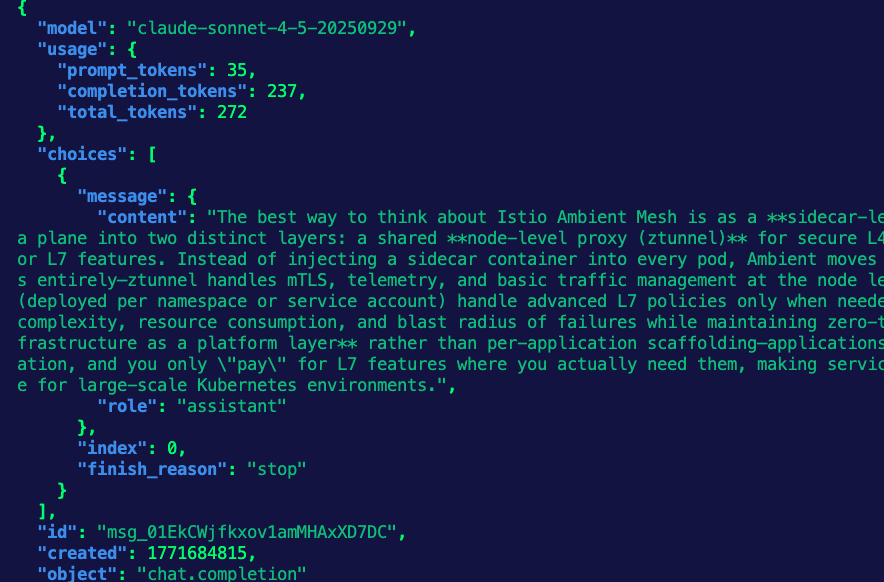
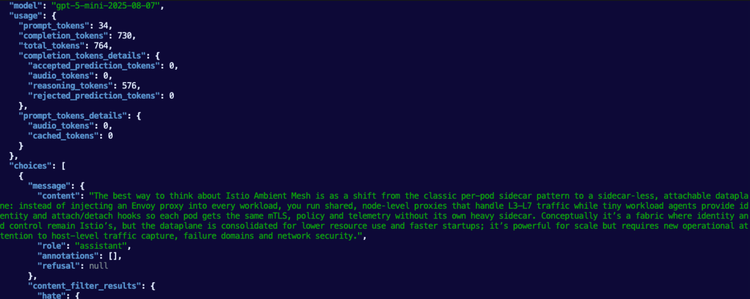
You should see an output similar to the below.
Add Prompt Enrichment
With the Gateway and LLM backends configured, you can now create prompt enrichment configurations via an agentgateway policy. The two methods that you can implement are system-level prompt enrichment and user-level prompt enrichment. Remember, system is for the system-level/default prompts and user level is for prompts that you create.
One important factor to point out is the target reference for the prompt enrichment. Notice how it's targeting the HTTPRoute. This is a great way to implement prompt enrichment because this means it won't be done solely at the Gateway level, which means you can modify/customize the prompts for each route configuration that is within the Gateway. You can, however, implement prompt enrichment at the Gateway level; this method just gives you a bit more customization in terms of how LLMs are interacted with per route.
System level:
kubectl apply -f- <<EOF
apiVersion: agentgateway.dev/v1alpha1
kind: AgentgatewayPolicy
metadata:
  name: prompt-policy
  namespace: agentgateway-system
  labels:
    app: agentgateway-route
spec:
  targetRefs:
  - group: gateway.networking.k8s.io
    kind: HTTPRoute
    name: claude
  backend:
    ai:
      prompt:
        prepend:
        - role: system
          content: "You are a senior software engineering assistant with deep expertise in Kubernetes and AI/ML systems."
EOF
User level:
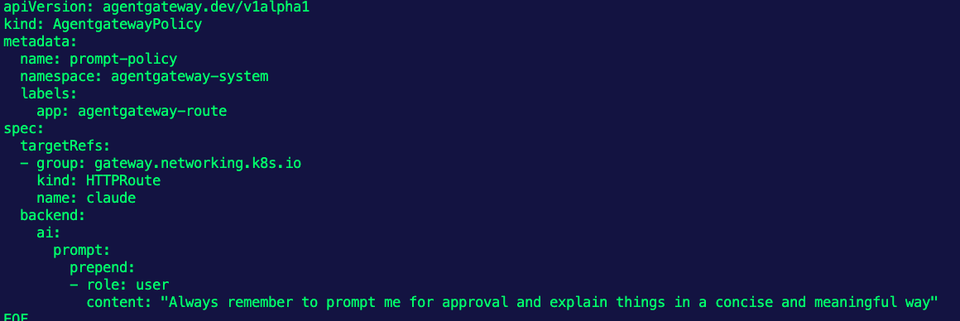
kubectl apply -f- <<EOF
apiVersion: agentgateway.dev/v1alpha1
kind: AgentgatewayPolicy
metadata:
  name: prompt-policy
  namespace: agentgateway-system
  labels:
    app: agentgateway-route
spec:
  targetRefs:
  - group: gateway.networking.k8s.io
    kind: HTTPRoute
    name: claude
  backend:
    ai:
      prompt:
        prepend:
        - role: user
          content: "Always remember to prompt me for approval and explain things in a concise and meaningful way"
EOF
Comments ()