AI Gateway Routing For All Agent Frameworks
If you're using an Agent that you built, a pre-built Agent (Claude Code, Ollama locally, etc.), or a provider-based Agentic UI (Gemini, ChatGPT, etc.), the question is - how do you know what traffic is being routed and what the destination is?
An AI Gateway not only allows you to secure the traffic, but it allows you to observe it for anything from what the Agent is connecting to (MCP Server, an LLM, etc.) to viewing active/live sessions and info about the packets traversing from the Agent to the destination (what LLM is used, who sends the packets, what the destination is, body information on the response).
In this blog post, you'll learn how to route any Agentic traffic using any framework with agentgateway.
Prerequisites
To follow along with this blog post, you'll need the following:
- CrewAI installed (this is the Agentic framework used for the purposes of this blog post).
- A Kubernetes cluster.
- Agentgateway installed, which you can find here.
Traffic Routing
As you look through any framework (CrewAI, ADK, etc.), you'll notice that there is typically a proxy address that you can configure to route traffic from your Agent to the destination in a safe and observable manner.
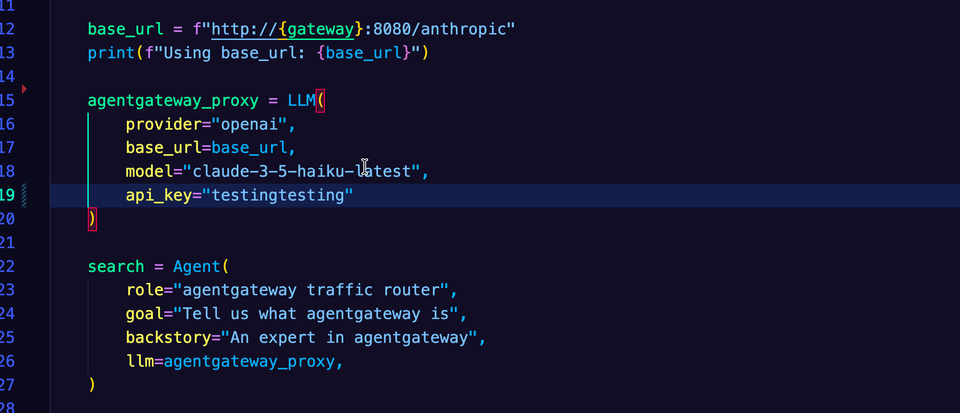
In CrewAI, you'd specify the Gateway IP address via the LLM class, which allows you to specify your Model, provider, and API key for the LLM provider to authenticate properly.
base_url = f"http://{gateway}:8080/anthropic"

LLM(
        provider="openai",
        base_url=base_url,
    )
In ADK, you'll see a similar configuration
     model="gemini-2.5-flash",
    proxy_url=f"https://{AIGATEWAY_PROXY_URL}",
    custom_headers={"foo": "bar"}
Without an AI Gateway, the traffic is effectively routed over the public internet, in which you have no way to secure the traffic, observe metrics/traces, or put guard rails in place.
The way to ensure that you can capture that information and secure it is by using an AI Gateway that allows you to perform these actions. For example, with agentgateway, you have metrics exposed by default.
agentgateway_gen_ai_client_token_usage_sum - Total Tokens
agentgateway_gen_ai_client_token_usage_count - Number of requests
agentgateway_gen_ai_client_token_usage_bucket - Tracks the distribution of token usage across different ranges.
agentgateway_build_info - Build/version information
Additionally, there are many other metrics, along with traces, that you can capture for Agentic end-to-end health.
Setting Up The Gateway
The first step is to create the Gateway, Backend (how the Gateway knows what to route to), and the HTTP route so there's a specific path to route to.
- Set the API key for your LLM provider of choice. In this case, Anthropic is used to reach a Claude Model.
export ANTHROPIC_API_KEY=- Create the Gateway.
kubectl apply -f- <<EOF
kind: Gateway
apiVersion: gateway.networking.k8s.io/v1
metadata:
  name: agentgateway
  namespace: agentgateway-system
  labels:
    app: agentgateway
spec:
  gatewayClassName: agentgateway
  listeners:
  - protocol: HTTP
    port: 8080
    name: http
    allowedRoutes:
      namespaces:
        from: All
EOF- Create a Secret that holds your LLM Provider API key.
kubectl apply -f- <<EOF
apiVersion: v1
kind: Secret
metadata:
  name: anthropic-secret
  namespace: agentgateway-system
  labels:
    app: agentgateway
type: Opaque
stringData:
  Authorization: $ANTHROPIC_API_KEY
EOF- Create an agentgateway backend object so the Gateway knows what to route to. In this case, it is routing to a Claude 3.5 Model.
kubectl apply -f- <<EOF
apiVersion: agentgateway.dev/v1alpha1
kind: AgentgatewayBackend
metadata:
  labels:
    app: agentgateway
  name: anthropic
  namespace: agentgateway-system
spec:
  ai:
    provider:
        anthropic:
          model: "claude-3-5-haiku-latest"
  policies:
    auth:
      secretRef:
        name: anthropic-secret
EOF- Ensure that the backend was created and accepted.
kubectl get agentgatewaybackend -n agentgateway-system- Create a route that will route to
/v1/chat/completions, but be replaced by the/anthropicpath for an easier implementation instead of having to always put/v1/chat/completionsas the path.
kubectl apply -f- <<EOF
apiVersion: gateway.networking.k8s.io/v1
kind: HTTPRoute
metadata:
  name: claude
  namespace: agentgateway-system
  labels:
    app: agentgateway
spec:
  parentRefs:
    - name: agentgateway
      namespace: agentgateway-system
  rules:
  - matches:
    - path:
        type: PathPrefix
        value: /anthropic
    filters:
    - type: URLRewrite
      urlRewrite:
        path:
          type: ReplaceFullPath
          replaceFullPath: /v1/chat/completions
    backendRefs:
    - name: anthropic
      namespace: kgateway-system
      group: agentgateway.dev
kind: AgentgatewayBackend- Test the Gateway and route to ensure that you can reach the LLM.
curl "$INGRESS_GW_ADDRESS:8080/anthropic" -v -H content-type:application/json -H x-api-key:$ANTHROPIC_API_KEY -H "anthropic-version: 2023-06-01" -d '{
  "messages": [
    {
      "role": "system",
      "content": "You are a skilled cloud-native network engineer."
    },
    {
      "role": "user",
      "content": "What is a credit card?"
    }
  ]
}' | jq
Routing Traffic Through CrewAI
With the Gateway and routing in place, you can now write the Agent and have the Agent route traffic through the AI Gateway.
- Specify the libraries you need. In this case, CrewAI is used.
from crewai import Agent, Task, Crew, Process, LLM

import os- Create a
mainfunction.
def main():- Create the environment variable that holds the ingress IP address and path.
    gateway = os.environ.get('INGRESS_GW_ADDRESS')

    if not gateway:
        raise ValueError("INGRESS_GW_ADDRESS environment variable is not set")

    base_url = f"http://{gateway}:8080/anthropic"
print(f"Using base_url: {base_url}")- Within the
LLMclass, specify all of the provider information and the base URL, which is the Gateway and route.
    agentgateway_proxy = LLM(
        provider="openai",
        base_url=base_url,
        model="claude-3-5-haiku-latest",
        api_key="testingtesting"  # agentgateway handles auth, but the OpenAI provider requires a key
)- In the
Agentclass, specify the goal of the Agent along with the variable for theLLMclasses configuration.
    search = Agent(
        role="agentgateway traffic router",
        goal="Tell us what agentgateway is",
        backstory="An expert in agentgateway",
        llm=agentgateway_proxy,
)- Create the Agents job.
    job = Task(
        description="Let us know EXACTLY what agentgateway is",
        expected_output="The best possible definition on agentgateway",
        agent=search
)- Implement the crew.
    crew = Crew(
        agents=[search],
        tasks=[job],
        verbose=True,
        process=Process.sequential
)- Create the starting point for the Agent (the kickoff) and ensure that the Agent can be ran as a main configuration/entry point.
    crew.kickoff()


if __name__ == '__main__':
    main()
Putting it all together, the Agent setup will look like the following:
from crewai import Agent, Task, Crew, Process, LLM

import os

def main():

    gateway = os.environ.get('INGRESS_GW_ADDRESS')

    if not gateway:
        raise ValueError("INGRESS_GW_ADDRESS environment variable is not set")

    base_url = f"http://{gateway}:8080/anthropic"
    print(f"Using base_url: {base_url}")

    # agentgateway returns a OpenAI-compatible format, so use provider="openai"
    # This happens at the `replaceFullPath: /v1/chat/completions` in the `HTTPRoute` object
    agentgateway_proxy = LLM(
        provider="openai",
        base_url=base_url,
        model="claude-3-5-haiku-latest",
        api_key="testingtesting"  # agentgateway handles auth, but the OpenAI provider requires a key
    )

    search = Agent(
        role="agentgateway traffic router",
        goal="Tell us what agentgateway is",
        backstory="An expert in agentgateway",
        llm=agentgateway_proxy,
    )

    job = Task(
        description="Let us know EXACTLY what agentgateway is",
        expected_output="The best possible definition on agentgateway",
        agent=search
    )

    crew = Crew(
        agents=[search],
        tasks=[job],
        verbose=True,
        process=Process.sequential
    )

    crew.kickoff()


if __name__ == '__main__':
    main()
Now, every time you use your Agent, you will be able to route that traffic through agentgateway as your AI Gateway. You can now begin to observe and secure your Agentic traffic.

Comments ()