Scaling Actors and Workers With HPA In Agent Substrate
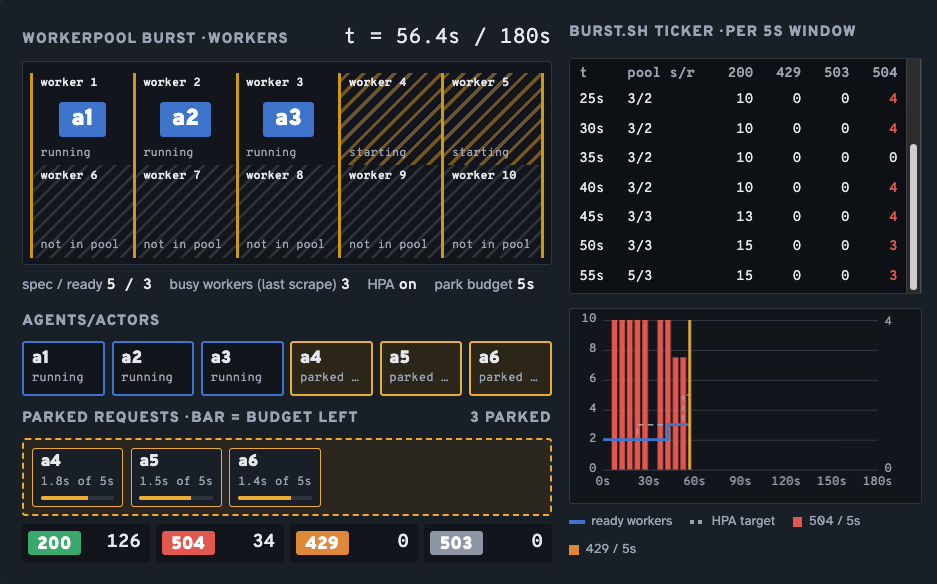
The number one rule of scaling is ensuring that you have more than enough resources readily available to consume, digest, and schedule what you need to run. In the case of agentic workloads, that's typically Agents. For example, is there enough memory to run multi-Actor Workers? Or do you need to scale Workers out to schedule Actors accordingly?
In this blog post, you'll learn how to schedule and scale Actors (where Agents run) via Workers and WorkerPools for any number of Actors that need to run within your environment.
Prerequisites
To follow along with this blog post from a hands-on perspective, you will need:
- A cluster with Agent Substrate running (e.g., GKE or a local cluster like Kind).
- Agentgateway set as the dataplane proxy for your
atenet-router.
- Agentgateway set as the dataplane proxy for your
- Worker images built with your underlying isolation layer (e.g., gVisor).
What Will You Be Deploying?
Going through this blog post, you will be:
- Deploying Actors
- "Parking" an Actor until a Worker is ready to schedule it.
- Scaling out Workers so if you have, let's say 3 Actors but only 2 Workers, HPA can scale out the Worker (a Pod) to schedule the third Actor.
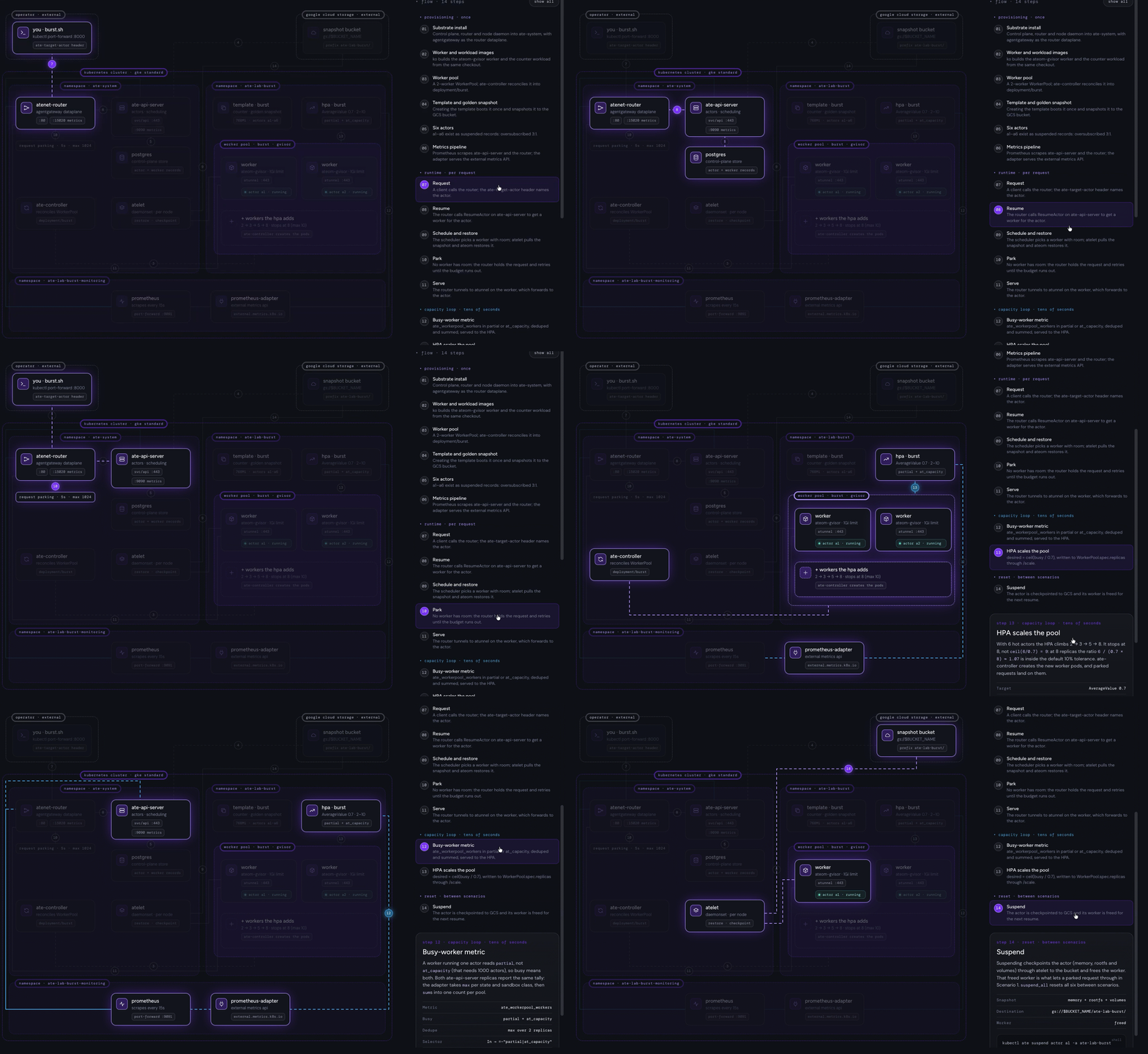
The goal here is to park Actors when there aren't enough Workers, or memory in the Workers, readily available to schedule an Actor. The Workers in this blog have a 1Gi memory limit, and each Actor asks for 768Mi. A second Actor needs 1536Mi, which means it won't fit. If anyone raises the WorkerPool memory or lowers the Template's, Actors will start sharing workers. Once a Worker is made available, the Actor can be automatically scheduled on said Worker so your Agent can run.
To go through the hands-on portion of this blog post in the way that it is configured, you'll want to clone this repo as it has all of the scripts and HPA configurations to run the lab along with Step 1 and Step 2, which is building the images and deploying your Workers.

Deploying Actors
The first step is deploying Actors. All Actors, when deployed, are automatically in a "suspended" state. Because they're in a suspended state, they aren't technically running, which is where the efficiency and overall performance of Agent Substrate come into play. Actors are only running when there is an active session to said Actor. That way, they aren't consuming resources (CPU/memory) for no reason.
Actors sit in a "warm state", which means they don't take seconds to resume. That way, when you create a session to an Actor that's running an Agent, it won't feel like the Actor is in a cold state and takes forever to resume/respond to the request that you're sending to the Actor running an Agent.
- Deploy the Actors. The pool caps each worker at 1Gi of memory (
manifests/workerpool.yaml.tmpl), and the template asks for 768Mi per actor (manifests/actortemplate.yaml.tmpl). The scheduler only places an actor where its memory still fits, so a second actor never does.
for i in 1 2 3 4 5 6; do
  kubectl ate create actor "a$i" -a ate-lab-burst --template burst
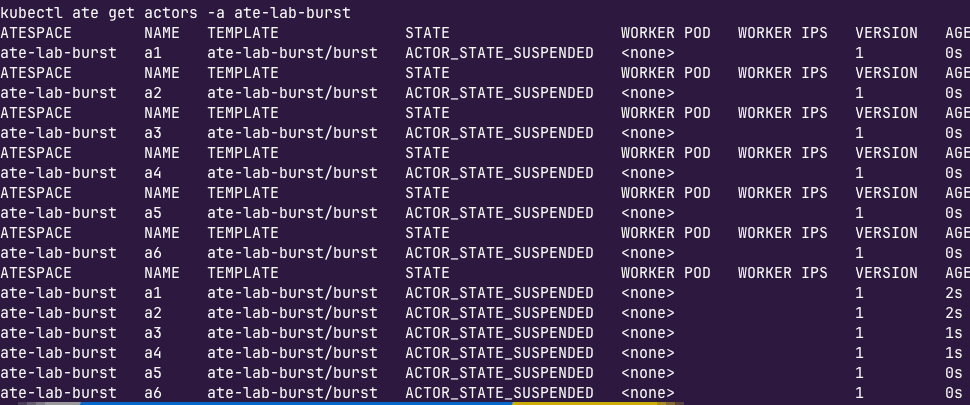
doneburst template is what's created in actortemplate.yaml.tmpl.All six start in ACTOR_STATE_SUSPENDED. They exist only as records, plus the golden snapshot in GCS.
- Confirm that the Actors are in a suspended state and in Agent Substrate.
kubectl get actors -a ate-lab-burstYou should see an output similar to the screenshot below.
As you're going through the rest of this blog post, an important note to keep in mind is that because six Actors were deployed and there are two Workers, there's a 3:1 ratio here. That means two Actors can be scheduled, but four cannot and therefore sit in a "parked" state until a Worker is available.
Park and Schedule An Actor
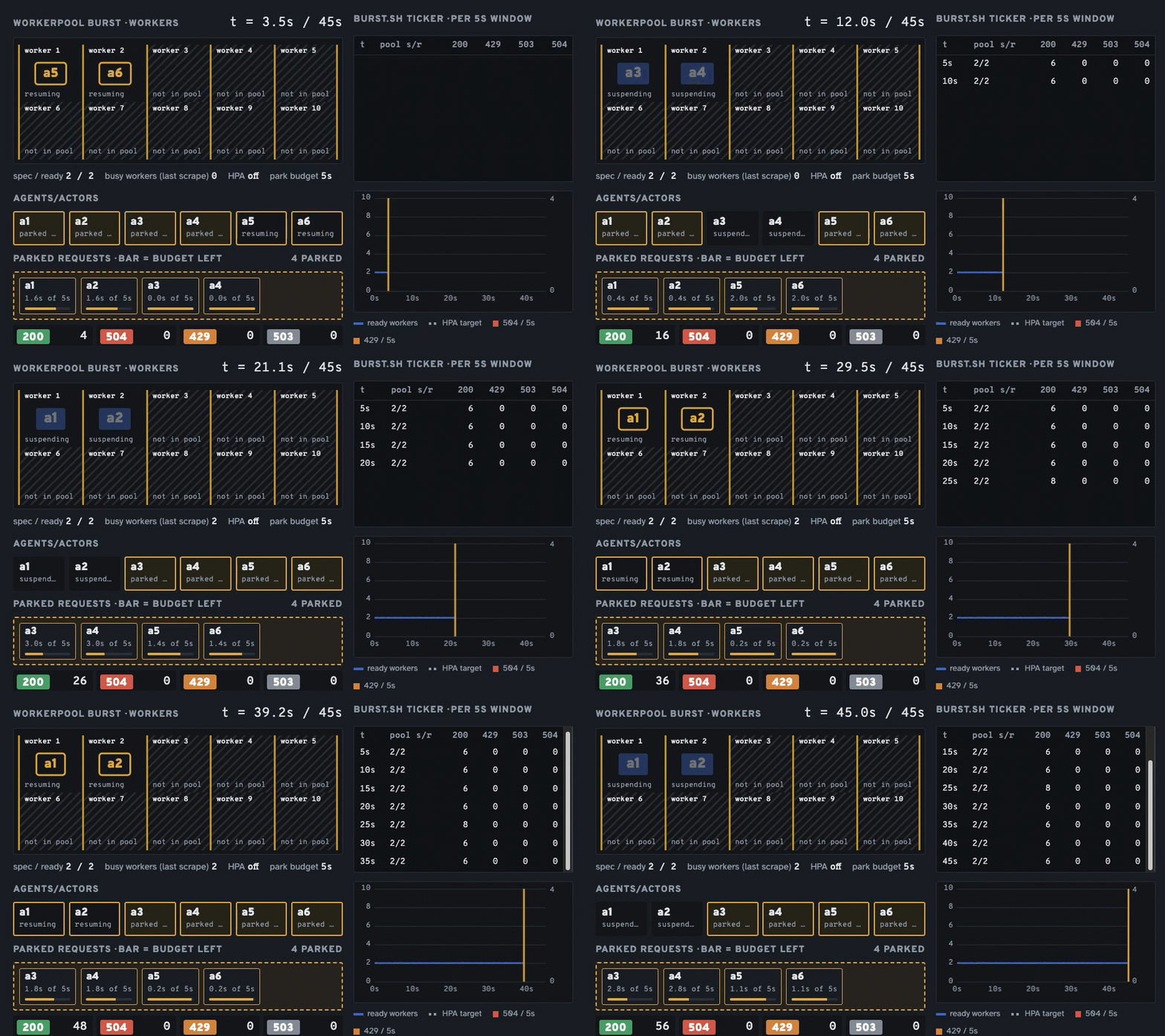
With the Actors deployed, let's resume two of the Actors, and then try a third, which will sit in a parked state until a Worker becomes readily available.
- Port-forward the router so it's open and accepting requests (for when a client or something like
curlneeds to reach it).
kubectl -n ate-system port-forward svc/atenet-router 8000:80- Fill both Workers with Actors.
curl -s -H "ate-target-actor: ate-lab-burst/a1" http://localhost:8000
curl -s -H "ate-target-actor: ate-lab-burst/a2" http://localhost:8000- Check and confirm that both Workers got assigned an Actor.
kubectl ate get workers -n ate-lab-burstYou'll see an output similar to the below:
NAME                                   POOL    STATE                 ACTORS   CPU      MEMORY      POD                                    AGE
cc852e96-6035-47a1-96e9-1b85d2b47c95   burst   WORKER_STATE_ACTIVE   1/1000   0/500m   768Mi/1Gi   ate-lab-burst/burst-6ff589448f-t26t7   20m
43210b1e-2a85-496c-96e9-497575d4e200 burst WORKER_STATE_ACTIVE 1/1000 0/500m 768Mi/1Gi ate-lab-burst/burst-6ff589448f-t7gm6 20m- Try assigning a third Actor.
curl -s -w '-> HTTP %{http_code} in %{time_total}s\n' \
  -H "ate-target-actor: ate-lab-burst/a3" http://localhost:8000
You'll get a "request timed out" with a 504. The reason why is that there isn't enough memory on either Worker to schedule the third Actor.

- Suspend Actor 1 and then run the
curlagain.
kubectl ate suspend actor a1 -a ate-lab-burstcurl -s -w '-> HTTP %{http_code} in %{time_total}s\n' \
-H "ate-target-actor: ate-lab-burst/a3" http://localhost:8000You'll see that Actor 3 can now be scheduled.

Add HPA For WorkerPools
In the previous section, you saw that because there are two Workers available within the WorkerPool, only 2/3 of the Actors could be scheduled on the Worker until a Worker freed up.
As you read in the What Will You Be Deploying? section, multiple Actors CAN be scheduled on one Worker as long as there's enough memory to support it. The scenario we want HPA for WorkerPools is when the Worker runs out of memory and therefore a new Worker (Pod/replica) needs to be created.
Tldr; Where HPA comes into play is scaling out an Actor to another Worker (or as many Workers as are needed based on how many Actors are waiting to be unparked).
- Use the
burstscript to wake up all six Actors
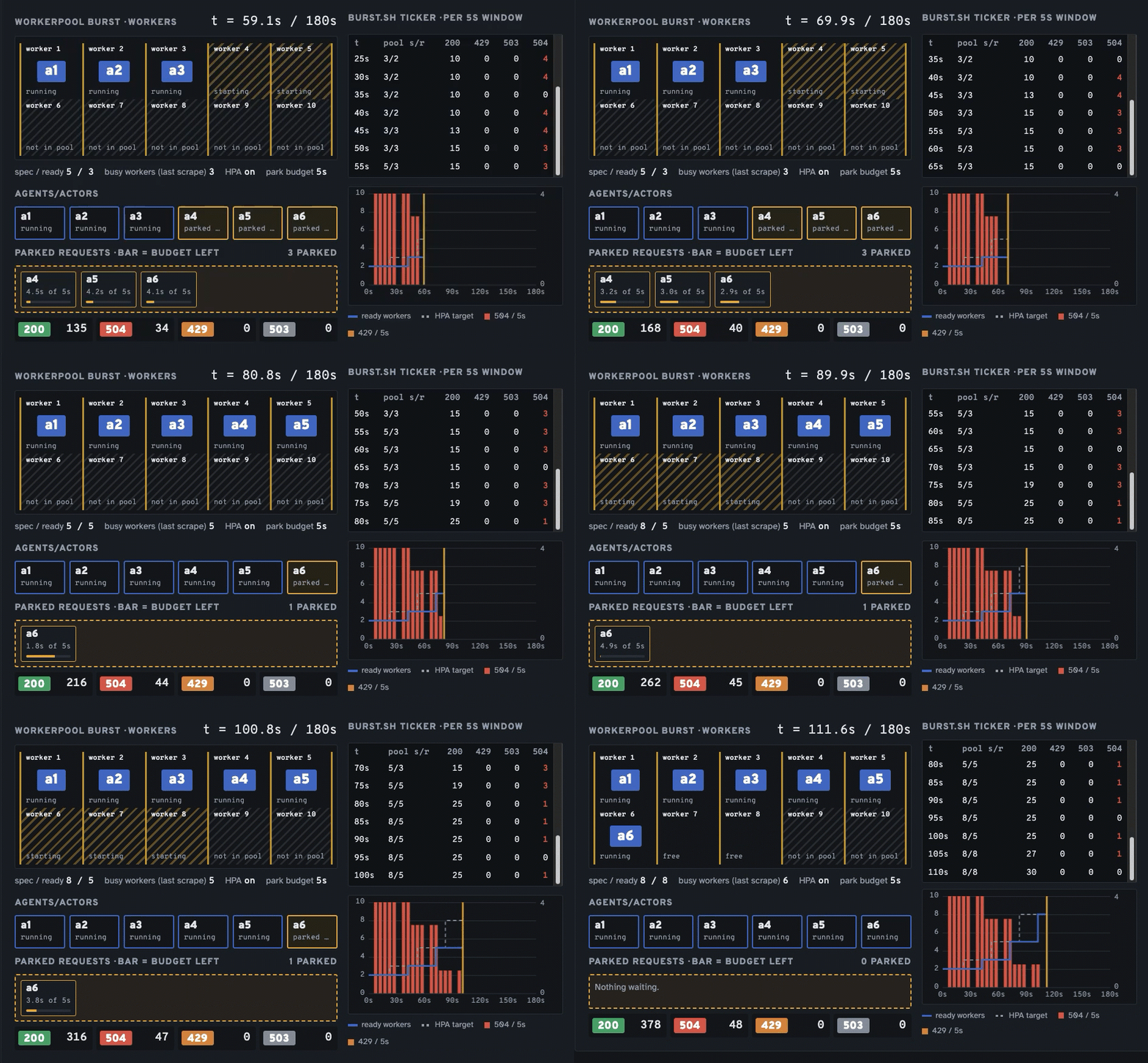
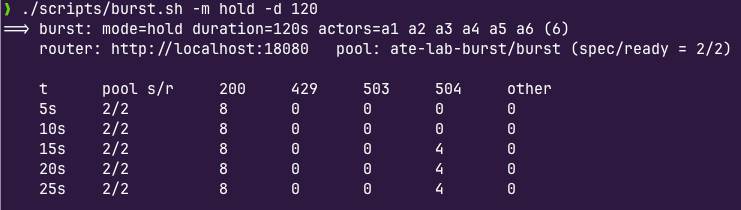
./scripts/burst.sh -m hold -d 120You'll see 504s (timeouts) for the 4 Actors that aren't scheduled on Workers as they aren't scheduled and therefore, aren't running.
- In another terminal, scale your WorkerPool to 6 replicas
kubectl -n ate-lab-burst scale workerpool burst --replicas=6- Go back to the first terminal and you'll see the scale start to occur (from 2/2 to 6/6). This shows that all six Actors are now up and running with successful 200's.
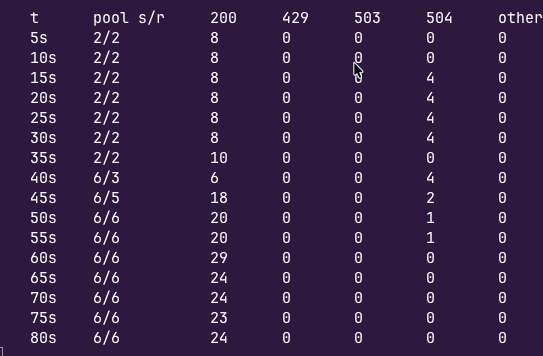
This proves out that scaling the Workers officially worked!
Wrapping Up
Scale becomes increasingly important in the world of agentic because it impacts so many areas. It's not just one app that impacts a department or a particular functionality of an app that impacts a customer. If an Agent is down, it can potentially impact the entire organization. That's why ensuring that scale can be properly implemented across Agents isn't just about the tech teams; it's everyone from engineering to marketing to HR and all teams that are incorporating AI into daily workflows.

Comments ()