The Multi-Cluster Strategy & Implementation for Actors in Prod with Agent Substrate

The "system" around Claude Desktop and others like it provides a capability that is key to how you interact with your Agents:
Memory.
When you close your laptop for the night and open it in the morning, you can pick up where you left off by continuing in the same session with your Agent. You don't have to start over like some stateless application.
In production, you need the same benefits, especially considering the crucial tasks that organizations are using agentic workflows for now, ranging from what departments like Finance and Marketing are doing to how engineering is managing infrastructure, apps, and systems.
In this blog post, you'll learn how to set up multi-cluster/high availability strategies for your Agents (Actors) with Agent Substrate.
Prereqs
To follow along from a hands-on perspective, you will need the following:
- Two clusters running k8s v1.37 or above as the
PodCertificateAPI is mandatory for Workers (Pods) to get certs. - Agent Substrate installed on both clusters. You can use the universal installer for this. This fork has the universal installer.
- Clone the Agent Substrate repo to use the demo available in the repo vs creating a net new one.
- A shared Postgres DB
Multi-What?
When diving into multi-cluster strategies, it can feel like there are many different methods of looking at it, and that's because there are. However, there are three typical implementation details of multi-cluster.
- "Clusters should be cross-region in case one cluster or one region goes down"
- "Databases scaled out across regions, across AZs, or both so my persistent data is always accessible"
- "Workload running in more than one cluster so if one cluster goes down, the workload stays up"
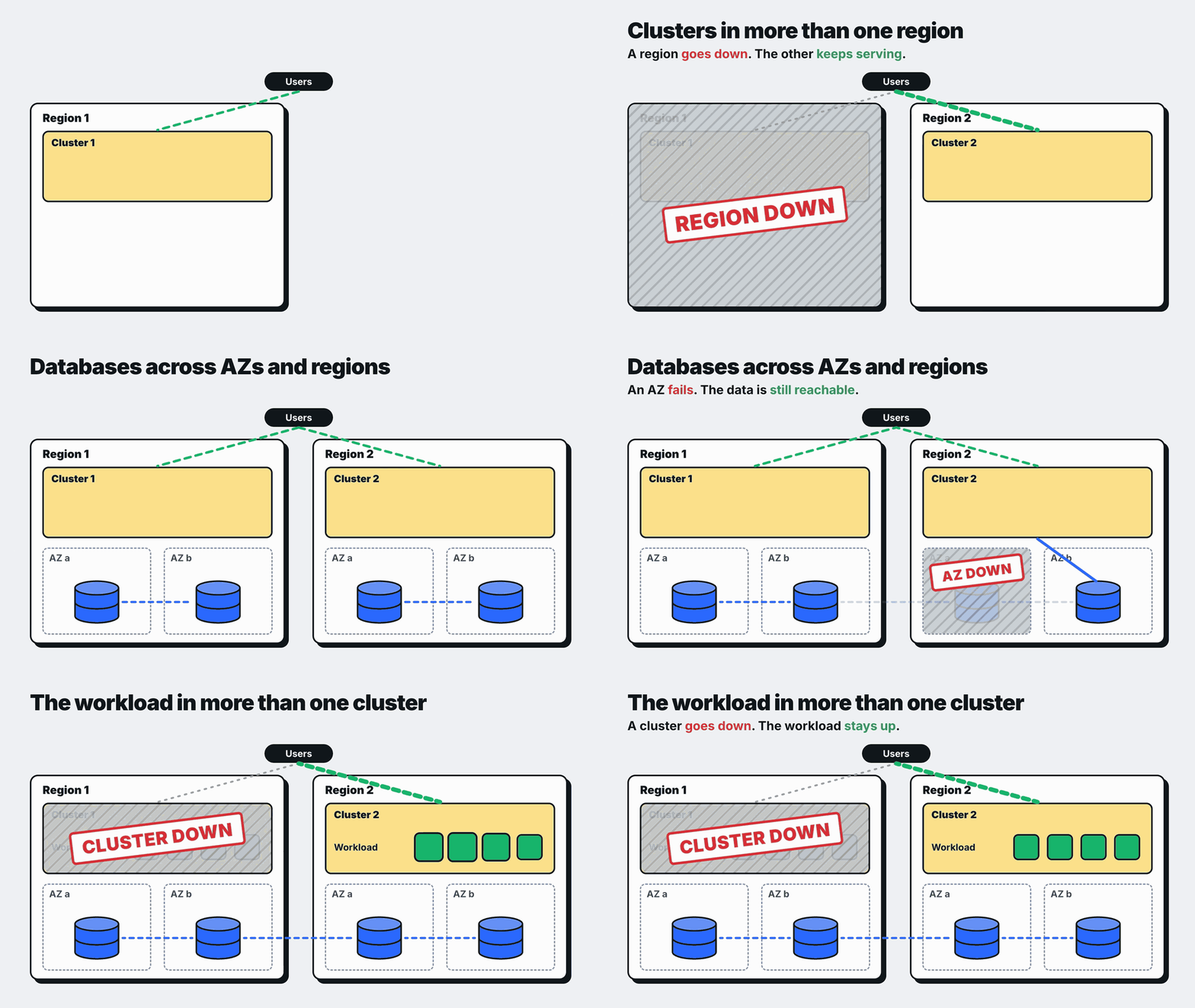
Those three fall into the category of O(n) clusters and O(n) databases (more than one), typically segregated across regions and/or zones. This typically comes down to the system/platform and what it supports. For example, if you have multiple databases, is there a form of leader election where one database is written to and the data is replicated to the others in case one needs to become the leader (if the current leader goes down)?
What's The Goal?
Short and sweet - the goal is to ensure your agentic workloads stay up and the data that they contain, or produce, is safe and accessible regardless of what catastrophic event occurs. In the case of Agents running in agentic infrastructure, it's all about:
- Making sure Agents stay accessible
- What they produce (output) is saved in a location that isn't ephemeral
- Context/memory/conversation is in the same type of location (think storage service like GCS or AWS S3).
Because there are a few ways to look at multi-cluster and how you can ultimately implement it, you have to think about where you want to start, and ensuring context/memory/output is stored somewhere scalable, and your Agents will be available when you need them is a great place to begin.
Substrate, by default, is a single-cluster environment by design. Multi-cluster means two independent installs plus a thin layer you own.
The Substrate Architecture
The goal for always-on Agents and persistent data that can be accessed across multiple clusters is to contain a directory where Actors live, ingress capabilities from your client that route to it, and a storage location that can be used/shared amongst each cluster. The important part about the storage is that it's not on the cluster, is highly available, and can be scaled out and backed up if needed.
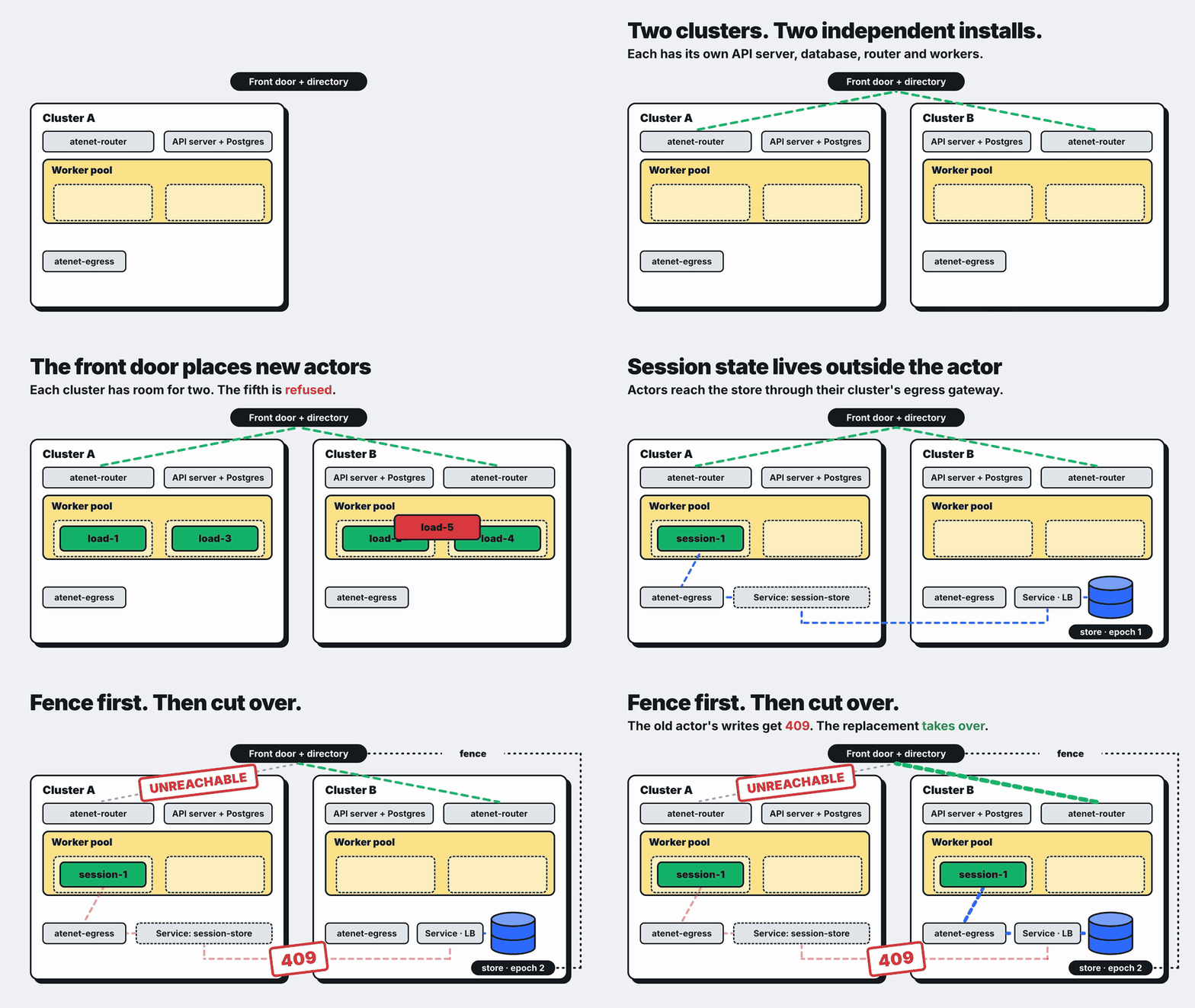
This lab demonstrates three things:
- Creating/placing Actors where there is room (what
WorkerPoolhas available space/memory/CPU). - Agents survive cluster outages.
- Cross-cluster-accessible storage.
Placing new Actors across clusters and getting them running tends to be the easier part. The hard part is recovering an existing Actor, and that's something you'll need to build for.
What We Want To Prove Out
The goal of this is to prove out the following:
- Placement spans clusters with four Actors (two per cluster).
- An actor has one "home". A request for a suspended Actor in a full cluster gets a
503from its home/base env and404from the other cluster's router. - A
503!= "failure". The same Actor serves again once its base cluster has room.. - Actors with the same name don't mean it's the same Actor.
session-1in cluster A andsession-1in cluster B have different UIDs and different local state. - Only external state comes back. The replacement continues the count from the store. Its local file starts over.
The Environment
The clusters, resources, and overall configuration are as follows:
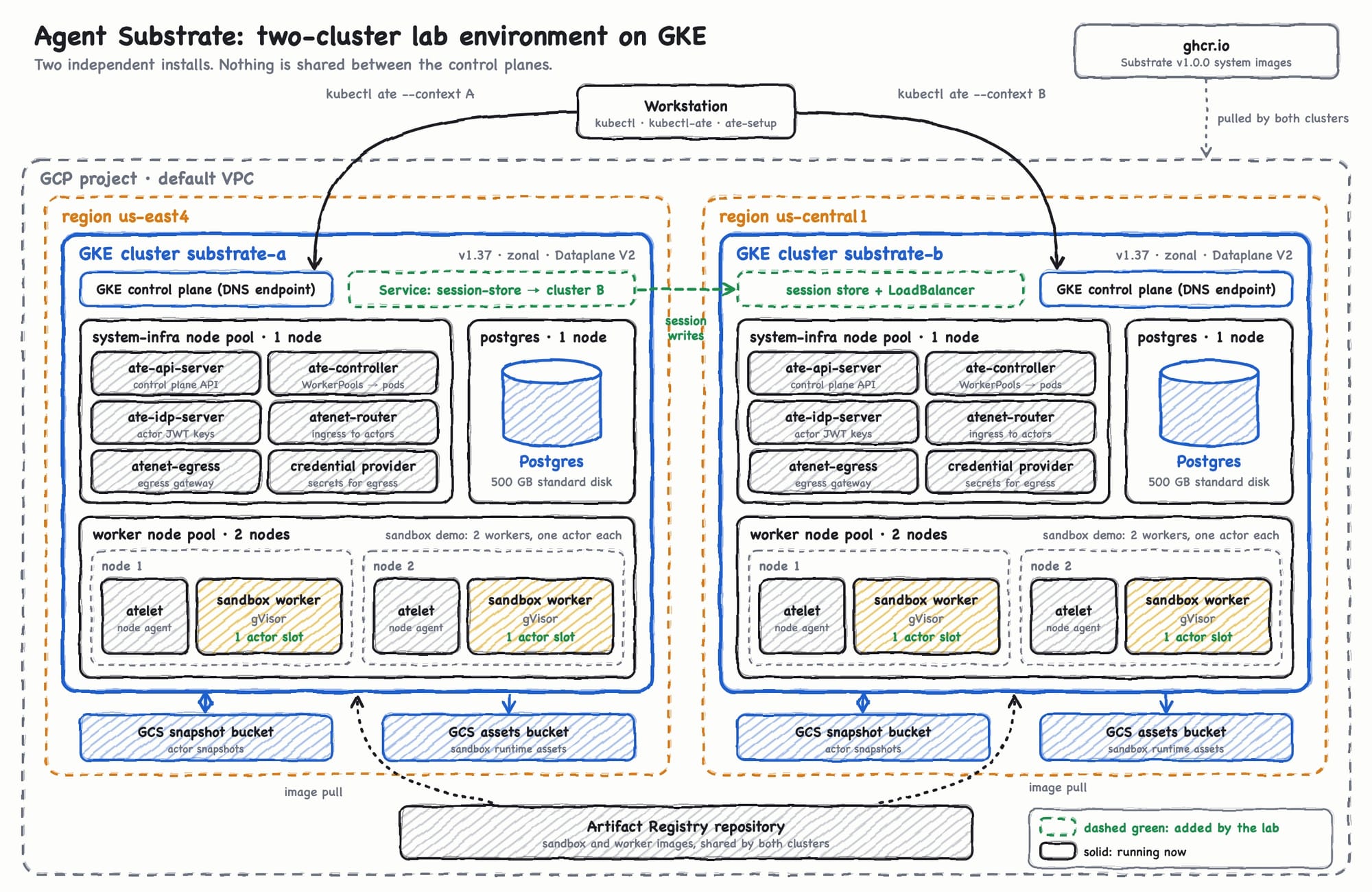
- Two clusters:
substrate-aandsubstrate-b - Two regions:
us-east-4andus-central1 - GKE v1.37
- Four nodes per cluster (2 workers + one for the system and Postgres pools)
- e2-standard-4 size/type
substrate-bneeds aLoadBalancertype for the service so thatsubstrate-aegress traffic can reach it. Because this env is running on GKE, that's straightforward.
Sharing The Persistent Layer
For the Actors application state (the session store) to be held in a way that both clusters can read and update it, there needs to be a shared, persisted layer across both clusters. You could use something like a Python store for in-memory persistence fronted by a Python service, but that doesn't feel very "production-ready". It ends up just being a small Python app that exposes the ability to read and write to the table, a container image built for that Python app, deployed as a Kubernetes Deployment, and accessible via a Kubernetes Service.
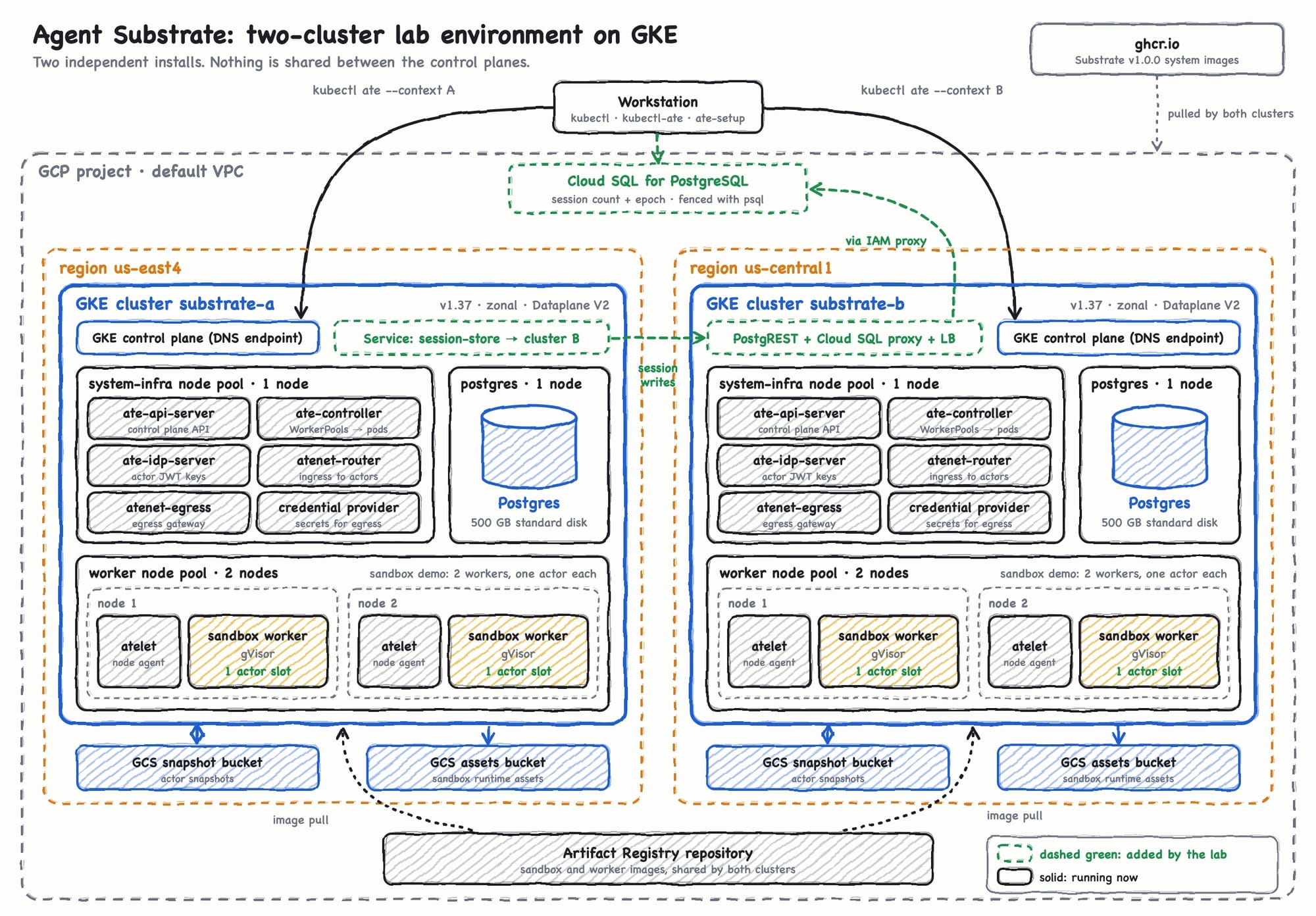
Instead, let's have a true database that's scalable. Because the clusters used in this article are on GKE, Cloud SQL for PostgreSQL can be used as the shared application database. If you're running clusters anywhere else though (AKS, EKS, etc.), you can use the Postgres service that's available in the cloud you choose.
You'll also see in this section that there's a Deployment, Network Policies, and a few Services that get deployed (all k8s objects). The reason why is because Cloud SQL stores the session state, but it doesn't expose an HTTP endpoint that Actors can call. Due to that:
- Cluster B’s Deployment runs PostgREST and the Cloud SQL Auth Proxy.
- Cluster B’s
LoadBalancerService exposes PostgREST to Actors in Cluster A. - Actors in Cluster B use the same Service locally.
- Cluster A’s mirror
ServiceandEndpointSlicelet Actors in Cluster A use the same hostname by forwarding traffic to Cluster B’s load balancer.
Create the DB and Connection
- Set the following env vars for Postgres.
export GCP_PROJECT="your-project-id"
export SQL_INSTANCE="your-cloud-sql-instance"
export SQL_DATABASE=substrate_dr_lab- Enable the Postgres API
gcloud services enable sqladmin.googleapis.com --project "$GCP_PROJECT"- Create the Postgres instance
SQL_ADMIN_PASSWORD=$(openssl rand -hex 24)

gcloud sql instances create "$SQL_INSTANCE" --project "$GCP_PROJECT" \
  --database-version=POSTGRES_17 --edition=enterprise --tier=db-f1-micro \
  --region=us-central1 --storage-size=10 --storage-type=SSD \
--assign-ip --no-deletion-protection --root-password="$SQL_ADMIN_PASSWORD"- Create the DB
SQL_CONNECTION_NAME=$(gcloud sql instances describe "$SQL_INSTANCE" \
  --project "$GCP_PROJECT" --format='value(connectionName)')
gcloud sql databases create "$SQL_DATABASE" --instance "$SQL_INSTANCE" --project "$GCP_PROJECT"- Start a local proxy so you can hit the DB without exposing it publicly.
cloud-sql-proxy --address 127.0.0.1 --port 15432 "$SQL_CONNECTION_NAME" &
SQL_PROXY_PID=$!- Define the
lab_sql()function, which is a helper that runspsqlagainst the DB as the standardpostgresuser. This is a reusable function as every DB step uses it.
lab_sql() {
  PGPASSWORD="$SQL_ADMIN_PASSWORD" PGCONNECT_TIMEOUT=5 psql -X -v ON_ERROR_STOP=1 \
    -h 127.0.0.1 -p 15432 -U postgres -d "$SQL_DATABASE" "$@"
}- Create the session state, which does the following:
- Creates a private table that holds the session count and
epoch(a number stored next to the session's count that says which writer is currently allowed to write) - Defines a
turnfunction that the HTTP API can call - Two roles for PostgREST (to connect and to call the turn)
- Creates a private table that holds the session count and
QL_LOGIN_PASSWORD=$(openssl rand -hex 24)

lab_sql -v login_password="$SQL_LOGIN_PASSWORD" <<'SQL'
BEGIN;
CREATE ROLE session_lab_http NOLOGIN;
CREATE ROLE session_lab_login LOGIN NOINHERIT;
GRANT session_lab_http TO session_lab_login;

CREATE SCHEMA session_state;
CREATE SCHEMA session_api;
CREATE TABLE session_state.sessions (
  id text PRIMARY KEY,
  epoch integer NOT NULL DEFAULT 1,
  value integer NOT NULL DEFAULT 0,
  a_writes integer NOT NULL DEFAULT 0,
  b_writes integer NOT NULL DEFAULT 0
);
INSERT INTO session_state.sessions (id) VALUES ('session-1');

CREATE FUNCTION session_api.turn(writer text, writer_epoch integer)
RETURNS jsonb
LANGUAGE plpgsql SECURITY DEFINER
SET search_path = pg_catalog, pg_temp
AS $$
DECLARE result jsonb;
BEGIN
  IF writer IS NULL OR writer NOT IN ('cluster-a', 'cluster-b') THEN
    RAISE SQLSTATE 'PT400' USING MESSAGE = 'invalid writer';
  END IF;

  UPDATE session_state.sessions AS s
     SET value = s.value + 1,
         a_writes = s.a_writes + CASE WHEN writer = 'cluster-a' THEN 1 ELSE 0 END,
         b_writes = s.b_writes + CASE WHEN writer = 'cluster-b' THEN 1 ELSE 0 END
   WHERE s.id = 'session-1' AND s.epoch = writer_epoch
   RETURNING jsonb_build_object('value', s.value, 'epoch', s.epoch) INTO result;

  IF NOT FOUND THEN
    RAISE SQLSTATE 'PT409' USING MESSAGE = 'stale epoch';
  END IF;
  RETURN result;
END;
$$;

REVOKE ALL ON FUNCTION session_api.turn(text, integer) FROM PUBLIC;
GRANT USAGE ON SCHEMA session_api TO session_lab_http;
GRANT EXECUTE ON FUNCTION session_api.turn(text, integer) TO session_lab_http;
ALTER ROLE session_lab_login PASSWORD :'login_password';
COMMIT;
SQL
Create The Endpoint
As mentioned previously, the DB doesn't have a public endpoint. Because of that, we'll need to expose a k8s Service that can point to the DB to ensure the HTTP endpoint can be reached, but in a secure way.
- Give the proxies in both clusters a dedicated Google Service Account.
SQL_GSA_NAME=substrate-dr-lab-sql
SQL_GSA_EMAIL="$SQL_GSA_NAME@$GCP_PROJECT.iam.gserviceaccount.com"

gcloud iam service-accounts create "$SQL_GSA_NAME" --project "$GCP_PROJECT"
gcloud projects add-iam-policy-binding "$GCP_PROJECT" \
  --member="serviceAccount:$SQL_GSA_EMAIL" --role=roles/cloudsql.client
gcloud iam service-accounts add-iam-policy-binding "$SQL_GSA_EMAIL" --project "$GCP_PROJECT" \
  --member="serviceAccount:$GCP_PROJECT.svc.id.goog[session-store/session-store]" \
  --role=roles/iam.workloadIdentityUser

kubectl --context "$CTX_B" create namespace session-store
printf '%s' "postgresql://session_lab_login:${SQL_LOGIN_PASSWORD}@127.0.0.1:5432/${SQL_DATABASE}?sslmode=disable" |
kubectl --context "$CTX_B" -n session-store create secret generic session-store-db --from-file=db-uri=/dev/stdin- In each cluster, create a Namespace and Secret holding the connection string to Postgres.
for ctx in "$CTX_A" "$CTX_B"; do
  kubectl --context "$ctx" create namespace session-store
  printf '%s' "postgresql://session_lab_login:${SQL_LOGIN_PASSWORD}@127.0.0.1:5432/${SQL_DATABASE}?sslmode=disable" |
    kubectl --context "$ctx" -n session-store create secret generic session-store-db --from-file=db-uri=/dev/stdin
done- Create the k8s
ServiceAccount,Deployment, andNetworkPolicy, which is the session store's HTTP front in both clusters.
for ctx in "$CTX_A" "$CTX_B"; do
kubectl --context "$ctx" apply -f - <<EOF
apiVersion: v1
kind: ServiceAccount
metadata:
  name: session-store
  namespace: session-store
  annotations:
    iam.gke.io/gcp-service-account: "${SQL_GSA_EMAIL}"
---
apiVersion: apps/v1
kind: Deployment
metadata:
  name: session-store
  namespace: session-store
spec:
  replicas: 1
  strategy:
    type: Recreate
  selector:
    matchLabels:
      app: session-store
  template:
    metadata:
      labels:
        app: session-store
    spec:
      serviceAccountName: session-store
      nodeSelector:
        iam.gke.io/gke-metadata-server-enabled: "true"
      securityContext:
        runAsNonRoot: true
        seccompProfile:
          type: RuntimeDefault
      initContainers:
      - name: cloud-sql-proxy
        restartPolicy: Always
        image: gcr.io/cloud-sql-connectors/cloud-sql-proxy:2.21.1@sha256:f6abce8d90076c0857f23fb2cffb744024f380eca25334e9f2b52d2d74dc9967
        args: ["--address=127.0.0.1", "--port=5432", "--structured-logs", "${SQL_CONNECTION_NAME}"]
        securityContext:
          allowPrivilegeEscalation: false
          runAsUser: 65532
          capabilities:
            drop: ["ALL"]
      containers:
      - name: postgrest
        image: postgrest/postgrest:v14.8@sha256:4173b72e0be29cf15349dc827798c3e464c5f2cc7f9c1697022f9cd1874b4c36
        env:
        - name: PGRST_DB_URI
          valueFrom:
            secretKeyRef:
              name: session-store-db
              key: db-uri
        - name: PGRST_DB_SCHEMAS
          value: session_api
        - name: PGRST_DB_ANON_ROLE
          value: session_lab_http
        - name: PGRST_SERVER_PORT
          value: "8080"
        - name: PGRST_ADMIN_SERVER_PORT
          value: "3001"
        - name: PGRST_LOG_LEVEL
          value: info
        ports:
        - name: data
          containerPort: 8080
        - name: readiness
          containerPort: 3001
        readinessProbe:
          httpGet:
            path: /ready
            port: readiness
        resources:
          requests:
            cpu: 50m
            memory: 64Mi
          limits:
            cpu: 250m
            memory: 128Mi
        securityContext:
          allowPrivilegeEscalation: false
          readOnlyRootFilesystem: true
          runAsUser: 1000
          capabilities:
            drop: ["ALL"]
---
apiVersion: v1
kind: Service
metadata:
  name: session-store
  namespace: session-store
spec:
  selector:
    app: session-store
  ports:
  - name: http
    port: 80
    targetPort: data
---
apiVersion: networking.k8s.io/v1
kind: NetworkPolicy
metadata:
  name: default-deny-ingress
  namespace: session-store
spec:
  podSelector: {}
  policyTypes:
  - Ingress
---
apiVersion: networking.k8s.io/v1
kind: NetworkPolicy
metadata:
  name: allow-egress-gateway
  namespace: session-store
spec:
  podSelector:
    matchLabels:
      app: session-store
  policyTypes:
  - Ingress
  ingress:
  - from:
    - namespaceSelector:
        matchLabels:
          kubernetes.io/metadata.name: ate-system
    ports:
    - protocol: TCP
      port: 8080
EOF
done- Export the
STORE_HOSTenv var for later sections in the terminal you'll be running this lab in. It saves the store's in-cluster DNS so later commands can reuse it instead of repeating the full name.
export STORE_HOST=session-store.session-store.svc.cluster.localPart 1: The Cluster's Full
You go into an Agent client (to interact with your Actor), and once you try to start a conversation with the Agent, you realize the session isn't initiated and is paused due to a lack of hardware resources for the Actor to use to run the process. What you can do in that case is place your session on another cluster.
- Set the proper env vars for your k8s contexts, the demo template, and the
atespace.
export CTX_A="cluster-a-context"
export CTX_B="cluster-b-context"
export ATESPACE=ate-demo-sandbox
export TEMPLATE=sandbox-template- Create a
labdirectory to store the output and resources/objects in (that way, you can easily clean it up later).
mkdir lab
LAB_DIR="lab"- Deploy the demo Actors. The template via the
TEMPLATEenv var in step 1 uses the stock sandbox demo on Substrate. The below fills both Worker's CPU capacity, not the Actor slots. Each worker advertises 2,000 millicores, and each sandbox-template actor (via the demo) reserves 2,000 millicores.
for actor in load-1 load-2; do
  kubectl ate --context "$CTX_A" create actor "$actor" -a "$ATESPACE" --template "$TEMPLATE" &&
    kubectl ate --context "$CTX_A" resume actor "$actor" -a "$ATESPACE" || break
done
kubectl ate --context "$CTX_A" get workers -n "$ATESPACE"- With each Worker filled, try deploying a third Actor.
kubectl ate --context "$CTX_A" create actor load-3 -a "$ATESPACE" --template "$TEMPLATE" &&
  kubectl ate --context "$CTX_A" resume actor load-3 -a "$ATESPACE"
You'll get an error similar to the output below, specifying that there aren't enough resources available on the Workers.
Error: failed to resume actor: rpc error: code = ResourceExhausted desc = no worker has room for the actCreating the Actor succeeds because it only creates a SUSPENDED record. However, because "resume" is the first capacity check, it fails with the ResourceExhausted and message output.
- Delete the Actor in cluster A.
kubectl ate --context "$CTX_A" delete actor load-3 -a "$ATESPACE"- Load the Actor into cluster B and resume it.
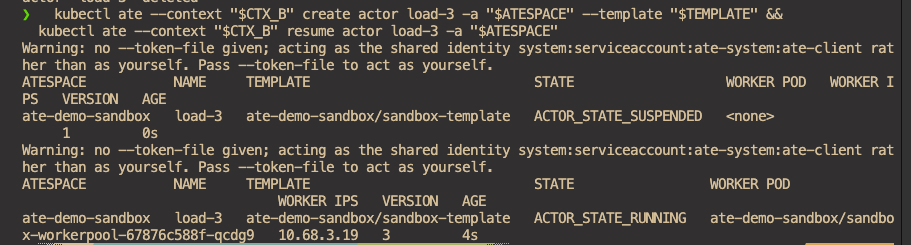
  kubectl ate --context "$CTX_B" create actor load-3 -a "$ATESPACE" --template "$TEMPLATE" &&
  kubectl ate --context "$CTX_B" resume actor load-3 -a "$ATESPACE"
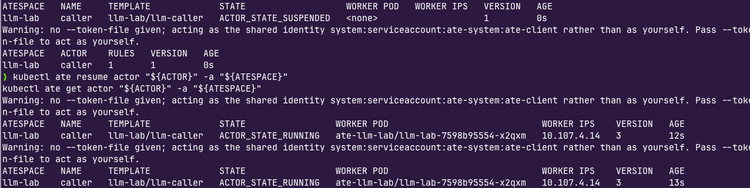
You'll see that the Actor is now scheduled on the second cluster.
- Clean up the deployments for the next section.
kubectl ate --context "$CTX_A" delete actor load-1 -a "$ATESPACE" &&
  kubectl ate --context "$CTX_A" delete actor load-2 -a "$ATESPACE" &&
  kubectl ate --context "$CTX_B" delete actor load-3 -a "$ATESPACE"
Part 2: Recovery
In the previous section (part 1), you saw the idea of "my first cluster doesn't have the resources available to run my Actor Agent, so I'm going to put it into my second cluster". That's a good way of ensuring your Agent definitely has a place to run, but it doesn't solve for failures.
The next goal is to route to Cluster B, but routing to Cluster B doesn’t recover anything. Instead, you need to create a replacement, fence the old writer before cutover, and show that Cluster B continues the externally stored count while its local file starts fresh. To do that, you'll simulate an outage from the front door's point of view. It loses contact with Cluster A, but the original Actor keeps running and can still write. To recover safely, keep the session count outside of the Actor and make the store reject the old writer before sending traffic to Cluster B.
Start Actor in Cluster A
- Create five helper functions for the rest of the lab:
wait_port: Waits until something is listening on a local portstore: Prints the session row straight from the databaseactor_sh: Runs a shell command inside an Actor.turn_command: Builds (doesn't run) the command an Actor uses to take a turn.turn: Usesturn_command (d.)to call the session store's HTTP endpoint from inside the Actor and take a turn. If that succeeds, it appends one line to/root/turns.local, which is a file inside the Actor. It then counts the lines in that file withwc -land prints the number.
wait_port() {
  local deadline=$((SECONDS + 30))
  until nc -z 127.0.0.1 "$1" 2>/dev/null; do
    if [ "$SECONDS" -ge "$deadline" ]; then
      echo "Timed out waiting for local port $1" >&2
      return 1
    fi
    sleep 1
  done
}

store() {
  lab_sql -c "SELECT epoch, value, a_writes, b_writes FROM session_state.sessions WHERE id = 'session-1'"
}

actor_sh() {
  local reply
  reply=$(curl -fsS --max-time 15 -H 'Content-Type: application/json' \
    -d "$(jq -n --arg c "$2" '{command: ["sh", "-c", $c]}')" \
    "http://127.0.0.1:$1/process") || return 1
  jq -r '.stdout, .stderr | select(length > 0)' <<< "$reply"
  jq -e '.exitCode == 0' <<< "$reply" >/dev/null
}

# turn_command <writer> <epoch>: print the command to run inside the sandbox.
turn_command() {
  local body
  body=$(jq -nc --arg writer "$1" --argjson epoch "$2" '{writer: $writer, writer_epoch: $epoch}') || return 1
  printf "wget -T 5 -q -O - --header='Content-Type: application/json' --post-data='%s' 'http://%s/rpc/turn'" \
    "$body" "$STORE_HOST"
}

# turn <local-port> <writer> <epoch>
turn() {
  local request
  request=$(turn_command "$2" "$3") || return 1
  actor_sh "$1" "$request &&
    echo x >> /root/turns.local && echo \"local turns: \$(wc -l < /root/turns.local)\""
}

store
You'll see an output similar to the following:
store
 epoch | value | a_writes | b_writes
-------+-------+----------+----------
     1 |     0 |        0 |        0
(1 row)- Create a YAML configuration that stores the Store Host and then create an Actor, create the egress policy, and resume the Actor.
cat > "$LAB_DIR/store-policy.yaml" <<EOF
rules:
- http:
    hostnames: ["${STORE_HOST}"]
EOF

kubectl ate --context "$CTX_A" create actor session-1 -a "$ATESPACE" --template "$TEMPLATE" &&
  kubectl ate --context "$CTX_A" create egress-policy session-1 -a "$ATESPACE" -f "$LAB_DIR/store-policy.yaml" &&
kubectl ate --context "$CTX_A" resume actor session-1 -a "$ATESPACE"- Proxy to the Actor session and run a
turn. You should see that the second turn showslocal turns: 2. If the Actor wasn't able to resolve the State Store, you wouldn't see2.
kubectl ate --context "$CTX_A" proxy actor session-1 8001:80 -a "$ATESPACE" &
PROXY_A=$!
wait_port 8001 && turn 8001 cluster-a 1 && turn 8001 cluster-a 1
The Failover
This section simulates losing contact with Cluster A, which locks the old Actor out of the session and brings up a replacement in Cluster B. The five steps:
- Drop the tunnel
- Fence the session
- Create the replacement Actor in Cluster B
- Send the next request through Cluster B
- Checks that the fence held.
"Fencing the session" in this case sets the epoch to 2. The DB stops accepting writes that carry epoch 1. In this run, epoch 1 means Cluster A and epoch 2 means Cluster B. It's the first owner of the session and the second owner after the first fence, which is Cluster B.
- Fence the first session.
FENCE_EPOCH=
if FENCE=$(lab_sql -qAtc "
  UPDATE session_state.sessions SET epoch = epoch + 1 WHERE id = 'session-1'
  RETURNING json_build_object('epoch', epoch, 'value', value, 'a_writes', a_writes)") &&
   FENCE_EPOCH=$(jq -e '.epoch | select(type == "number" and . >= 2)' <<< "$FENCE"); then
  jq . <<< "$FENCE"
else
  FENCE_EPOCH=
  echo "Fence failed. Do not cut over." >&2
fi
You'll see an output similar to the following:
{
  "epoch": 2,
  "value": 2,
  "a_writes": 2
}- Create the replacement Actor, egress policy, and resumed session in Cluster B.
[ -n "$FENCE_EPOCH" ] &&
  kubectl ate --context "$CTX_B" create actor session-1 -a "$ATESPACE" --template "$TEMPLATE" &&
  kubectl ate --context "$CTX_B" create egress-policy session-1 -a "$ATESPACE" -f "$LAB_DIR/store-policy.yaml" &&
  kubectl ate --context "$CTX_B" resume actor session-1 -a "$ATESPACE"
ATESPACE NAME TEMPLATE STATE WORKER POD WORKER IPS VERSION AGE
ate-demo-sandbox session-1 ate-demo-sandbox/sandbox-template ACTOR_STATE_RUNNING ate-demo-sandbox/sandbox-workerpool-67876c588f-lwjm5 10.68.2.8 3 3s- Send the request to the Actor in Cluster B.
kubectl ate --context "$CTX_B" proxy actor session-1 8002:80 -a "$ATESPACE" &
PROXY_B=$!
wait_port 8002 && turn 8002 cluster-b "$FENCE_EPOCH"
- Check that
a_writesstill matches the fence response andb_writesis1.
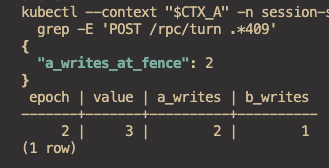
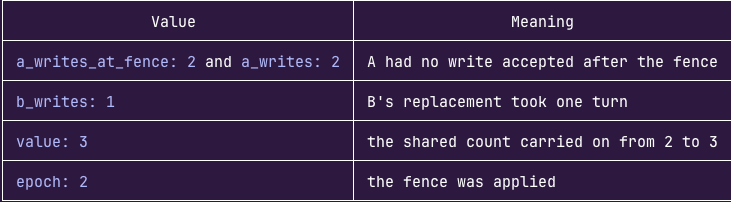
Success means Cluster A's accepted count hasn't changed, Cluster A has at least one rejected write, and Cluster B has one accepted write.
Wrapping Up
In this lab, you tested and showcased the failover. In production, keep using a durable database, but bind writes to an authenticated Actor incarnation instead of trusting the caller to report its epoch. This lab/article used this approach to see it happen in real time, as it's an easier approach to demo to prove out failover. For untrusted Actors, the gateway can inject credentials outside the sandbox. External side effects need their own fencing or idempotency.

Comments ()