Agent Substrate v1.0.0 on AKS: Installation and Configuration
November 5th, 2026, is a monumental moment for Agent Substrate as the official v1.0.0 was released ahead of KubeCon NA 2026 in Salt Lake City. With v1.0.0 being official, there were, of course, some big changes (primarily around installation, configuration, and how the system will look moving forward).
In this quickstart, you'll learn how to install and configure Agent Substrate as you may have seen in the install/config before v1.0.0, but there have been some changes in how it's installed.
What Changed In Agent Substrate?
For the installation and configuration, a few things changed. Before getting to those, there are some other notable changes to point out so you're aware:
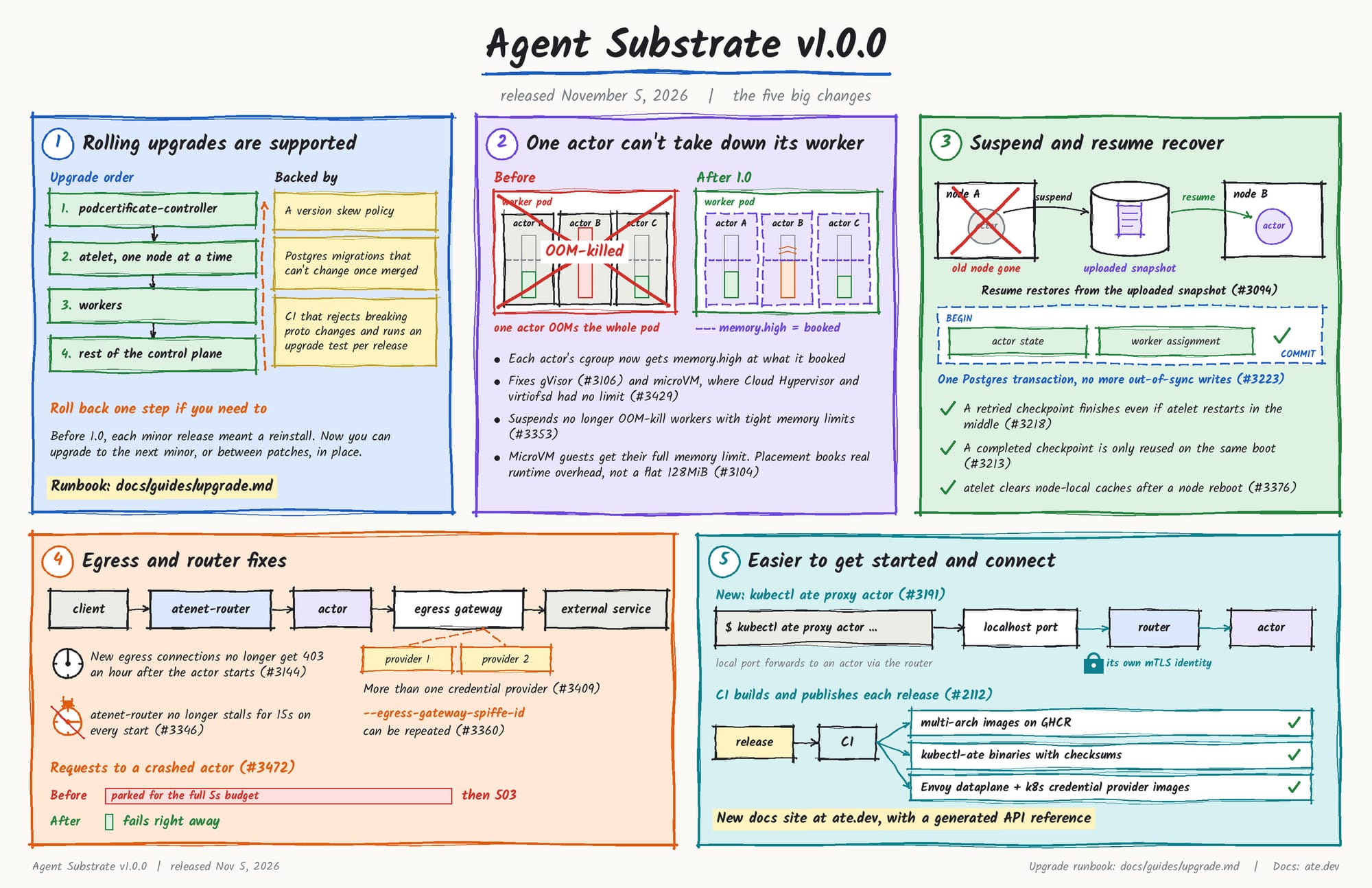
1. Rolling upgrades are supported
You no longer have to reinstall for every release. You can upgrade to the next minor or between patches with no reinstall needed.
2. One Actor's memory use can no longer take down its Worker
Before, the whole Worker died with every Actor on it. Now, the Worker keeps running.
3. Suspend and resume recover from more failures
Resume stores from the snapshot when the old Node is gone.
4. Egress and router fixes
No stalls on router start, and more than one credential provider can be used.
5. Easier to get started and connect clients
kubectl ate proxy actor opens a port that forwards to an Actor through the router.
What About The Installation and Configuration?
When it comes to installation & configs, several things changed in v1.0.0.
The installer (install-ate.sh) was replaced with go run ./cmt/ate-setup deploy ate-system
You no longer need to build everything with ko. The Control Plane installs from published/public images.
The API version is now ate.dev/v1 instead of ate.dev/v1alpha1.
Host: .actors... through a port-forward is replaced by kubectl ate proxy actor, or the ate-target-actor: header over mTLS.
The router (atenet-router) used to be open to anyone. Now it only admits SPIFFE IDs on --ingress-allowed-spiffe-ids; an empty list lets nothing in, and every deploy replaces the list.
Installing Agent Substrate
As you read in the previous section, the installation and configuration have changed quite a bit. With that, this section will cover how you can install Agent Substrate on any Kubernetes cluster running v1.37 or above.
PROJECT_ID env var, which doesn't exist in Azure. The reason why is due to how the installation works for Agent Substrate today, it technically "expects" a GKE or Kind cluster. Because of that, we have to get a little "hacky" to "trick" the installation on clusters outside of GKE or Kind.For the steps ahead, please clone the following repo:
git clone https://github.com/AdminTurnedDevOps/agentic-demo-repo.gitStep 1: Configure The Environment
Write the following env vars to a file to be used during the installation.
cat > ~/gitrepos/substrate-aks.env <<'EOF'
export RESOURCE_GROUP='<cluster-resource-group>'
export CLUSTER='<cluster-name>'
export ACR_NAME='<name>'

export AKS_FILES='<path-to-this-repo>/substrate/install-and-setup/aks'

export KO_DOCKER_REPO=${ACR_NAME}.azurecr.io/ate

export KUBECTL_CONTEXT=$CLUSTER

export SNAPSHOT_LOCATION=s3://ate-snapshots/

export PROJECT_ID=unused-on-aks
export SNAPSHOT_TRANSFER_GSA_NAME=unused-on-aks

unset CLUSTER_NAME CLUSTER_LOCATION

export ATE_CREDENTIAL_PROVIDER='{"name":"k8s.io"}'

export ATE_INGRESS_ALLOWED_SPIFFE_IDS=spiffe://cluster.local/ns/ate-system/sa/atenet-client

export ATE_INSTALL_SANDBOX_CLASSES=gvisor
EOF

source ~/gitrepos/substrate-aks.env
The file substrate-aks.env will contain all of the variables and values for the next steps.
Step 2: Azure Container Registry (ACR)
ko pushes the counter demo image (not part of the installation, but for the next major section when configuring and using Actors).
Create it in the cluster's resource group, with anonymous pull, which needs the **Standard** or**Premium** SKU.
az acr create --resource-group "$RESOURCE_GROUP" --name "$ACR_NAME" --sku Standard
az acr update --name "$ACR_NAME" --anonymous-pull-enabled true
Attach the registry to your cluster.
az aks update -g "$RESOURCE_GROUP" -n "$CLUSTER" --attach-acr "$ACR_NAME"Connect from your terminal to ACR.
az acr login --name "$ACR_NAME"Step 3: File Configuration
ate-setup assumes GKE or a Kind cluster. It reads its manifests from the checkout and they hardcode GCS snapshot storage, GKE paths for atelet's image credentials, and a GKE-only PodMonitoring. On AKS these break snapshots, crash atelet, and stop the install. ate-setup has no settings for them, so the patch changes the manifests instead.
Patch the installation config with the AKS files.
cd ~/gitrepos/substrate-v1.0.0
git apply --check "$AKS_FILES/substrate-v1.0.0-aks.patch"   # dry run, prints nothing on success
git apply "$AKS_FILES/substrate-v1.0.0-aks.patch"
Step 4: Snapshot Store
Agent Substrate has two objectstore-plugin sidecars that read and write snapshots - one next to ate-api-server, and one next to every atelet.
Both point athttp://rustfs.ate-system.svc:9000 and take the keys from theate-objectstore-s3 Secret.
Create both before the install, so those pods start on the first try
kubectl create namespace ate-system --dry-run=client -o yaml | kubectl apply -f -

kubectl -n ate-system create secret generic ate-objectstore-s3 \
  --from-literal=AWS_ACCESS_KEY_ID=ate-snapshots \
  --from-literal=AWS_SECRET_ACCESS_KEY="$(openssl rand -hex 24)"

kubectl apply -f "$AKS_FILES/rustfs.yaml"
kubectl -n ate-system rollout status deploy/rustfs --timeout=5m
kubectl -n ate-system wait job/rustfs-bucket-init --for=condition=complete --timeout=5m
kubectl -n ate-system logs job/rustfs-bucket-init | tail -1
Step 5: Install Substrate
With the patched files, snapshot store, and registry configured and ready, you can now install Agent Substrate
cd ~/gitrepos/substrate-v1.0.0
source ~/gitrepos/substrate-aks.env

go run ./cmd/ate-setup deploy ate-system \
  --context "$KUBECTL_CONTEXT" \
  --image-repo ghcr.io/agent-substrate/substrate \
  --image-tag v1.0.0 \
  --snapshot-location "$SNAPSHOT_LOCATION" \
  --credential-provider="$ATE_CREDENTIAL_PROVIDER" \
  --ingress-allowed-spiffe-ids="$ATE_INGRESS_ALLOWED_SPIFFE_IDS" \
  --sandbox-classes=gvisor
Congrats! Agent Substrate is now fully configured in your environment.
As of now, you will need to do this "hack" for the file configurations that you saw in step 3, along with some of the env vars (like setting a PROJECT_ID even though one doesn't exist) until there's a universal config for Agent Substrate.
Luckily, this work has already started. What's coming isn't one universal installer; it's an ate-setup provider interface (#3189), plus ate-setup render (#3240, PR #3411), Helm base values (#3186), and install bootstrap (#3175), all milestoned for v1.1. There's also open PR #1920, which adds ATE_SYSTEM_OVERLAY so you could point ate-setup at your own overlay.

Comments ()