Agent Substrate + Agentgateway: Your Secure Egress Path To Models
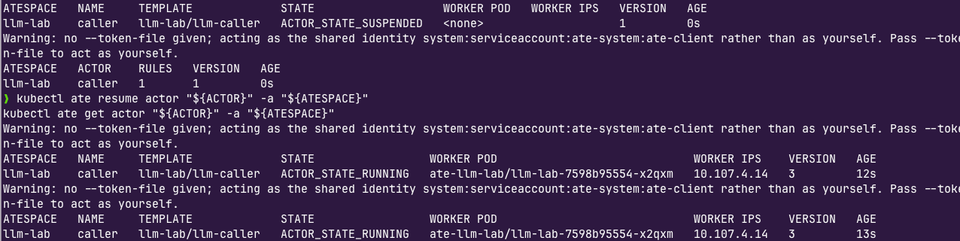
In agentic infrastructure, AI workloads, and Agents as a whole, networking is 90% of what you need to get right. It encompasses the security aspect of AI, how traffic flows in and out of Agents, and how agentic workloads and infrastructure can be governed and observed. Without it, you're blind.
In this blog post, you'll learn how to combine a true agentic sandbox/isolation layer with an LLM gateway (agentgateway) for all ingress and egress traffic for Agents.
Prerequisites
To follow along in a hands-on fashion, you will need:
- A Kubernetes cluster.
- Agent Substrate installed with agentgateway as the dataplane proxy. At the time of writing this (10/25/2026), you'll need kagents version of Substrate as it fixed the egress need to hit the LLM Gateway.
v0.7.0-alpha1will work. - An OpenAI API key. This lab uses OpenAI, but you can swap it out for another provider if you prefer. You can see the list of supported providers here.
Agentgateway Within Agent Substrate
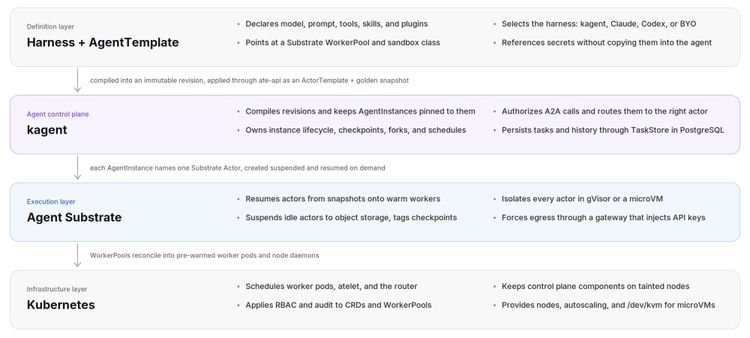
When you install Agent Substrate, you specify the atenet dataplane (e.g., - --atenet-dataplane=agentgateway) which includes both the atenet-router and the atenet-egress. Atenet is the underlying network data plane, and it's managed by the proxy that you choose (like agentgateway).
The atenet-router is the inbound/ingress traffic (acts as the ingress for the environment). It routes all inbound requests to the Worker where the Actor that the client is trying to hit (e.g., a curl request, kagent, etc.)
atenet-egress, on the other hand, is the egress gateway and Policy Enforcement Point (PEP). It intercepts outbound traffic (outside the sandbox from the Actor) and ensures network posture and policy enforcement. Tldr; all of the Actors outbound TCP traffic goes through the atenet-egress.

atunnel. Atunnel is node-level and is the termination point for incoming and outgoing Actor traffic. For outgoing traffic, it's the initiation point, so when an Actor tries to talk to an external service, it's forced through atunnel. It does this in a secure fashion via mTLS.Inbound:
atenet-router > (mTLS) > atunnel (terminates) > Actor Sandbox.Outbound: Actor Sandbox >
atunnel (initiates) >(mTLS) > atenet-egress > External Service.If Agent Substrate comes with agentgateway, the question then is... how about more control and a dedicated proxy for your egress? And why?
Where does an LLM gateway with AgentGateway come into Play?
Agent Substrate can be agentgateway "all the way down" from the ingress point to the egress point. However, what if you want things like provider translation, model routing/failover, cost optimization (token counts, budgets, rate limits, etc.), prompt guarding, and overall observability data (logs, traces, metrics) for your agentic workflow?
That's where having a dedicated LLM gateway via agentgateway comes into play.
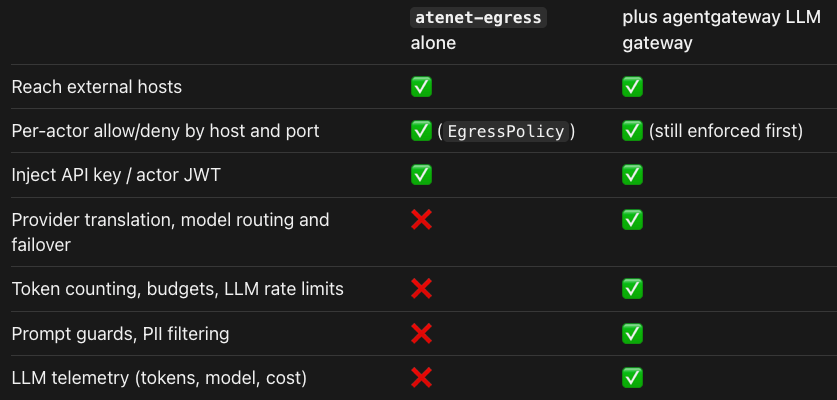
The goal with using agentgateway as a dedicated LLM gateway is:
actor → atunnel → atenet-egress (policy, injects actor JWT) → agentgateway LLM gateway → OpenAI/Anthropic/…Let's get hands-on and start implementing agentgatewy as an LLM proxy.
Lab Env Vars
For the purposes of the labs to come, set the following environment variables in your terminal:
export SUBSTRATE_DIR="${HOME}/gitrepos/substrate"

export ATESPACE=llm-lab
export ACTOR=caller
export TEMPLATE=llm-caller
export LLM_NS=agentgateway-system
export LLM_GW=llm-gateway
export LLM_HOST="${LLM_GW}.${LLM_NS}.svc.cluster.local"
export LLM_AUDIENCE=llm-gateway

export KO_DOCKER_REPO=

export OPENAI_API_KEY=
export OPENAI_MODEL=gpt-5-mini

export CURL_IMAGE='curlimages/curl:8.22.0@sha256:58adaa4e8dca9c988bae2aba4ab3434a0bb2da16bbe3f92dec39ec7785166777'
Install and Configure Agentgateway
Per what was described in the previous section (an agentgateway proxy as a dedicated LLM gateway), you will need a dedicated proxy. This means installing and configuring agentgateway OSS (which is quick, 2 minutes max) to ensure that you have a specific LLM proxy to use to route to your LLM of choice.
Install Agentgateway
- Install agentgateway.
kubectl apply --server-side \
  -f https://github.com/kubernetes-sigs/gateway-api/releases/download/v1.6.0/standard-install.yaml

helm upgrade -i agentgateway-crds oci://cr.agentgateway.dev/charts/agentgateway-crds \
  --version v1.6.0 \
  --namespace "${LLM_NS}" --create-namespace

helm upgrade -i agentgateway oci://cr.agentgateway.dev/charts/agentgateway \
  --version v1.6.0 \
  --namespace "${LLM_NS}" \
--wait- Create a k8s secret with your OpenAI API key.
kubectl -n "${LLM_NS}" create secret generic openai-secret \
  --from-literal=Authorization="${OPENAI_API_KEY}" \
  --dry-run=client -o yaml | kubectl apply -f -
Create A Gateway
- Create the Gateway, HTTPRoute, and agentgatewaybackend so your Gateway knows what to route to.
cat <<EOF | kubectl apply -f -
apiVersion: gateway.networking.k8s.io/v1
kind: Gateway
metadata:
  name: ${LLM_GW}
  namespace: ${LLM_NS}
spec:
  gatewayClassName: agentgateway
  listeners:
  - name: http
    protocol: HTTP
    port: 80
    allowedRoutes:
      namespaces:
        from: Same
---
apiVersion: agentgateway.dev/v1alpha1
kind: AgentgatewayBackend
metadata:
  name: openai
  namespace: ${LLM_NS}
spec:
  ai:
    provider:
      openai:
        model: ${OPENAI_MODEL}
  policies:
    auth:
      secretRef:
        name: openai-secret
---
apiVersion: gateway.networking.k8s.io/v1
kind: HTTPRoute
metadata:
  name: openai
  namespace: ${LLM_NS}
spec:
  parentRefs:
  - name: ${LLM_GW}
  rules:
  - matches:
    - path:
        type: PathPrefix
        value: /v1/chat/completions
    backendRefs:
    - group: agentgateway.dev
      kind: AgentgatewayBackend
      name: openai
EOF
Configure The LLM Gateway
- Create an
AgentgatewayPolicy, which adds fields to the LLM Gateway's access log. It shows which Actor made the call (jwt.sub), the LLM called, and the input/output token counts.
cat <<EOF | kubectl apply -f -
apiVersion: agentgateway.dev/v1alpha1
kind: AgentgatewayPolicy
metadata:
  name: ${LLM_GW}-access-log
  namespace: ${LLM_NS}
spec:
  targetRefs:
  - group: gateway.networking.k8s.io
    kind: Gateway
    name: ${LLM_GW}
  frontend:
    accessLog:
      attributes:
        add:
        - name: substrate.actor
          expression: jwt.sub
        - name: llm.model
          expression: llm.responseModel
        - name: llm.input_tokens
          expression: llm.inputTokens
        - name: llm.output_tokens
          expression: llm.outputTokens
EOF- Create another
AgentgatewayPolicyfor trusting Actor JWTs at the LLM gateway.
ate-api signs Actor JWTs with the actor-id-jwt-pool key. The public keys are
in the same Secret under jwks, and ate-idp-server also serves them athttps://idp.ate-system.svc/openid/v1/jwks. That endpoint's certificate comes
Substrate's internal servicedns signer, so this blog copies the JWKS
inline rather than teaching the LLM gateway that CA.
export ACTOR_JWT_ISSUER=$(kubectl -n ate-system get cm ate-api-server-envvars \
  -o jsonpath='{.data.ATE_API_ACTOR_JWT_ISSUER}')
export ACTOR_JWKS=$(kubectl -n ate-system get secret actor-id-jwt-pool \
  -o jsonpath='{.data.jwks}' | base64 -d | jq -c .)

cat <<EOF | kubectl apply -f -
apiVersion: agentgateway.dev/v1alpha1
kind: AgentgatewayPolicy
metadata:
  name: substrate-actor-jwt
  namespace: ${LLM_NS}
spec:
  targetRefs:
  - group: gateway.networking.k8s.io
    kind: HTTPRoute
    name: openai
  traffic:
    jwtAuthentication:
      mode: Strict
      providers:
      - issuer: ${ACTOR_JWT_ISSUER}
        audiences:
        - ${LLM_AUDIENCE}
        jwks:
          inline: '${ACTOR_JWKS}'
    authorization:
      action: Allow
      policy:
        matchExpressions:
        - 'jwt.sub.startsWith("actor/${ATESPACE}/")'
EOF
Workers, Pools, and Actors
With the Gateway, routes, and policies setup/configured, let's now start creating the infrastructure where Actors (the Agents) will run and connect to LLMs via the agentgateway LLM proxy.
- Create the
WorkerPool. You'll have two Workers - one for the templates golden Actor and one for the blog posts Actor that you're using to interact with the LLM.
cd "${SUBSTRATE_DIR}"
: "${KO_DOCKER_REPO:?set KO_DOCKER_REPO (Lab variables)}"

cat <<'EOF' | hack/run-tool.sh ko apply -f -
apiVersion: v1
kind: Namespace
metadata:
  name: ate-llm-lab
---
apiVersion: ate.dev/v1
kind: WorkerPool
metadata:
  name: llm-lab
  namespace: ate-llm-lab
  labels:
    workload: llm-lab
spec:
  replicas: 2
  workerImage: ko://go.ate.dev/substrate/cmd/ateworker-gvisor
  sandboxClasses:
  - name: gvisor
  template:
    resources:
      limits:
        cpu: "1"
        memory: 1Gi
      requests:
        cpu: 250m
        memory: 1Gi
EOF- Create the
atespacewhere the Actor will live.
kubectl ate create atespace "${ATESPACE}"- Create the Actor Template. You'll see within the Template below that the
$LLM_HOSTvariable is used, which is the Gateway + the path to its Namespace and the k8s service that it runs locally. Having the full FQDN vs just specifying an IP address is needed for the egress policy, as the egress policy can't name an IP.
sed \
  -e "s|@ATESPACE@|${ATESPACE}|g" \
  -e "s|@TEMPLATE@|${TEMPLATE}|g" \
  -e "s|@CURL_IMAGE@|${CURL_IMAGE}|g" \
  -e "s|@LLM_HOST@|${LLM_HOST}|g" \
  -e "s|@OPENAI_MODEL@|${OPENAI_MODEL}|g" \
  <<'EOF' | kubectl ate create actor-template -f -
metadata:
  atespace: @ATESPACE@
  name: @TEMPLATE@
workerSelector:
  matchLabels:
    workload: llm-lab
containers:
- name: caller
  image: @CURL_IMAGE@
  command: ["/bin/sh", "-c"]
  args:
  - |
    while true; do
      echo "=== $(date -u +%H:%M:%SZ) via LLM gateway"
      curl -sS --connect-timeout 5 --max-time 60 -w '\nHTTP %{http_code}\n' \
        "http://${LLM_HOST}/v1/chat/completions" \
        -H 'Authorization: Bearer placeholder' \
        -H 'Content-Type: application/json' \
        -d "{\"model\":\"${MODEL}\",\"messages\":[{\"role\":\"user\",\"content\":\"In one short sentence, what is a sandbox?\"}]}"
      sleep "${INTERVAL_SECONDS}"
    done
  env:
  - name: LLM_HOST
    value: "@LLM_HOST@"
  - name: MODEL
    value: "@OPENAI_MODEL@"
  - name: INTERVAL_SECONDS
    value: "30"
resources:
  limits:
    cpuMillicores: 1000
    memoryBytes: 536870912 # 512Mi
snapshotConfig:
  preferredFidelity: SNAPSHOT_FIDELITY_MEMORY
EOF- Run/deploy an Actor within the proper
atespaceusing the Actor Template created in the previous section along with its egress policy that passes traffic through the agentgateway LLM Gateway.
kubectl ate create actor "${ACTOR}" -a "${ATESPACE}" --template "${TEMPLATE}"

cat <<EOF | kubectl ate create egress-policy "${ACTOR}" -a "${ATESPACE}" -f -
rules:
- http:
    hostnames:
    - ${LLM_HOST}
    effects:
      replaceHeaders:
      - header: Authorization
        prefix: "Bearer "
        actorJwt:
          audiences:
          - ${LLM_AUDIENCE}
          expirationSeconds: 900
EOF- Resume/run the Actor.
kubectl ate resume actor "${ACTOR}" -a "${ATESPACE}"
kubectl ate get actor "${ACTOR}" -a "${ATESPACE}"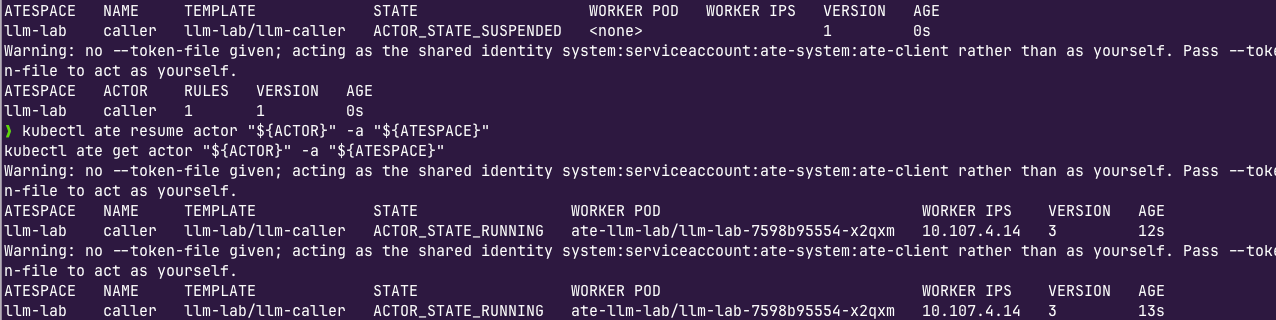
- Confirm that the traffic went through the agentgateways LLM Gateway proxy.
kubectl -n "${LLM_NS}" logs -l gateway.networking.k8s.io/gateway-name="${LLM_GW}" | grep 'actor/llm-lab/caller'You'll see an output similar to the following:
2026-10-25T18:31:46.774847Z info request gateway=agentgateway-system/llm-gateway listener=http route=agentgateway-system/openai endpoint=api.openai.com:443 src.addr=10.107.4.17:56078 http.method=POST http.host=llm-gateway.agentgateway-system.svc.cluster.local http.path=/v1/chat/completions http.version=HTTP/1.1 http.status=200 jwt.sub=actor/llm-lab/caller protocol=llm gen_ai.operation.name=chat gen_ai.provider.name=openai gen_ai.request.model=gpt-5-mini gen_ai.response.model=gpt-5-mini-2025-08-07 gen_ai.usage.input_tokens=16 gen_ai.usage.cache_read.input_tokens=0 gen_ai.usage.output_tokens=223 gen_ai.usage.reasoning_tokens=192 agw.ai.usage.cost.total=0.000450 gen_ai.usage.input_audio_tokens=0 gen_ai.usage.output_audio_tokens=0 duration=5193ms substrate.actor="actor/llm-lab/caller" llm.model="gpt-5-mini-2025-08-07" llm.input_tokens=16 llm.output_tokens=223
Comments ()