Cutting Idle Agent Costs by 90% with Agent Substrate
Cost is everything. In just about every agentic conversation, the three things that come up for enterprises implementing AI workloads are:
- Cost
- Observability
- Security
and as AI continues to throw everyone for a loop when it comes to cost management (e.g - Uber running out of the yearly token budget in one quarter), the ability to shrink resource (like hardware) usage will be crucial moving forward.
In this blog post, you will learn how to cust costs by 90% using Agent Susbtrate in comparison to Agents running in k8s Deployments/Pods.
The Cost Comparison
Agents need a place to run. The "place to run" needs to be a platform that's easily managed, orchestrated, and has the ability to cluster resources. Resources like CPU, GPU, and memory need to be able to scale and expand. Without this, it's a matter of manually managing servers that Agents are running on and clients to interact with said server.
That's why so many organizations choose Kubernetes to run Agentic.
When running Agents per Pod, however, that can get costly very quick in terms of hardware (GPU, CPU, memory) and performance (can your cluster scale up and down quickly based on resource needs when it comes to Agents coming up and going down per use?).
The tests in this blog post show:
- Always-on Agents running in k8s.
- Actors running in Workers via Agent Substrate
And the comparison will be 50 always-on Pods in comparison to 50 Actors across 5-7 Workers (Pods). If there are 50 Agents running per Pod and 50 Agents running per Worker with 5-10 Actors per Pod, you can already imagine the hardware resource savings that can be accomplished.
Right now, the majority of organizations start off with the "one Agent per Pod" approach as that's the fastest way to show value and get up and running. For the future, however, Agents in Actors via Agent Substrate will be how organizations deploy when they care about efficiency, optimization, and managing cost.
Let's dive in from a hands-on perspective.
Prerequisites
To follow along in a hands-on fashion, you will need:
- A Kubernetes cluster in GKE or Kind locally
- Agent Substrate installed
kubectl-ateinstalled
You can install Agent Substrate and kubectl-ate from the Agent Substrate repo.
Installation & Configuration
Within the Agent Substrate repo, you will see a file in the hack directory called ate-dev-env.sh.example. Make a copy of the file:
cp hack/ate-dev-env.sh.example .ate-dev-env.shThen, edit the file with your cluster and account information. For example, if you are using GCP and deploy a GKE cluster, the .ate-dev-env.sh will look like the below:
PROJECT_ID=<your-project-id>
PROJECT_NUMBER=<your-project-number>
GCE_REGION=<bucket-region>
CLUSTER_LOCATION=<cluster-zone-or-region>
CLUSTER_NAME=<your-gke-cluster>
BUCKET_NAME=<your-snapshot-bucket>
KO_DOCKER_REPO=gcr.io/<your-project-id>/ate-images
KUBECTL_CONTEXT=<your-kube-context>
Once you've filled in your .ate-dev-env.sh file, you can source it and install the counter demo which exists in the Agent Substrate repo.
source .ate-dev-env.sh
./hack/install-ate.sh --deploy-demo-counter
You can then install the kubectl-ate CLI to interact with Actors, Workers, and Templates.
go install ./cmd/kubectl-ate

export PATH="$(go env GOPATH)/bin:$PATH"
Verify that Substrate is up and operational:
kubectl get workerpools.ate.dev counter -n ate-demo-counter
kubectl get pods -n ate-demo-counter
kubectl ate get workers
A Quick Note About GKE
If your GKE cluster is regional or has Worker Nodes spread across zones, pin the demo WorkerPool to one zone before creating benchmark actors. Agent Substrate uses checkpoint/restore, and gVisor restores can fail if a snapshot created on oneunderlying CPU platform is restored on a node with a different CPU feature set.
Choose the zone where you want the counter workers to run:
export SUBSTRATE_WORKER_ZONE=us-east1-dThen patch the counter WorkerPool to schedule Workers in that zone.
kubectl patch workerpools.ate.dev counter \
  -n ate-demo-counter \
  --type=merge \
  -p "{\"spec\":{\"template\":{\"nodeSelector\":{\"topology.kubernetes.io/zone\":\"${SUBSTRATE_WORKER_ZONE}\"}}}}"
Configure The Benchmark
With the installation and configuration complete, you can now start setting up the benchmark environment and tests.
There are several environment variables below. The ACTOR_COUNT is the number of logical counter agents to test in both scenarios. BENCHMARK_NAMESPACE | is the namespace for the always-on Kubernetes baseline workloads and the in-cluster benchmark client Pod. BASELINE_PREFIX is the name prefix for Kubernetes baseline Deployments and Services. SUBSTRATE_PREFIX is the name prefix for Substrate actors created by the benchmark. TEMPLATE_REF is the Substrate actor template reference in <namespace>/<name> format. The counter demo creates ate-demo-counter/counter. SUBSTRATE_ROUTER_URL is the in-cluster URL for atenet-router; benchmark client sends Substrate actor traffic through this service. BASELINE_CPU_REQUEST is the requests assigned to each always-on Kubernetes baseline Pod. Used to make baseline resource consumption explicit. BASELINE_MEMORY_REQUEST is the memory request assigned to each always-on Kubernetes baseline Pod and is used to make baseline resource consumption explicit. BASELINE_RESULTS_FILE is the Local TSV file for Kubernetes baseline latency results. SUBSTRATE_RESULTS_FILE and SUMMARY_FILE are the files that contain the results.
export ACTOR_COUNT=50
export BENCHMARK_NAMESPACE=cost-comparison
export BASELINE_PREFIX=k8s-counter
export SUBSTRATE_PREFIX=substrate-counter
export TEMPLATE_REF=ate-demo-counter/counter
export SUBSTRATE_ROUTER_URL=http://atenet-router.ate-system.svc:80

export BASELINE_CPU_REQUEST=50m
export BASELINE_MEMORY_REQUEST=64Mi
export SUBSTRATE_WORKER_CPU_REQUEST=50m
export SUBSTRATE_WORKER_MEMORY_REQUEST=64Mi

export BASELINE_RESULTS_FILE=baseline-kubernetes-results.tsv
export SUBSTRATE_RESULTS_FILE=substrate-results.tsv
export SUMMARY_FILE=cost-comparison-summary.txt- Get the counter image from the live
ActorTemplate. This keeps the Kubernetes baseline on the same counter server image used by the Substrate demo.
export COUNTER_IMAGE=$(kubectl get actortemplates.ate.dev counter \
  -n ate-demo-counter \
  -o jsonpath='{.spec.containers[0].image}')

printf "Counter image: %s\n" "$COUNTER_IMAGE"- Check the image. If the output from the following is blank, that means the container image is valid.
case "$COUNTER_IMAGE" in
  ko://*)
    printf "Counter image was not resolved: %s\n" "$COUNTER_IMAGE"
    exit 1
    ;;
esac- Retrieve the Substrate Worker count.
export WORKER_REPLICAS=$(kubectl get workerpools.ate.dev counter \
  -n ate-demo-counter \
  -o jsonpath='{.spec.replicas}')

printf "Logical agents: %s\nSubstrate workers: %s\n" \
  "$ACTOR_COUNT" "$WORKER_REPLICAS"
Deploying Kubernetes Always-On Pods
In this section, you will deploy the Kubernetes Pods that will be running the counter demo.
- Create a Namespace for the Pods to exist.
kubectl create namespace "$BENCHMARK_NAMESPACE"- Deploy one
DeploymentandServiceobject per logical counter Agent.
for i in $(seq 1 "$ACTOR_COUNT"); do
  name=$(printf "%s-%03d" "$BASELINE_PREFIX" "$i")

  kubectl apply -f - <<EOF
apiVersion: apps/v1
kind: Deployment
metadata:
  name: ${name}
  namespace: ${BENCHMARK_NAMESPACE}
  labels:
    app.kubernetes.io/name: counter
    app.kubernetes.io/part-of: cost-comparison
    cost-comparison/model: always-on-kubernetes
spec:
  replicas: 1
  selector:
    matchLabels:
      app.kubernetes.io/name: counter
      app.kubernetes.io/instance: ${name}
  template:
    metadata:
      labels:
        app.kubernetes.io/name: counter
        app.kubernetes.io/instance: ${name}
        app.kubernetes.io/part-of: cost-comparison
        cost-comparison/model: always-on-kubernetes
    spec:
      containers:
      - name: counter
        image: ${COUNTER_IMAGE}
        command:
        - /ko-app/counter
        ports:
        - containerPort: 80
        resources:
          requests:
            cpu: ${BASELINE_CPU_REQUEST}
            memory: ${BASELINE_MEMORY_REQUEST}
---
apiVersion: v1
kind: Service
metadata:
  name: ${name}
  namespace: ${BENCHMARK_NAMESPACE}
  labels:
    app.kubernetes.io/name: counter
    app.kubernetes.io/part-of: cost-comparison
    cost-comparison/model: always-on-kubernetes
spec:
  selector:
    app.kubernetes.io/name: counter
    app.kubernetes.io/instance: ${name}
  ports:
  - name: http
    port: 80
    targetPort: 80
EOF
done- Confirm the baseline.
kubectl get deployments -n "$BENCHMARK_NAMESPACE" \
  -l cost-comparison/model=always-on-kubernetes

kubectl get pods -n "$BENCHMARK_NAMESPACE" \
  -l cost-comparison/model=always-on-kubernetes
You'll see an output with 50 objects like in the example below:
NAME                               READY   STATUS    RESTARTS   AGE
k8s-counter-001-9f9f44464-h526d    1/1     Running   0          128m
k8s-counter-002-9678fb86f-bwpwm    1/1     Running   0          128m
k8s-counter-003-54bccfd7db-k5wgz   1/1     Running   0          128m
k8s-counter-004-5957785959-59k24   1/1     Running   0          128m
k8s-counter-005-5df4559dd4-pgm4v   1/1     Running   0          128m
k8s-counter-006-5597c6cd9-nj9mm    1/1     Running   0          128m
k8s-counter-007-8d5c5bb74-j2n6p    1/1     Running   0          128m
k8s-counter-008-ff9898c5f-hc7hw    1/1     Running   0          128m
k8s-counter-009-77bc4cf8bd-rk2sq   1/1     Running   0          128m
k8s-counter-010-578684f8c8-d7xg8   1/1     Running   0          128m
k8s-counter-011-8697447c4f-5jz9p   1/1     Running   0          128m
k8s-counter-012-5d7bc67f4d-hhhkh   1/1     Running   0          128m
xxxxx
xxxxx
xxxxx
xxxxx
xxxxx
Create Substrate Actors
In this configuration, you can create one Actor per logical counter Agent.
for i in $(seq 1 "$ACTOR_COUNT"); do
  actor=$(printf "%s-%03d" "$SUBSTRATE_PREFIX" "$i")
  kubectl ate create actor "$actor" --template "$TEMPLATE_REF" || true
done
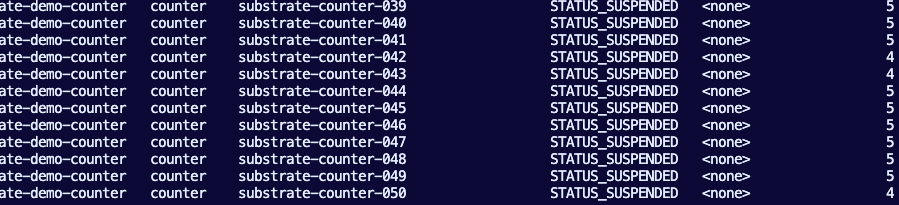
When you run the above, you will see 50 Actors deployed via kubectl ate get actors
However, you will only see 7 Workers.
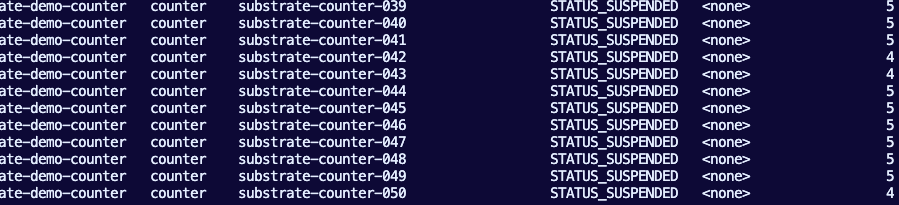
That's the optimization and efficiency right there. Same exact deployment/configuration as the Kubernetes section above, except with Agent Substrate, you can run the same workloads in 7 Pods (Workers) insteadof 50.
How Actors Work
You’ll see 50 Agent Substrate Actors and a smaller set of Workers (Pods). The Actors are logical workloads, but they are not actively running while they are STATUS_SUSPENDED. By default, Actors are in a "suspended" state until they are used, which is why Actors are so great from an efficiency perspective. When traffic arrives for an Actor, Agent Substrate assigns that actor to an available Worker, resumes it, serves the request, and can suspend it again afterward. This is the efficiency model: many idle actors can exist without each requiring its own always-on Kubernetes Pod.
Create a Benchmark Client
The benchmark client runs inside the cluster so both paths avoid local port-forward overhead.
benchmark-client = temporary in-cluster curl Pod.
Why it exists:
- Sends requests to the Kubernetes baseline Services.
- Sends requests to Substrate through atenet-router.- Avoids local kubectl port-forward latency.
- Keeps both benchmark paths inside the cluster network for a fairer comparison.
kubectl delete pod benchmark-client \
  -n "$BENCHMARK_NAMESPACE" \
  --ignore-not-found

kubectl run benchmark-client \
  -n "$BENCHMARK_NAMESPACE" \
  --image=curlimages/curl:8.10.1 \
  --restart=Never \
  --command -- sleep 3600

kubectl wait --for=condition=Ready pod/benchmark-client \
  -n "$BENCHMARK_NAMESPACE" \
  --timeout=2m
Run The Benchmark For Kubernetes Always On
Each baseline agent receives two requests:
- First measured request.
- Second warm request.
Because these are always-on Pods, both requests should be served by already running Kubernetes workloads.
kubectl exec -n "$BENCHMARK_NAMESPACE" benchmark-client -- sh -c '
set -eu
actor_count="$1"
prefix="$2"
namespace="$3"

printf "agent\tfirst_seconds\twarm_seconds\n"

for i in $(seq 1 "$actor_count"); do
  name=$(printf "%s-%03d" "$prefix" "$i")
  url="http://${name}.${namespace}.svc.cluster.local"

  first_seconds=$(curl -sS -o /dev/null -w "%{time_total}" -X POST "$url")
  warm_seconds=$(curl -sS -o /dev/null -w "%{time_total}" -X POST "$url")

  printf "%s\t%s\t%s\n" "$name" "$first_seconds" "$warm_seconds"
done
' sh "$ACTOR_COUNT" "$BASELINE_PREFIX" "$BENCHMARK_NAMESPACE" > "$BASELINE_RESULTS_FILE"
Inspect the baseline results:
column -t -s $'\t' "$BASELINE_RESULTS_FILE"You'll see an output similar to the below for 50 counters.
agent            first_seconds  warm_seconds
k8s-counter-001  0.023404       0.003911
k8s-counter-002  0.023275       0.005233
k8s-counter-003  0.015850       0.003773
k8s-counter-004  0.017657       0.005033
k8s-counter-005  0.014946       0.004443
k8s-counter-006  0.015616       0.004212
k8s-counter-007  0.016875       0.004261
k8s-counter-008  0.014731       0.004317
k8s-counter-009  0.017053       0.004707
k8s-counter-010  0.013013       0.003273
k8s-counter-011  0.014281       0.004552
k8s-counter-012  0.018644       0.003734
xxxxx
xxxxx
Run The Benchmark For Substrate
Each Substrate actor receives two requests:
- Wake request, which resumes a suspended Actor and serves the request.
- Warm request, which hits the already-running Actor.
After each actor is measured, the Actor is suspended so the worker can serve the next Actor.
printf "actor\twake_seconds\twarm_seconds\n" > "$SUBSTRATE_RESULTS_FILE"

for i in $(seq 1 "$ACTOR_COUNT"); do
  actor=$(printf "%s-%03d" "$SUBSTRATE_PREFIX" "$i")
  actor_host="${actor}.actors.resources.substrate.ate.dev"

  result=$(kubectl exec -n "$BENCHMARK_NAMESPACE" benchmark-client -- sh -c '
set -eu
router_url="$1"
actor_host="$2"

wake_seconds=$(curl -sS -o /dev/null -w "%{time_total}" \
  -X POST \
  -H "Host: ${actor_host}" \
  "$router_url")

warm_seconds=$(curl -sS -o /dev/null -w "%{time_total}" \
  -X POST \
  -H "Host: ${actor_host}" \
  "$router_url")

printf "%s\t%s" "$wake_seconds" "$warm_seconds"
' sh "$SUBSTRATE_ROUTER_URL" "$actor_host")

  printf "%s\t%s\n" "$actor" "$result" >> "$SUBSTRATE_RESULTS_FILE"
  kubectl ate suspend actor "$actor" >/dev/null
done
Inspect the Substrate results:
column -t -s $'\t' "$SUBSTRATE_RESULTS_FILE"The Results
Now it's time to measure the results and see if Substrate really saves resources and helps optimize workloads running in k8s.
export BASELINE_RUNNING_PODS=$(kubectl get pods \
  -n "$BENCHMARK_NAMESPACE" \
  -l cost-comparison/model=always-on-kubernetes \
  --field-selector=status.phase=Running \
  --no-headers | wc -l | tr -d ' ')

export SUBSTRATE_WORKLOAD_PODS=$(kubectl get pods \
  -n ate-demo-counter \
  --field-selector=status.phase=Running \
  --no-headers | wc -l | tr -d ' ')
The results for k8s always on:
printf "baseline_cpu_request_per_pod=%s\n" "$BASELINE_CPU_REQUEST"
printf "baseline_memory_request_per_pod=%s\n" "$BASELINE_MEMORY_REQUEST"

baseline_cpu_request_per_pod=50m
baseline_memory_request_per_pod=64Mi
The results for Substrate:
baseline_cpu_request_per_pod=50m
baseline_memory_request_per_pod=64Mi
substrate_worker_cpu_request_per_pod=50m
substrate_worker_memory_request_per_pod=64Mi
baseline_total_cpu_request_millicores=2500
baseline_total_memory_request_mib=3200
substrate_total_cpu_request_millicores=250
substrate_total_memory_request_mib=320
The above shows the requested-capacity savings:
Kubernetes baseline: 50 Pods * 50m CPU / 64Mi = 2500m CPU / 3200Mi
Substrate: 5 Pods * 50m CPU / 64Mi = 250m CPU / 320Mi
Which results in a 90% reduction!
You can also capture actual CPU and memory usage if metrics-server is installed:
kubectl top pods -n "$BENCHMARK_NAMESPACE" \
  -l cost-comparison/model=always-on-kubernetes || true

kubectl top pods -n ate-demo-counter || true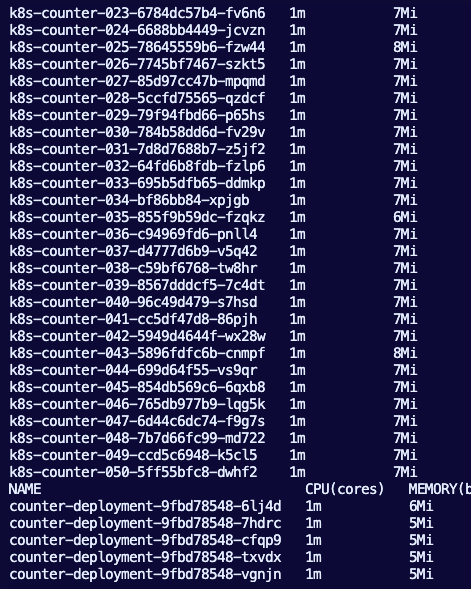
Notice how many resources are saved with just a few Substrate deployments (on the bottom) vs k8s running workloads (50 pods, 50 agents).
The Kubernetes baseline is running one always-on Pod per logical workload. WithACTOR_COUNT=50, that means 50 k8s-counter-* Pods are running even when they are mostly idle. Each baseline Pod has explicit CPU and memory requests, so the always-on capacity grows linearly with the number of logical workloads.
The Substrate side is running the same logical workload count as actors, but only the worker pool stays hot. In this run, the counter WorkerPool has 5 counter-deployment-* Pods. Each worker Pod has explicit CPU and memory requests, so the requested always-on capacity grows with worker count, not Actor count.
The main difference is the always-on footprint:
Kubernetes baseline: 50 running workload PodsAgent Substrate: 5 running worker Pods for 50 logical actors
Your result shows the core optimization: 50 idle logical workloads do not require50 always-on workload Pods when they run as Substrate actors.

Comments ()