MCP Guardrails: Gate Tool Calls at the Method Layer With Agentgateway
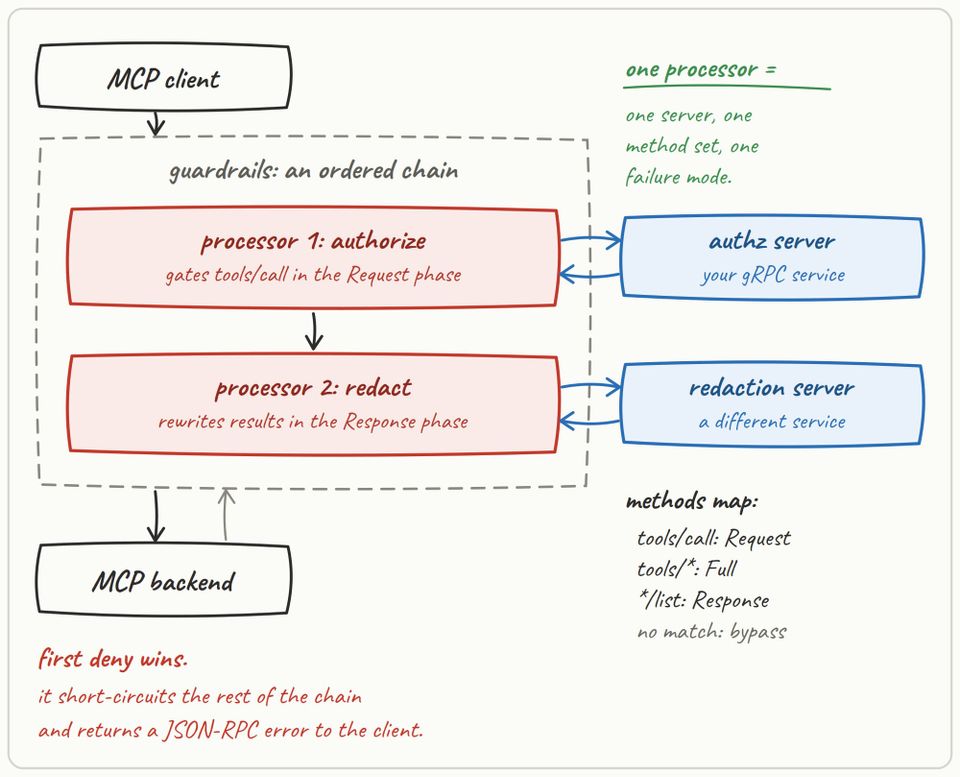
A typical gateway comes with a lot of policy enforcement, authentication/authorization implementations, and filtering for both agentic and API-centric traffic. However, there may come a time when you need:
- Custom auth, inspection, or mutation logic
- Integration of custom policy engines
- Business-specific services and logic
And that's where ExtProc comes into play.
It, ironically enough, is also where ExtMCP for MCP Guardrails comes into play.
In this blog post, you'll learn what ExtProc does, how it typically works in gateways, and how you can carry similar primitives and concepts over to MCP Guardrails.
Prerequisites
To follow along with this blog post in a hands-on fashion, you will need:
- A Kubernetes cluster (local is totally fine).
- Agentgateway OSS installed, and you can learn how to do so here.
- A GitHub Personal Access Token (PAT).
ExtProc For Gateway Works
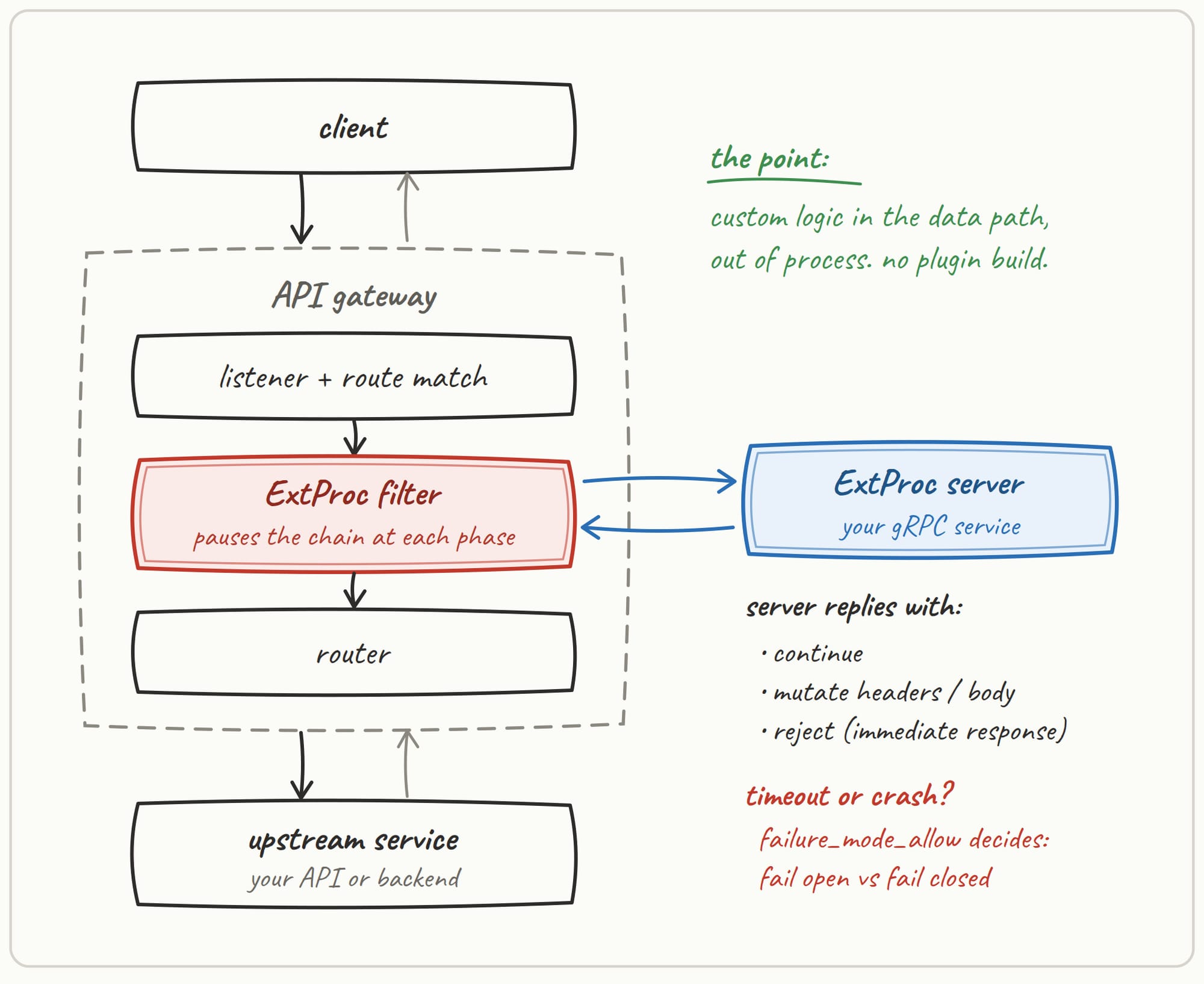
Before diving into how guardrails with MCP work, it's important to understand how ExtProc works. Conceptually, it allows your gateway to offload custom business logic that's not built into the gateway via high-performant, bidirectional gRPC streams.
Tldr; ExtProc lets a gateway delegate HTTP request and response processing to an external service.
When implementing MCP Guardrails, you'll most likely see ExtMcp. When thinking about the key differences, you can conceptualize it as instead of implementing standard ExtProc, ExtMCP is almost like a primitive tying back to how ExtProc works in nature. It provides a similar external extension point, but operates on parsed MCP method calls rather than raw HTTP.
What Is ExtMCP?
It's not, in itself, ExtProc or a thin wrapper around ExtProc. It's a third-party callout primitive at the MCP method layer. It does similar jobs that ext_authz and ExtProc do without making the policy server speak in native HTTP. ExtMCP is, however, modeled around ext_authz, but it borrows mutations from ExtProc.
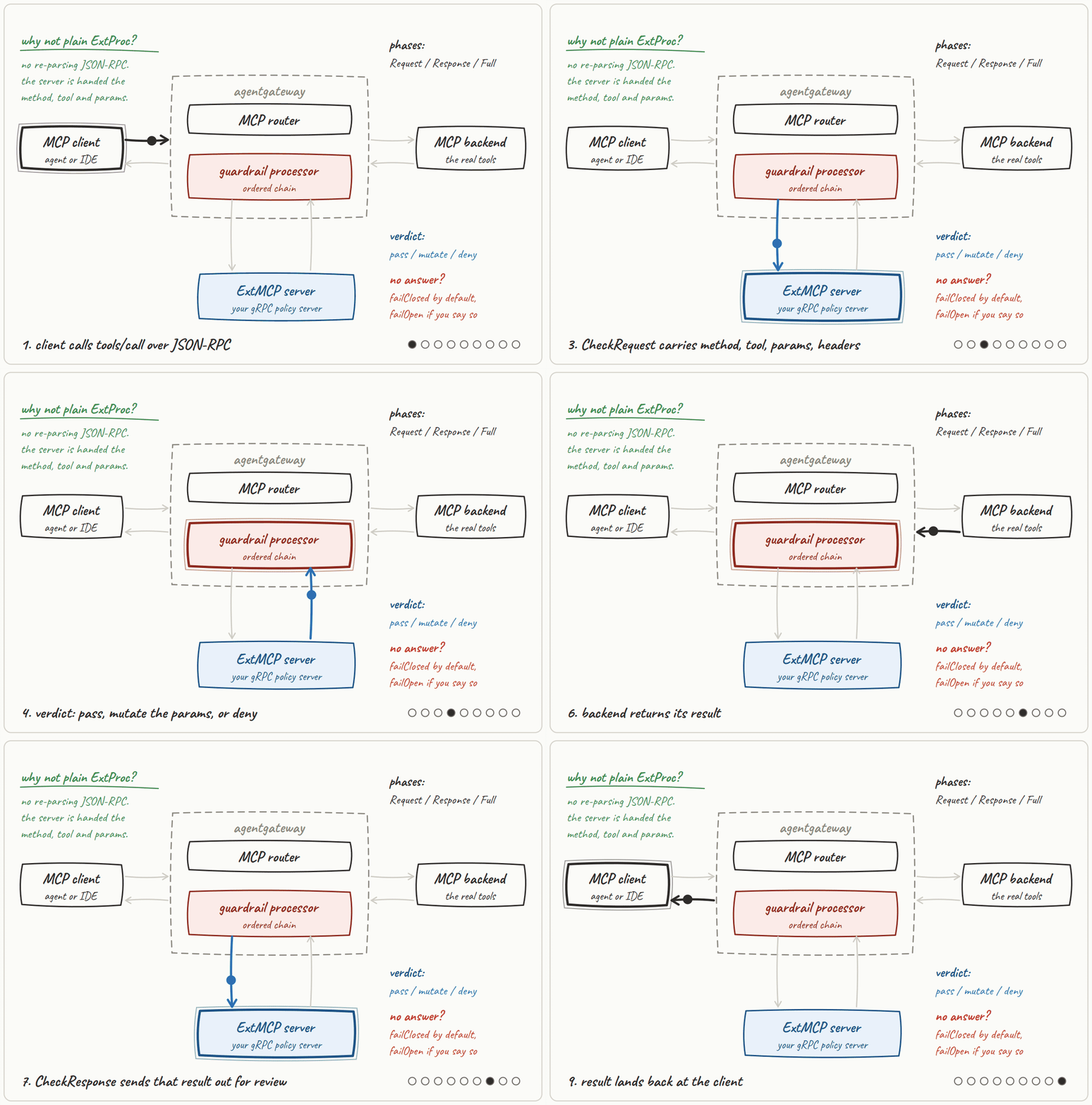
Why a new protocol? MCP is natively JSON-RPC over Streamable HTTP or stdio. ExtProc is HTTP. It sees frames, Content-Type, and SSE data to decide “is issue_write allowed?” The ExtProc server would reassemble the body, parse JSON-RPC, and handle MCP framing. ExtMCP skips that as the gateway already parses the method (the policy server gets method, service_names, raw params/result, selected headers).
So the "family" is the same in terms of what they do and how they do it, but ExtMCP is MCP-native, not “ExtProc with MCP types.
In the sections to follow, you'll see, from a hands-on perspective, how to implement guardrails for an MCP Server.
Configuring An MCP Gateway
With the theory of the "why" complete, let's begin implementing a gateway. For the purposes of this blog post, the GitHub Copilot MCP Server will be used.
- Create a k8s Secret for auth to the GitHub Copilot MCP Server.
export GITHUB_PAT=

kubectl apply -f - <<EOF
apiVersion: v1
kind: Secret
metadata:
  name: github-pat
  namespace: agentgateway-system
type: Opaque
stringData:
  Authorization: "Bearer ${GITHUB_PAT}"
EOF- Create a Gateway using the
agentgatewayGateway Class.
kubectl apply -f - <<EOF
apiVersion: gateway.networking.k8s.io/v1
kind: Gateway
metadata:
  name: mcp-gateway
  namespace: agentgateway-system
  labels:
    app: github-mcp-server
spec:
  gatewayClassName: agentgateway
  listeners:
    - name: mcp
      port: 3000
      protocol: HTTP
      allowedRoutes:
        namespaces:
          from: Same
EOF- Create a backend that points to GitHubs MCP.
kubectl apply -f - <<EOF
apiVersion: agentgateway.dev/v1alpha1
kind: AgentgatewayBackend
metadata:
  name: github-mcp-server
  namespace: agentgateway-system
spec:
  mcp:
    targets:
      - name: github-copilot
        static:
          host: api.githubcopilot.com
          port: 443
          path: /mcp/
          protocol: StreamableHTTP
          policies:
            tls: {}
            auth:
              secretRef:
                name: github-pat
EOF- Capture the Gateway for use across this blog post.
export GATEWAY_IP=$(kubectl get svc mcp-gateway -n agentgateway-system -o jsonpath='{.status.loadBalancer.ingress[0].ip}')

export MCP_ADDR=http://${GATEWAY_IP}:3000/mcp- Test to ensure that the MCP Server is reachable via the Gateway.
curl -s "$MCP_ADDR" \
  -H 'Content-Type: application/json' \
  -H 'Accept: application/json, text/event-stream' \
  -H 'MCP-Protocol-Version: 2025-03-26' \
  -d '{"jsonrpc":"2.0","id":1,"method":"initialize","params":{"protocolVersion":"2025-03-26","capabilities":{},"clientInfo":{"name":"guardrails-demo","version":"1.0.0"}}}'
Implementing The ExtMCP Policy Server
With the MCP Gateway up and operational, it's tme to deploy a custom ExtMCP policy server.
Within the agentic-demo-repo under agentgateway-oss-k8s/mcp-guardrails/extmcp-server, you'll see:
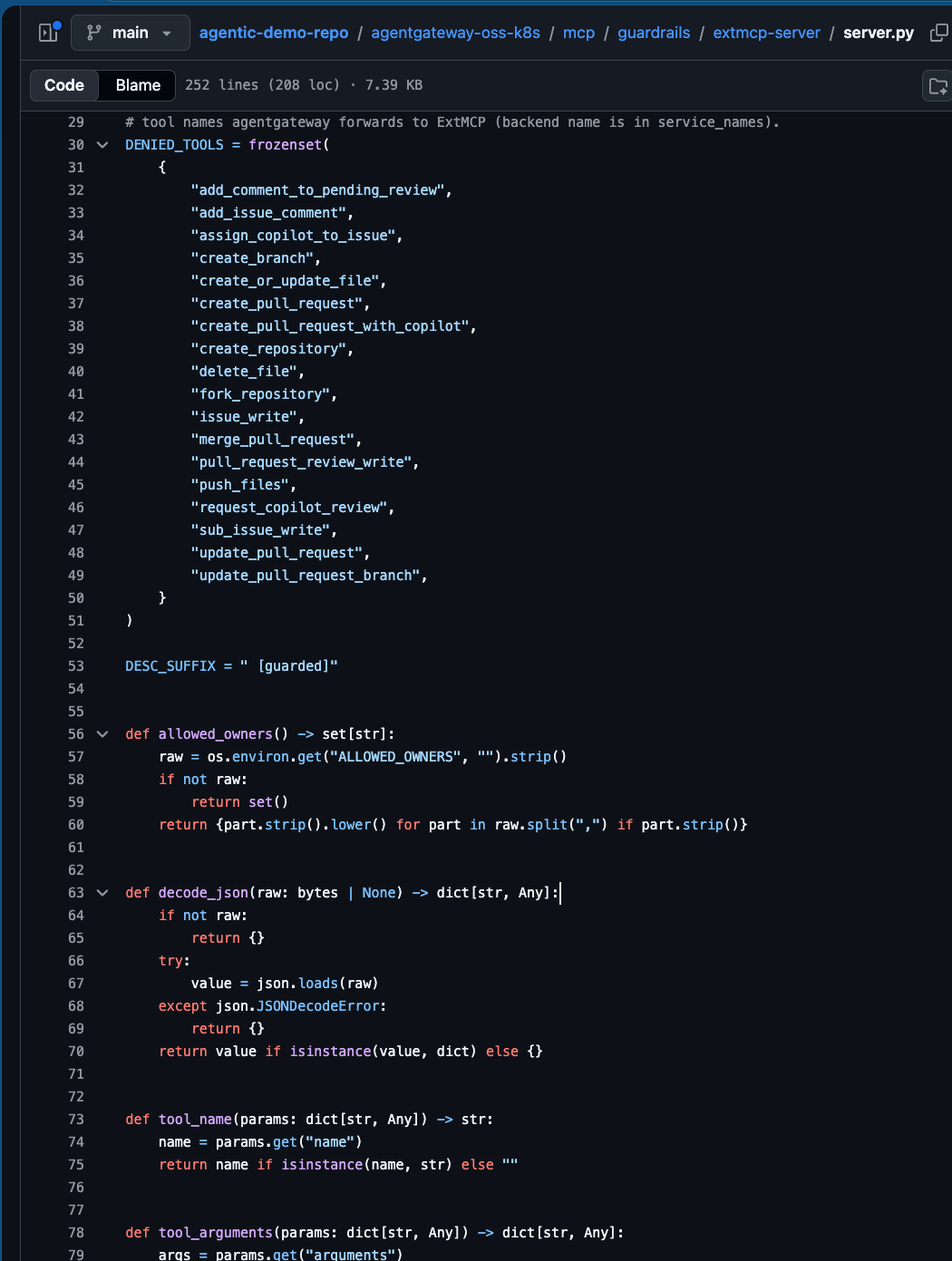
ext_mcp.proto: ExtMCP gRPC contract agentgateway calls. Defines CheckRequest / CheckResponse and the Pass / Mutate / Deny results.server.py: Policy server that implements that contract. Denies GitHub write tools ontools/call, strips those tools fromtools/list and tags the rest with[guarded].
Create the ConfigMap and the deploy.yaml so agentgateway can read the ExtMCP configuration for agentgateway and the ExtMCP policy server is running in the cluster:
kubectl -n agentgateway-system create configmap extmcp-github-policy \
  --from-file=server.py=guardrails/extmcp-server/server.py \
  --from-file=ext_mcp.proto=guardrails/extmcp-server/ext_mcp.proto \
  --from-file=requirements.txt=guardrails/extmcp-server/requirements.txt \
  --dry-run=client -o yaml | kubectl apply -f -
kubectl apply -f guardrails/extmcp-server/deploy.yamlThen, create the policy that attaches the guardrails to the GitHub Copilot MCP Server backend.
kubectl apply -f - <<EOF
apiVersion: agentgateway.dev/v1alpha1
kind: AgentgatewayPolicy
metadata:
  name: mcp-guardrails
  namespace: agentgateway-system
spec:
  targetRefs:
    - group: agentgateway.dev
      kind: AgentgatewayBackend
      name: github-mcp-server
  backend:
    mcp:
      guardrails:
        processors:
        - remote:
            backendRef:
              name: ext-mcp
              port: 4445
            failureMode: FailClosed
          methods:
            tools/call: Request
            tools/list: Response
EOF
Add The Deadline
The guardrails policy above tells agentgateway "who" to call, it does not set a deadline. By default, the gRPC call to the policy server waits forever. A cold or stuck ExtMCP Pod then hangs tools/call / tools/list instead of failing closed after a few seconds.
The object below defines the deadline.
kubectl apply -f - <<EOF
apiVersion: gateway.networking.k8s.io/v1
kind: HTTPRoute
metadata:
  name: ext-mcp-route
  namespace: agentgateway-system
spec:
  parentRefs:
    - name: mcp-gateway
  hostnames:
    - "ext-mcp.internal"
  rules:
    - backendRefs:
        - name: ext-mcp
          port: 4445
---
apiVersion: agentgateway.dev/v1alpha1
kind: AgentgatewayPolicy
metadata:
  name: ext-mcp-timeout
  namespace: agentgateway-system
spec:
  targetRefs:
    - group: ""
      kind: Service
      name: ext-mcp
  backend:
    http:
      requestTimeout: 5s
EOF
Verify The ExtMCP Server
With the configurations in place, let's verify that ExtProc will work as expected.
- Open MCP Inspector.
npx modelcontextprotocol/inspector#0.18.0- Connect to your Gateway with
http://$GATEWAY_IP:3000/mcp.
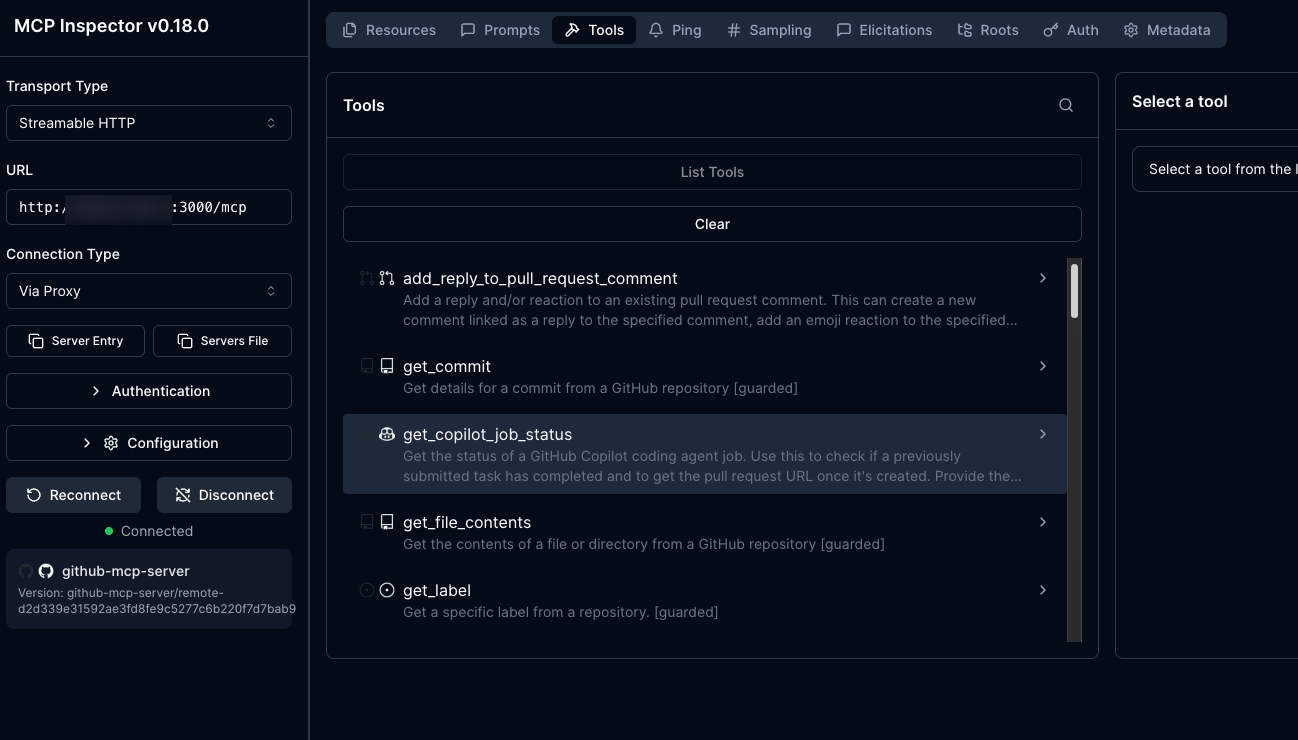
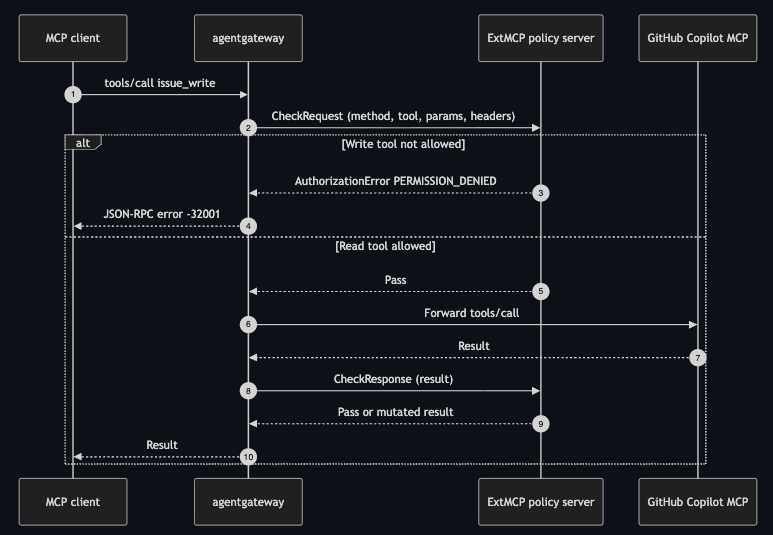
You'll notice that:
- All of the
writetools are gone. get_mesucceeds, butissue_writeis not allowed.
And that's specified in the server.py and in the AgentgatewayPolicy as it only wires methods to that server (tools/calls: Request, tools/list:Response) instead of tool names.
Congrats! You've successfully implemented MCP Guardrails.

Comments ()