Stateless MCP With Compatible AI Gateways
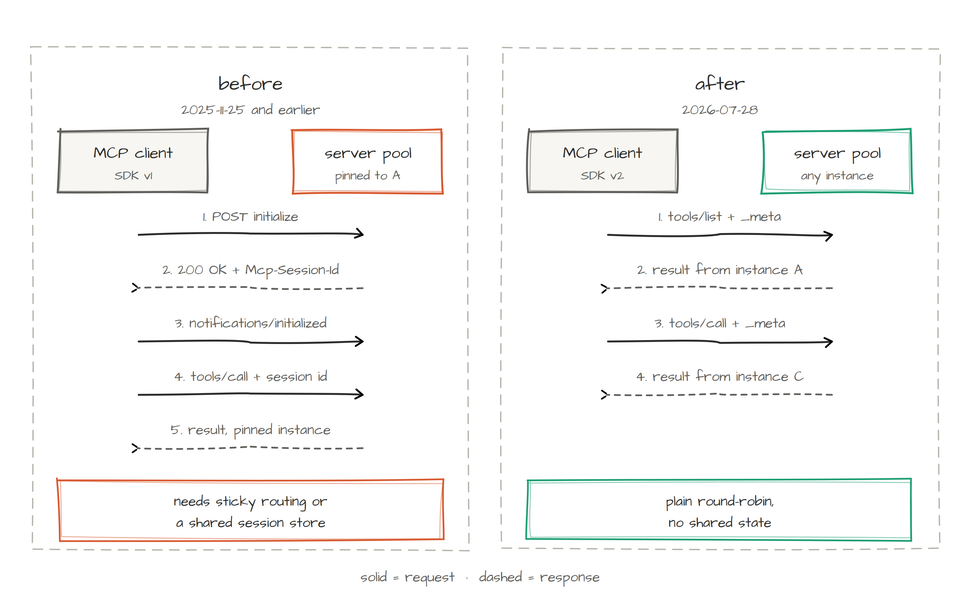
With the stateless MCP spec now officially out as of July 28th, 2026, there are now two methods of connecting to and configuring an MCP Server.
In this blog post, you'll learn what the stateless MCP spec means for the future, the breakdown of the spec, and how to implement it.
Stateless MCP Breakdown
Two of the key changes in the 2026-07-28 change: removal of initialization handshakes and session IDs.
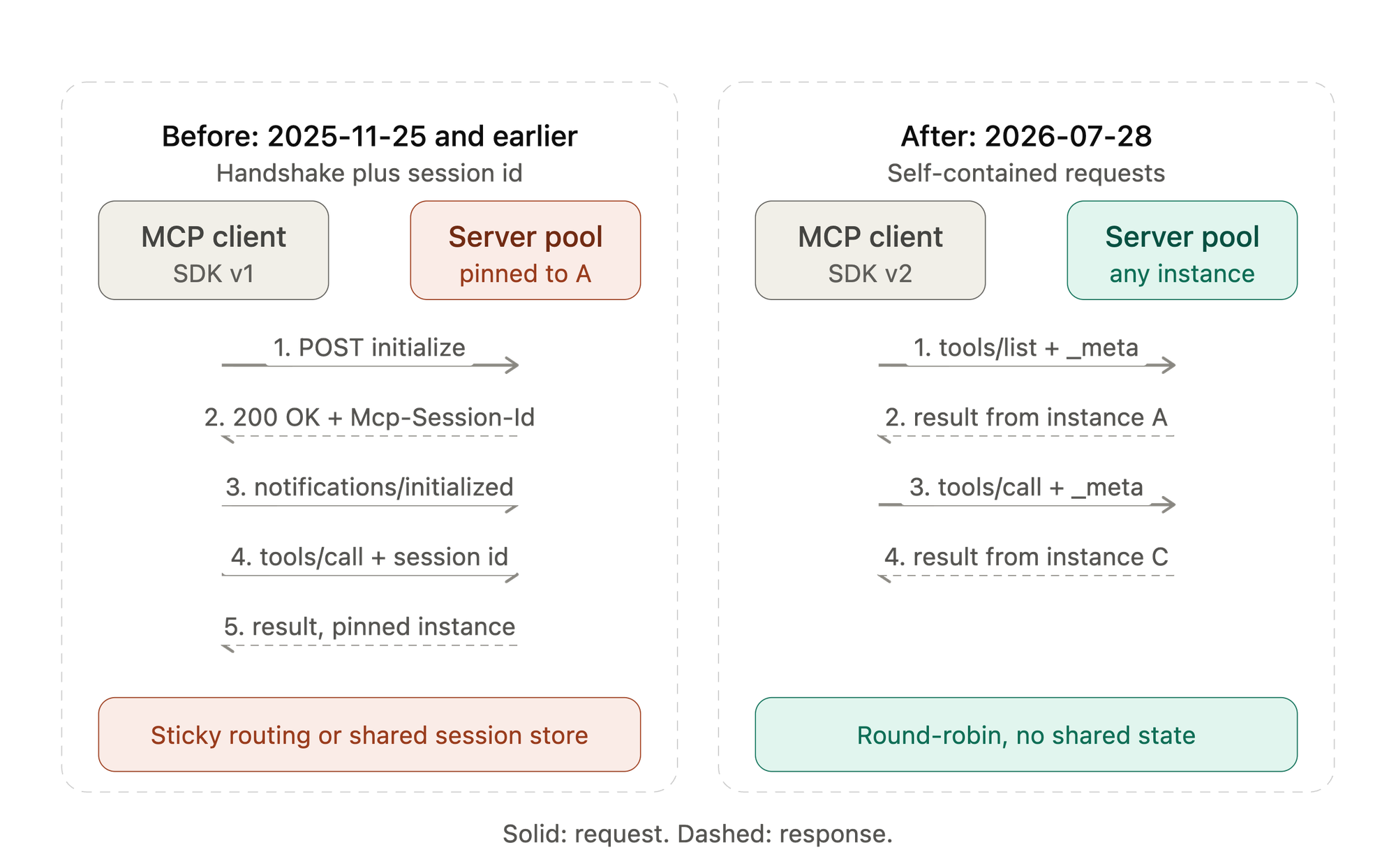
An initialization handshake was the startup exchange used by MCP versions through 2025-11-25.
- Client sends an initialize request containing its protocol version, capabilities, and client information.
- Server returns an InitializeResult with the negotiated version, server capabilities, and server information. It could also return MCP-Session-Id
- Client sends notifications/initialized.
- Normal MCP requests begin.
It established what features both sides supported before tools or resources were used.
In MCP 2026-07-28, this handshake was removed. Each request instead carries its protocol version and client metadata, making requests independently processable and stateless.
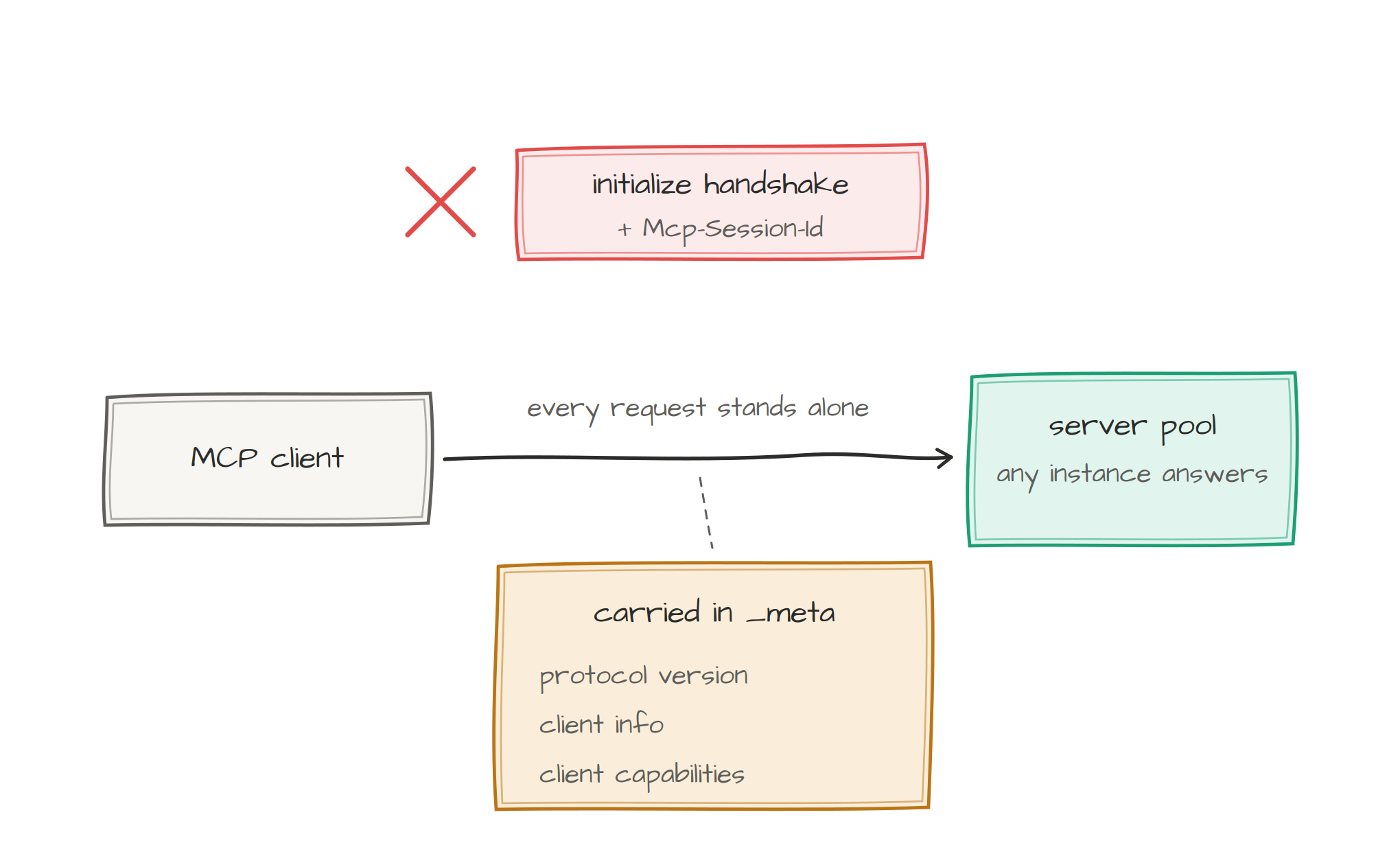
Session IDs were also removed, as anything with a session ID is stateful, since that ID serves as a lookup key for data stored on a server or in a database. Example: If you log into Gmail and look at the devices that are logged into Gmail (your phone, laptop, etc.), the reason you don't need to continuously log into them/daily login is that a session exists for that device.
Headers and Body
Some headers must be in the body, and some headers that aren't. Standard HTTP headers (Content-Type, accept, Content-Length, etc.) don't need to be in the body. MCP headers that mirror requests, however, need to be in both the header and the body.
- MCP-Protocol-Version
- Mcp-Method
- Mcp-Name
- Mcp-Param-*
Notice how in the example below you'll see the name, method, and protocol version are in both. However, tool arguments aren't mirrored by default (e.g - location is in the parameters, but not directly in the header).
POST /mcp HTTP/1.1
Content-Type: application/json
Accept: application/json, text/event-stream
MCP-Protocol-Version: 2026-07-28
Mcp-Method: tools/call
Mcp-Name: get_weather

{
  "jsonrpc": "2.0",
  "id": 1,
  "method": "tools/call",
  "params": {
    "name": "get_weather",
    "arguments": {
      "location": "Seattle, WA"
    },
    "_meta": {
      "io.modelcontextprotocol/protocolVersion": "2026-07-28",
      "io.modelcontextprotocol/clientInfo": {
        "name": "example-client",
        "version": "1.0.0"
      },
      "io.modelcontextprotocol/clientCapabilities": {}
    }
  }
}
Building A Stateless MCP Server
By default, popular methods for creating MCP Servers, like using the fastmcp library, support stateless MCP out of the box (specifically using FastMCP 4 in this case).
from fastmcp import FastMCP

mcp = FastMCP("Weather")


@mcp.tool
def get_weather(location: str) -> str:
    return f"Weather for {location}"


app = mcp.http_app()
However, if you're using FastMCP 2 or 3, stateless_http=True is what you would use to eliminate server-side Streamable HTTP sessions.
app = mcp.http_app(stateless_http=True)Use the above for stateless deployment of a legacy server, not as a substitute for FastMCP 4 when 2026-07-28 compliance is required. Because of this, it's of course recommended to upgrade to FastMCP when able.
Scaling Stateless MCP Servers
There is a lot of talk around the idea that bringing the stateless MCP spec means you now have round-robin load balancing. Although this is true, it's important to understand that "technically", having a stateless app for load balancing in this fashion isn't "required", but it's certainly not ideal. It fails at three layers:
- Auth: A user or agent logs in and they're authenticated on that server with a session. However, if the next request goes to another server, they have to log in again.
- Data corruption: If an update occurs on the MCP Server, the update will only exist on the server that the update was implemented on.
- Dropped connections: Connections like WebSockets, which are long-lived, will disconnect and fail to reconnect properly.
There are ways to implement load balancing for stateful apps, though, like implementing state across a database/cache like Redis and enabling sticky sessions on a load balancer so it remembers to send the user to the same server where the user's request originated.
Stateless workloads bring us far easier load balancing though. Taking the example from the previous paragraph, if the server goes down, regardless of whether sticky sessions are enabled or not, the server still isn't reachable.
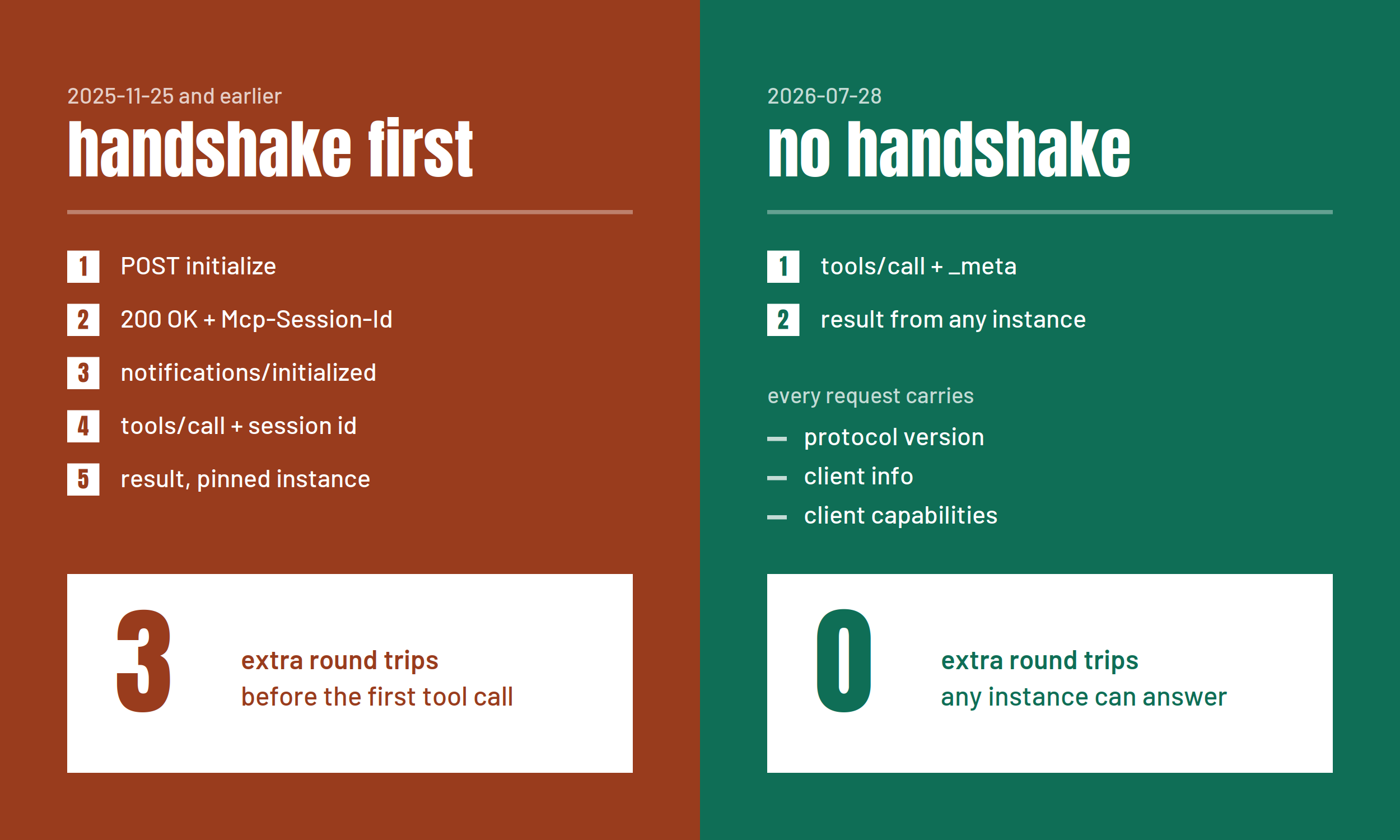
And truth be told, especially in the cloud-native community, we've all definitely gotten a bit used to the "ease of use" when it comes to statless (e.g - stateless microservices that run in Kubernetes that can easily be load balanced to with a k8s Service sitting in front).
Implementation With Agentgateway
Before using the stateless MCP spec, ensure that the AI Gateway you're using supports it. Within agentgateway, it's been supported since day 0.
To implement stateless MCP, you'll need three objects:
GatewayAgentgatewayBackendHTTPRoute
As an example, you can use the GitHub Copilot MCP Server.
- Create a k8s Secret with your GitHub Personal Access Token (PAT).
export GITHUB_PAT=

kubectl apply -f - <<EOF
apiVersion: v1
kind: Secret
metadata:
  name: github-pat
  namespace: agentgateway-system
type: Opaque
stringData:
  Authorization: "Bearer ${GITHUB_PAT}"
EOF- Create a standard Gateway using the
agentgatewaygateway class.
kubectl apply -f - <<EOF
apiVersion: gateway.networking.k8s.io/v1
kind: Gateway
metadata:
  name: mcp-gateway
  namespace: agentgateway-system
  labels:
    app: github-mcp-server
spec:
  gatewayClassName: agentgateway
  listeners:
    - name: mcp
      port: 3000
      protocol: HTTP
      allowedRoutes:
        namespaces:
          from: Same
EOF- Create an
AgentgatewayBackendwith theStatelesssession routing option enabled (by default, it'sStateful).
kubectl apply -f - <<EOF
apiVersion: agentgateway.dev/v1alpha1
kind: AgentgatewayBackend
metadata:
  name: github-mcp-server
  namespace: agentgateway-system
spec:
  mcp:
    sessionRouting: Stateless
    targets:
      - name: github-copilot
        static:
          host: api.githubcopilot.com
          port: 443
          path: /mcp/
          protocol: StreamableHTTP
          policies:
            tls: {}
            auth:
              secretRef:
                name: github-pat
EOF- Create a route so you can route traffic to your Stateless MCP connection via a client like MCP Inspector or an Agent.
kubectl apply -f - <<EOF
apiVersion: gateway.networking.k8s.io/v1
kind: HTTPRoute
metadata:
  name: mcp-route
  namespace: agentgateway-system
  labels:
    app: github-mcp-server
spec:
  parentRefs:
    - name: mcp-gateway
  rules:
    - matches:
        - path:
            type: PathPrefix
            value: /mcp
      backendRefs:
        - name: github-mcp-server
          namespace: agentgateway-system
          group: agentgateway.dev
          kind: AgentgatewayBackend
EOF- Retrieve your IP address.
export GATEWAY_IP=$(kubectl get svc mcp-gateway -n agentgateway-system -o jsonpath='{.status.loadBalancer.ingress[0].ip}')
echo $GATEWAY_IP
Test Connection
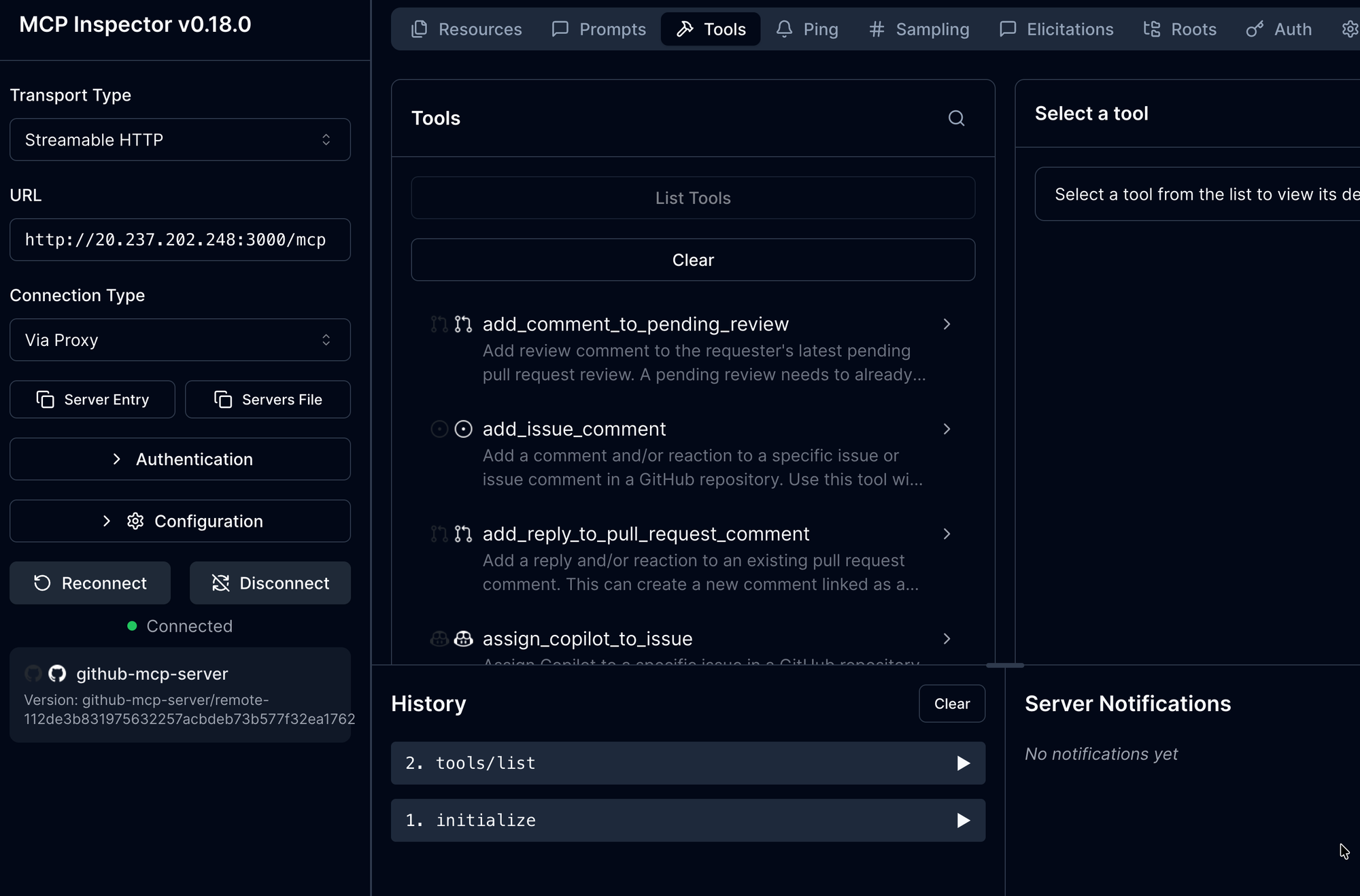
Test your MCP Gateway connectivity by using a client like MCP Inspector, as it's a quick method of testing the connection.
npx modelcontextprotocol/inspector#0.18.0use http://YOUR_GATEWAY_IP:3000/mcp
You should now see the connection to the GitHub Copilot MCP Server.
Congrats! You've successfully learned what the stateless MCP protocol brings, how to implement the stateless MCP spec, and how to utilize it in an existing MCP server.

Comments ()