MCP in Agent Substrate: Connect and Managed Tools

Agents need isolation, but so do the resources that they connect to - think tools, servers, plugins, extensions, and anything else that an Agent can reach to get the job done.
In the case of how Agents reach tools today, it's typically over the MCP protocol, which means that's a key isolation layer.
In this blog post, you'll learn how to run MCP Servers with an Actor.
Prerequisites
To follow along with this blog post from a hands-on perspective, you will need the following:
- A Kubernetes cluster running v1.37+ (needed for the
PodCertificateAPI that Agent Substrate relies on). - Kagent + Agent Substrate installed. You can learn how to do that here.
Why Run MCP In Substrate?
Today, Agents can connect to anything (as long as permissions exist, of course) by default. Full egress to an MCP Server, an LLM, cloud services, databases, and any other endpoint is fully accessible out of the box. As an engineer, that's great because your Agent can help you with what you need to accomplish.
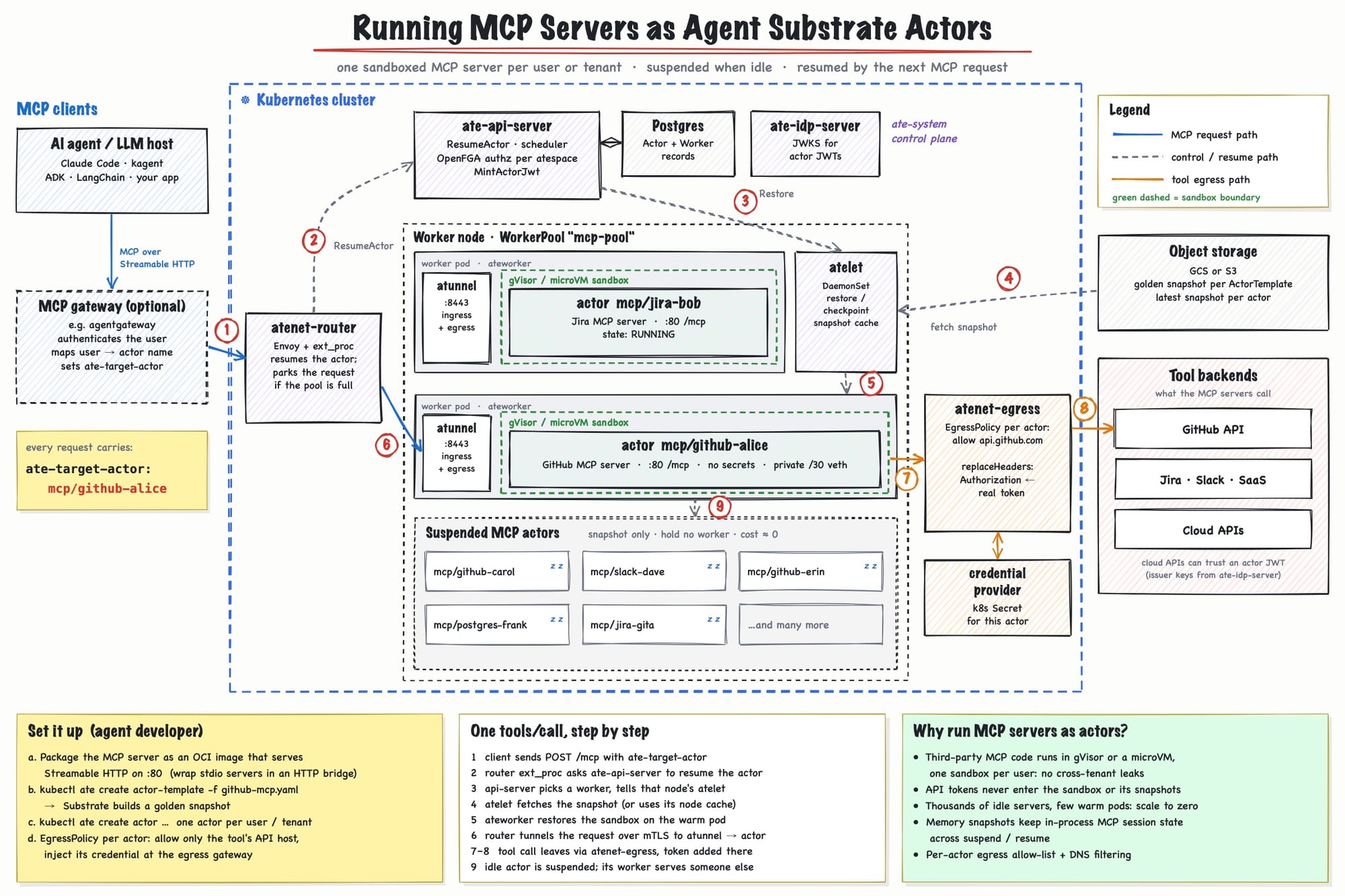
The concern comes from the same thing that is the benefit - the Agent has access to everything. That means, from an organizational standpoint, you and your coworkers will naturally want to ensure there's proper security around what you're accessing with your Agents. In the case of what "Agents speak" today, it's typically an MCP Server or a protocol that follows the MCP Spec (like code mode). This will help with everything from stopping bad actors to ensuring compliance and, therefore, auditing, is in good standing, along with your organization being safe thanks to your solution.
The solution means an MCP Server can be isolated and connected to with proper security, but you also gain an even larger, positive impact. The Actor (where the MCP Server runs) has its own sandbox, which means snapshots and durable directories for persistent storage (which is helpful for stateful MCP Servers) along with a mechanism that allows for idle efficiency (only using CPU and memory when interacted with).
Building A Simple MCP Server
The first step is to have an MCP Server that can run within an Agent Substrate Actor. To do that, you can create a simple MCP Server using the FastMCP library that has one tool which adds numbers together.
docker.io/adminturneddevops/testmcp:0.1.0You'll need three things for this:
- An MCP Server.
- A
requirements.txtso all of the dependencies are met - A
Dockerfileto containerize the MCP Server.
server.py
import os
import socket
import threading
import time
from datetime import datetime, timezone
from typing import Any

from fastmcp import FastMCP
from starlette.requests import Request
from starlette.responses import PlainTextResponse

VERSION = "0.1.0"

mcp = FastMCP(
    "testmcp",
    instructions=(
        "Test MCP server. Use echo and add to check connectivity, increment "
        "and get_count to check in-memory state, and server_info to see "
        "which process is answering."
    ),
    version=VERSION,
)

_started_at = time.time()
_count = 0
_count_lock = threading.Lock()


@mcp.tool
def echo(message: str) -> str:
    """Return the message unchanged."""
    return message


@mcp.tool
def add(a: float, b: float) -> float:
    """Add two numbers."""
    return a + b


@mcp.tool
def increment(by: int = 1) -> int:
    """Add `by` to the in-memory counter and return the new value."""
    global _count
    with _count_lock:
        _count += by
        return _count


@mcp.tool
def get_count() -> int:
    """Return the in-memory counter without changing it."""
    with _count_lock:
        return _count


@mcp.tool
def server_info() -> dict[str, Any]:
    """Return the hostname, PID, start time and uptime of this process."""
    return {
        "name": "testmcp",
        "version": VERSION,
        "hostname": socket.gethostname(),
        "pid": os.getpid(),
        "started_at": datetime.fromtimestamp(_started_at, timezone.utc).isoformat(),
        "uptime_seconds": round(time.time() - _started_at, 3),
    }


@mcp.custom_route("/healthz", methods=["GET"])
async def healthz(request: Request) -> PlainTextResponse:
    return PlainTextResponse("ok")


def main() -> None:
    host = os.environ.get("HOST", "0.0.0.0")
    port = int(os.environ.get("PORT", "80"))
    mcp.run(transport="http", host=host, port=port, show_banner=False)


if __name__ == "__main__":
    main()
requirements.txt
fastmcp==4.2.6
starlette==1.10.0
Dockerfile
ARG PYTHON_IMAGE=python:3.13.18-slim-trixie@sha256:168d3a5d10f2152f8e8d77b6843ac82c22a846cfefeef7afdf9aa630404e82a7

FROM ${PYTHON_IMAGE} AS build
ENV PIP_DISABLE_PIP_VERSION_CHECK=1 PIP_NO_CACHE_DIR=1
RUN python -m venv /opt/venv
COPY requirements.txt /tmp/requirements.txt
RUN /opt/venv/bin/pip install -r /tmp/requirements.txt

FROM ${PYTHON_IMAGE}
ENV PATH=/opt/venv/bin:$PATH \
    PYTHONDONTWRITEBYTECODE=1 \
    PYTHONUNBUFFERED=1 \
    HOST=0.0.0.0 \
    PORT=80
COPY --from=build /opt/venv /opt/venv
WORKDIR /app
COPY server.py .
# Substrate sandboxes and Docker both let non-root processes bind port 80.
USER 65532:65532
EXPOSE 80
HEALTHCHECK --interval=15s --timeout=3s --start-period=10s --retries=3 \
  CMD ["python", "-c", "import os, urllib.request; urllib.request.urlopen(f'http://127.0.0.1:{os.environ[\"PORT\"]}/healthz', timeout=2)"]
ENTRYPOINT ["python", "server.py"]
Deploy An MCP Server In an Actor
Now that the MCP Server is built and lives in a container image, it can be deployed to Agent Substrate. It'll run within an Actor and have a Template associated with it that calls out to the MCP Server
- Store the template in
mcp-template.yaml
metadata:
  atespace: mcp
  name: my-mcp
workerSelector:
  matchLabels:
    kagent.dev/worker-pool-name: kagent-default
    kagent.dev/worker-pool-namespace: kagent
containers:
- name: mcp
  image: docker.io/adminturneddevops/testmcp:0.1.0@sha256:5c56cc1cf60d140eff36af59a57732ca6931c2d82373fbebf7e289ef6aaefa5d
  wakeupProbe:
    httpGet:
      path: /healthz
      port: 80
resources:
  limits:
    cpuMillicores: 500
    memoryBytes: 268435456   # 256Mi
snapshotConfig:
preferredFidelity: SNAPSHOT_FIDELITY_MEMORY- Create an atespace (it's like a Namespace)
kubectl ate create atespace mcp- Create the Actor Template.
kubectl ate create actor-template -f mcp-template.yaml- Ensure that it was created.
kubectl ate get actor-template my-mcp -a mcp -o yaml- Create the Actor.
kubectl ate create actor testmcp-1 --template=my-mcp -a mcpYou should see it in the SUSPENDED state.
kubectl ate get actor testmcp-1 -a mcpConnect to an MCP Endpoint with RemoteMcpServer
With the MCP Server deployed, you can now connect to it via an Agent, but the question is "how?". With kagent, there's an object called RemoteMCPServer which you can use to create an object in k8s with the contents of your MCP Server. Agents can then connect to it using Kubernetes primitives.
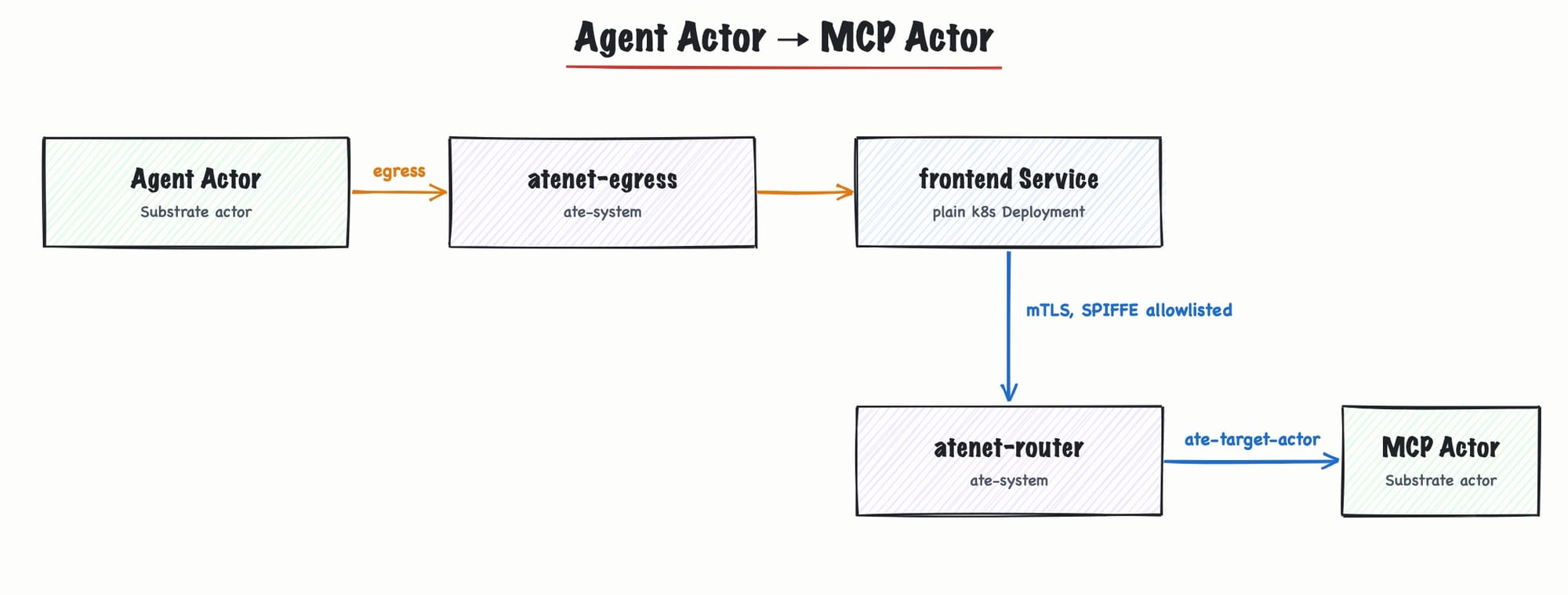
The Frontend
You will need the following:
- The frontend. This is a Deployment plus Service, not an Actor. It must:
- Get a pod certificate from the podidentity.podcert.ate.dev signer. Its SPIFFE ID is spiffe://cluster.local/ns//sa/.
- Proxy to https://atenet-router.ate-system.svc:443 over mTLS with that certificate.
- Set ate-target-actor: / itself. Never take this value from the caller.
- Pass streaming responses through, because streamable HTTP and SSE stream.
- Allowlist the frontend on the router. This goes in the Substrate chart values. Keep the controller's ID, because the list is replaced, not merged:
atenetRouter:
  ingressAllowedSPIFFEIDs:
    - "spiffe://cluster.local/ns/kagent/sa/kagent-controller"
    - "spiffe://cluster.local/ns/mcp-frontend/sa/mcp-frontend"
This will require a small proxy (tiny Go app), allowList for the frontend so the frontend's SPIFFE ID to atenetRouter.ingressAllowedSPIFFEIDs is in the Substrate chart, and a NetworkPolicy to restrict who/what can access the frontend.
Because it's a fair amount of code/instructions, you can use these directions to deploy it.
Kagent Resources
With the frontend and MCP Server deployed as an Actor, you can now connect to it via the MCP Server object in kagent and have your Agent within kagent use it.
- Create the MCP object that points to your frontend and, therefore, the MCP Server running within the Actor.
apiVersion: api.kagent.dev/v1alpha3
kind: RemoteMCPServer
metadata:
  name: lab-mcp
  namespace: kagent
spec:
  description: MCP server running as a Substrate Actor
  url: http://mcp-frontend.mcp-frontend.svc.cluster.local:8080/mcp
  protocol: STREAMABLE_HTTP
timeout: 30s- Create the Harness, Template, and Agent, which talks to the MCP Server.
apiVersion: api.kagent.dev/v1alpha3
kind: Harness
metadata:
  name: mcp-lab
  namespace: kagent
spec:
  kagent: {}
  substrate:
    workerPoolRef:
      name: kagent-default
    snapshotPolicy:
      location: s3://ate-snapshots/kagent/myagent/
---
apiVersion: api.kagent.dev/v1alpha3
kind: AgentTemplate
metadata:
  name: mcp-lab
  namespace: kagent
spec:
  description: Demonstrate recovery of a kagent Session after worker loss.
  modelConfig:
    name: default-model-config
  systemPrompt: Follow the user's instructions. Use the current conversation to answer questions about earlier turns.
---
apiVersion: api.kagent.dev/v1alpha3
kind: Agent
metadata:
  name: mcp-lab-agent
  namespace: kagent
spec:
  template:
    ref:
      name: mcp-lab
  harnessRef:
    name: mcp-lab
    inline:
      description: Answer questions and use MCP tools
      modelConfig:
        name: default-model-config
      systemPrompt: You are a helpful answer
      tools:
        - mcp:
            server:
              kind: RemoteMCPServer
              name: lab-mcp
            tools:
              - add
              - echo
You can also see how the Agent object specifies what MCP tools can be used from the MCP Server.
The Agent is now created and connected to the MCP Server that's deployed within an Actor.
Wrapping Up
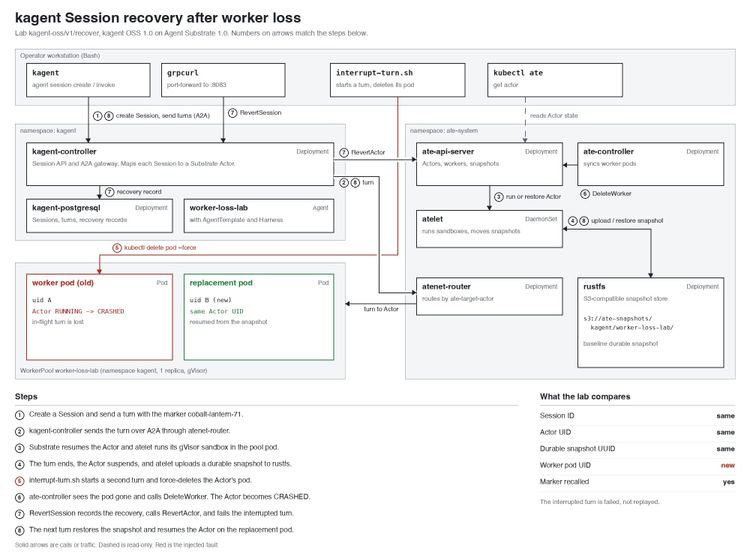
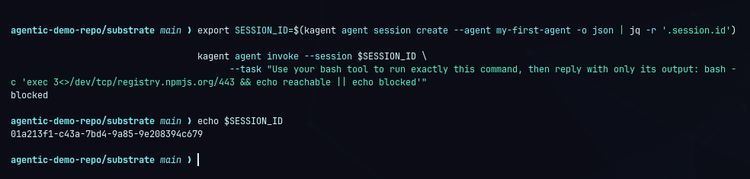
With an MCP Server running in an Actor, you get true isolation and sandboxing of your MCP Servers. The goal is not only to have security, but also proper scale and usability, as an Actor is only "on" (otherwise, it's in a Warm State) while it's being interacted with. Putting that all together, it means high-density agentic workloads, hardware (CPU/memory) that's only used when it's actually needed, and security.

Comments ()