Recovering an Actor from Worker Pod Loss in Kagent + Agent Substrate
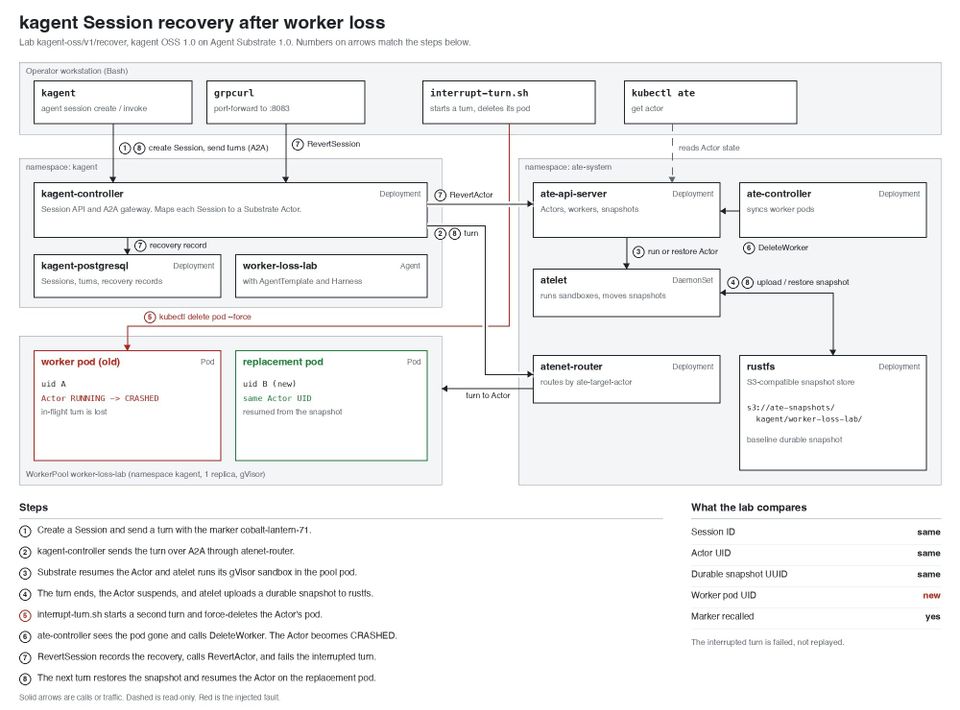
Infrastructure fails every once in a while. It could happen from anything as simple as the server shutting off to a piece of infrastructure (like a Pod) going down for whatever reason or simply not being accessible. That's why redundancy, high availability, and disaster recovery exist.
Those same rules need to apply and be consistent in sandbox environments, especially considering that's where your Agents are running, and no one wants to be midway through working a solution with an Agent and it randomly go down without a way to recover it.
In this blog post, you'll learn how to recover an Actor session and pick up where you left off with kagent + Agent Substrate.
Prerequisites
To follow along with this blog post in a hands-on fashion, you will need:
- The
agent.yamlandWorkerPoolconfigs, which you can find here. - A Kubernetes cluster running v1.37+ or a cluster that you can manage the API server on directly (e.g., using Kind, Kubeadm, etc.) to enable the
PodCertificateAPI. - Kagent + Agent Substrate installed. You can learn how to do that here.
- The latest kagent CLI binary, which you can find here.
- gRPC reflection, which is a protocol that allows a gRPC server to expose its Protobuf-defined APIs and message schemas at runtime, turned on. For an existing installation of kagent + Agent Substrate, you can turn it on with the following:
  helm upgrade kagent oci://ghcr.io/kagent-dev/kagent/helm/kagent \
    --version "$(helm get metadata kagent -n kagent -o json | jq -r .version)" \
    -n kagent --reuse-values --set config.server.grpcReflection=true
Otherwise, please feel free to go through it from a theoretical standpoint! It's great info to have regardless of whether you have a cluster ready to run or not.
WorkerPool and Agent
The first step is to ensure that you have a WorkerPool ready to use for an Actor (and therefore, your Agent) to run on along with the Agent Harness inside of the Actor. To do that, create a new WorkerPool, AgentHarness, and Agent.
- Create a new
WorkerPoolby using the existingWorkerPoolas a starting point that exists when you install kagent + Agent Substrate (aWorkerPool, by default, gets created with the installation of kagent + Agent Substrate unless you choose otherwise).
kubectl -n kagent get workerpool kagent-default -o json |
  jq -e '
    select(any(.spec.sandboxClasses[]?; .name == "gvisor")) |
    {
      apiVersion: "ate.dev/v1", kind: "WorkerPool",
      metadata: {
        name: "worker-loss-lab", namespace: "kagent",
        labels: {
          "kagent.dev/worker-pool-name": "worker-loss-lab",
          "kagent.dev/worker-pool-namespace": "kagent"
        }
      },
      spec: (.spec | .replicas = 1 | .sandboxClasses |= map(select(.name == "gvisor")))
    }
' | kubectl create -f -WorkerPool without the above if you'd like. This is just a starting point/baseline (for a quick creation) as it reads the existing pool, copies the existing .spec which includes the worker image/pod settings, and sets the replica to 1.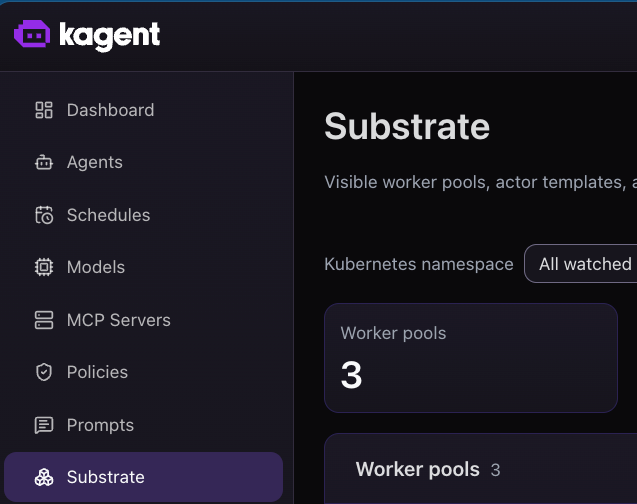
- Create the
AgentHarnesandAgent.
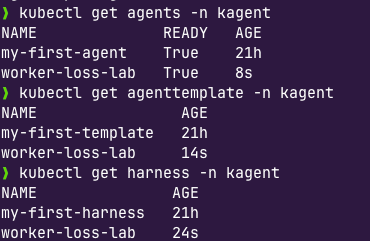
kubectl apply -f agent.yamlYou should now see the Agent created in your kagent environment.
Running Your Agent
With the WorkerPool and Agent built out, you can now interact with it by initiating a session (which just means "talking" to your Agent) and send a "turn" to it (a chat).
- Run the following, which uses the kagent CLI to initiate/create a session, send a turn, inspect/get the session's Actor ID, and get the snapshot status.
session_id=$(kagent --user-id admin@kagent.dev -n kagent agent session create \
  --agent worker-loss-lab -o json | jq -er '.session.id')
get_actor() {
  kubectl ate get actor "session-$session_id" -a kagent -o json
}

durable_snapshot() {
  jq -er '[.status.snapshots[]? |
    select(.owner == "SNAPSHOT_OWNER_ACTOR" and
           .durableSnapshot.state == "SNAPSHOT_STORAGE_STATE_COMPLETED")]
    | max_by(.generation | tonumber) | .uuid'
}

kagent --user-id admin@kagent.dev -n kagent agent invoke --session "$session_id" \
--task 'Remember this recovery marker for a later question: cobalt-lantern-71. Reply with the marker.'- Wait for the Actor to show the
ACTOR_STATE_SUSPENDEDstatus with a completed snapshot.
baseline=$(get_actor | jq -ce 'select(.status.state == "ACTOR_STATE_SUSPENDED")')
actor_uid=$(jq -er '.metadata.uid' <<<"$baseline")
snapshot_uuid=$(durable_snapshot <<<"$baseline")
printf 'Session %s\nActor %s\nDurable snapshot %s\n' "$session_id" "$actor_uid" "$snapshot_uuid"
Here's an example output:
Session 01a21884-3d2f-xxxx-a489-xxxxxxxx
Actor 308310f2-xxxx-4dad-9d8b-xxxxxxxxx
Durable snapshot xxxxxxxx-xxxx-4e16-9d32-xxxxxxYou now have a recovery point/snapshot.
What Happens When A Worker Disappears Mid-Turn?
If you've ever been in the middle of a piece of work and what you're working on fails as you're working on it, that's a problem.
Was the state stored? Can you recover the session? Is everything you've been doing gone?
That's a major question that comes up with Actors working within Agent Substrate - what if your Actor (and therefore, the Agent inside of the Actor) goes down for whatever reason? Is everything lost? Luckily, the answer is "no".
- Run the
interrupt-turn.shscript, which does the following:- Starts the turn in the back
- Waits for the Actor to be assigned to a Worker
- Prints the Worker (Pod) name
- Confirms the Worker's UID
- Deletes the Worker
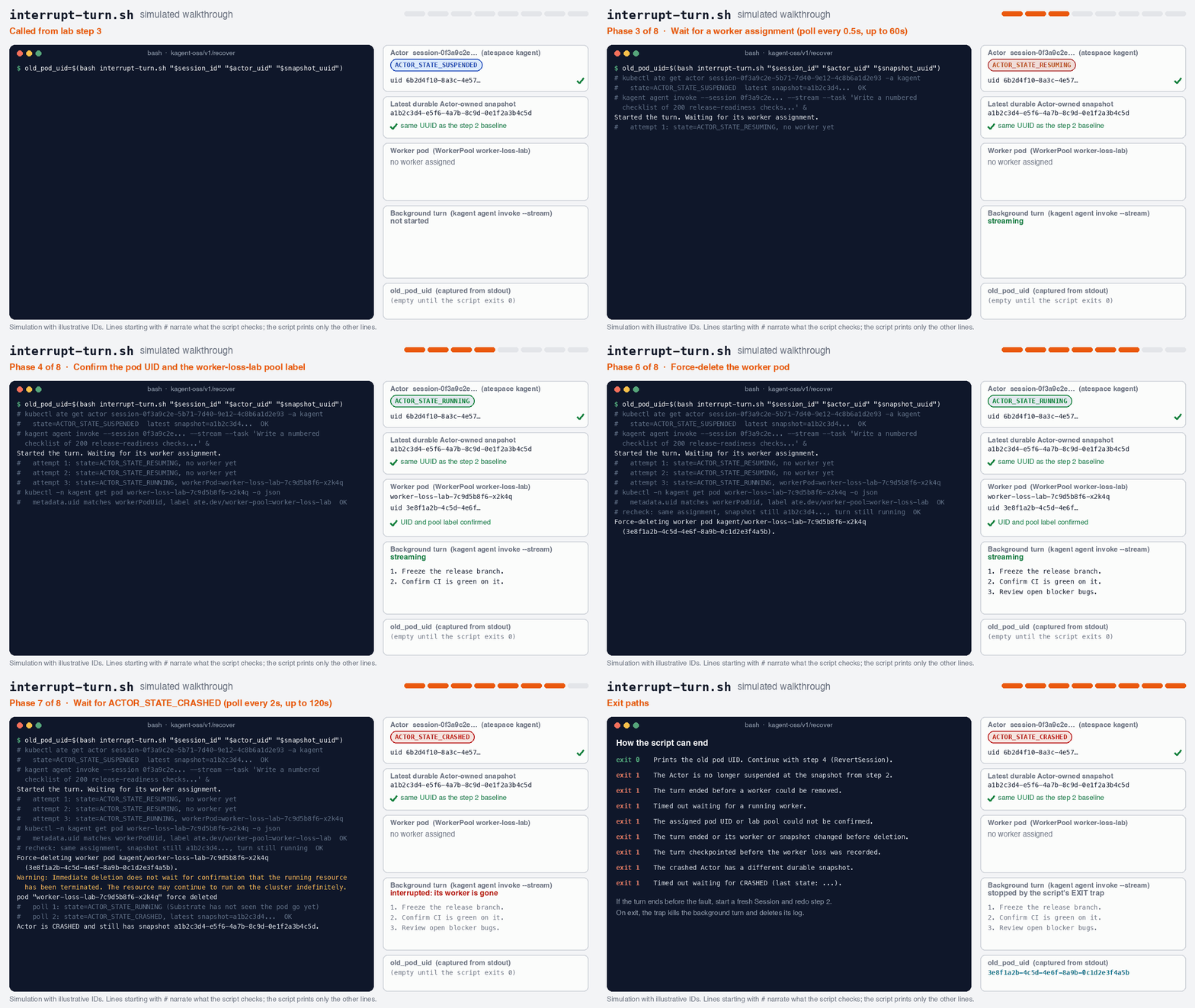
The goal here is to run the Actor and then delete the Worker that it's running on to prove out in the next section that you can recover the session even though the Worker (where the Actor was running) was deleted.
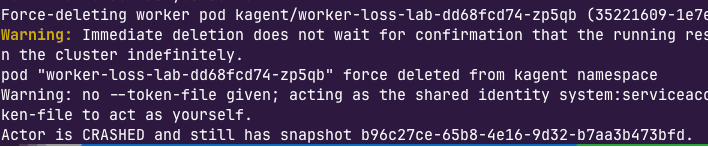
old_pod_uid=$(bash interrupt-turn.sh "$session_id" "$actor_uid" "$snapshot_uuid")- Continue onto the next section only when you see the
CRASHEDoutput.
Recovering The Session
In the last section, you saw what happens when a Worker disappears while there's an Actor session running. That exact crash sets us up for this section, which is to see if we can recover from a snapshot to continue the work that was happening within the session, which failed due to the Worker failing mid-turn and the Actor then moved to a CRASHED state.
Let's now recover the session.
- For the second step, you'll need to be able to use
grpcurl. To do that, thekagent-controllerneeds to be reachable from your terminal.
kubectl -n kagent port-forward svc/kagent-controller 8083:8083- Call the
RevertSessiongRPC method (which lives on kagentsSessionServicegRPC service) with the same session ID so the Actor recovers with the same information. This step also verifies that the Actor is suspended via the snapshot that was created before the crash.
session_request=$(jq -nc --arg id "$session_id" '{sessionId:$id}')
grpcurl -plaintext -max-time 120 -H 'X-User-Id: admin@kagent.dev' \
  -d "$session_request" localhost:8083 kagent.api.v1.SessionService/RevertSession |
  jq -e --arg id "$session_id" '.session | select(.id == $id) | {id, state}'
restored=$(get_actor | jq -ce --arg uid "$actor_uid" '
  select(.metadata.uid == $uid and .status.state == "ACTOR_STATE_SUSPENDED")
')
test "$(durable_snapshot <<<"$restored")" = "$snapshot_uuid" &&
printf 'Same Session and Actor, reverted to the baseline snapshot.\n'- With the recovery verified, check and ensure that the new Worker exists. The
WorkerPoolcreates a replacement Worker automatically.
replacement=''
for ((attempt = 0; attempt < 60; attempt++)); do
  replacement=$(kubectl -n kagent get pods -l ate.dev/worker-pool=worker-loss-lab -o json |
    jq -c --arg uid "$old_pod_uid" '
      .items[] | select(.metadata.uid != $uid and .metadata.deletionTimestamp == null) |
      select(any(.status.conditions[]?; .type == "Ready" and .status == "True")) |
      {name: .metadata.name, uid: .metadata.uid}
    ')
  [[ -n "$replacement" ]] && break
  sleep 5
done
test -n "$old_pod_uid" && test -n "$replacement" && printf 'Replacement: %s\n' "$replacement"- Send a new turn which uses the Actor's original session (not a new session). This showcases that kagent resumes the Actor on the new Worker after the old Worker was deleted.
kagent --user-id admin@kagent.dev -n kagent agent invoke --session "$session_id" \
  --task 'What recovery marker did I ask you to remember in the first turn?'
You can now see that even though the Worker was deleted, the session for the Actor can still be resumed where you left off on a new Worker without skipping a beat.


Comments ()