OpenEnv + Agent Substrate: Run Agentic RL In Isolated Sandboxes
One of the most amazing advancements of Agents is that when you ask a question, it's not a "one question > one answer > stop" motion. You ask a question, and your Agents can go through many attempts to complete a task.
This helps when completing one of the things you're working on, but it's also paramount for Model success in post-training.
In this blog post, you'll learn what the post-training portion is with Agentic RL and how to implement RL environments in Agent Substrate to protect the system it runs on.
Prerequisites
To follow along with this blog post in a hands-on fashion, there is a list of requirements below. If you don't have these requirements/infrastructure, however, it's still good to read through this blog from a theoretical perspective. That way, you have everything you need once you bring the infra/env online.
- A GKE cluster or any cluster that can run Agent Substrate.
- An L4 quota (for the NVIDIA GPUs).
- Agent Substrate installed.
- Roughly 10-12 GB of free memory (for the CPU node pool).
What's Agentic RL?
RL stands for "Reinforcement Learning"
TLDR; it's a way to have an Agent perform multiple tasks (e.g., this test failed, figure out why), learn from those tasks (many attempts per task), and update the weights in the LLMs that the Agent used after the tasks are done with what it learned. This happens at training time (usually post-training).
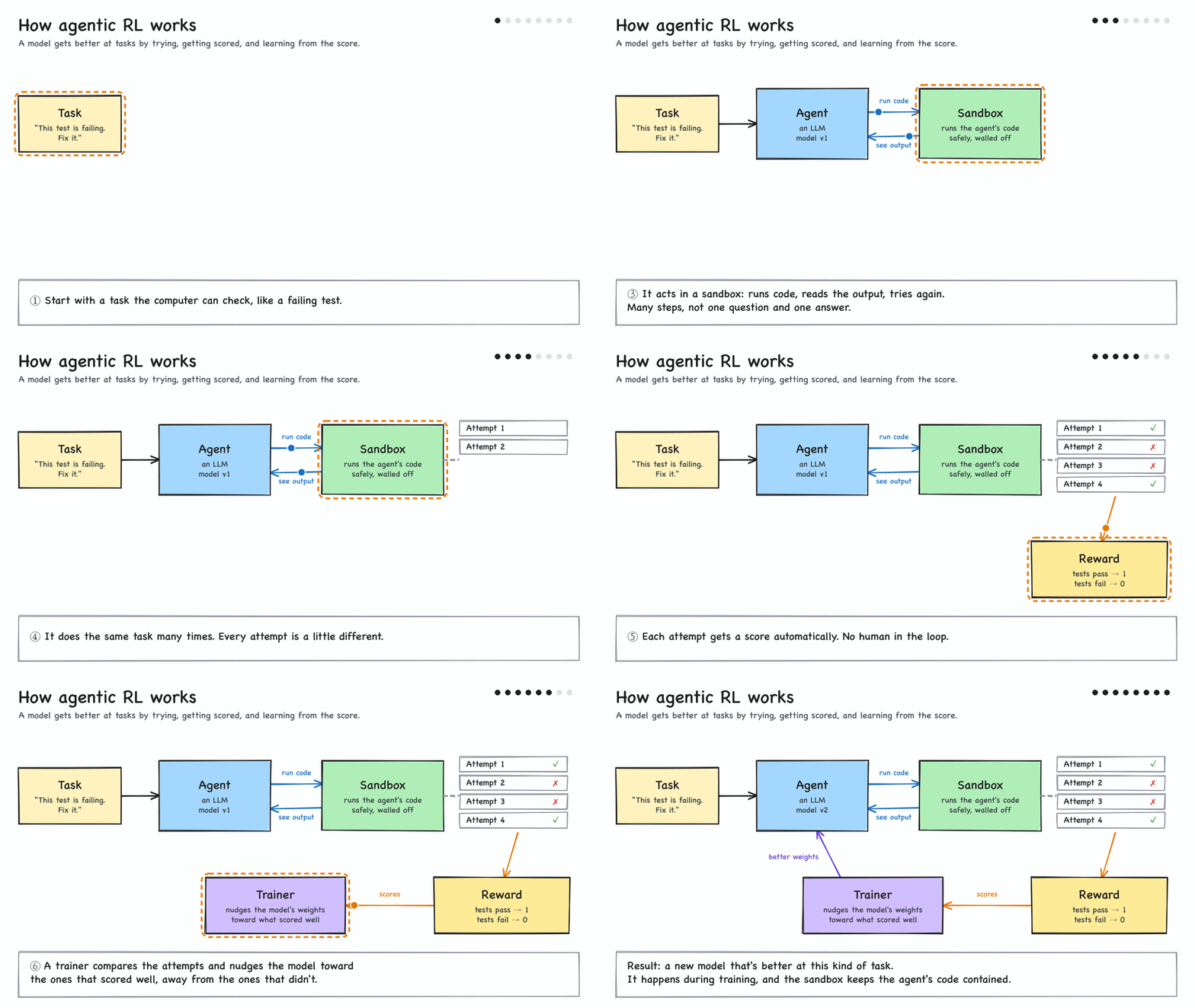
For Agentic RL to work within Kubernetes, you'll use OpenEnv, one of the latest projects donated to the AAIF.
Why Agent Substrate?
Agentic RL, like OpenEnv, needs a system to run on, and since the LLM is running untrusted actions inside the env, that system should be a secure/isolated sandbox.
Why? Because when running an environment for Agentic RL, there could be:
- Destructive Actions (e.g.,
rm -rf) - Escape and lateral movements
- "Reward hacking" because Agentic RL is optimized for the reward (a completed task)
- Scale
This is exactly why Agent Substrate is the perfect place.
What Runs In Substrate?
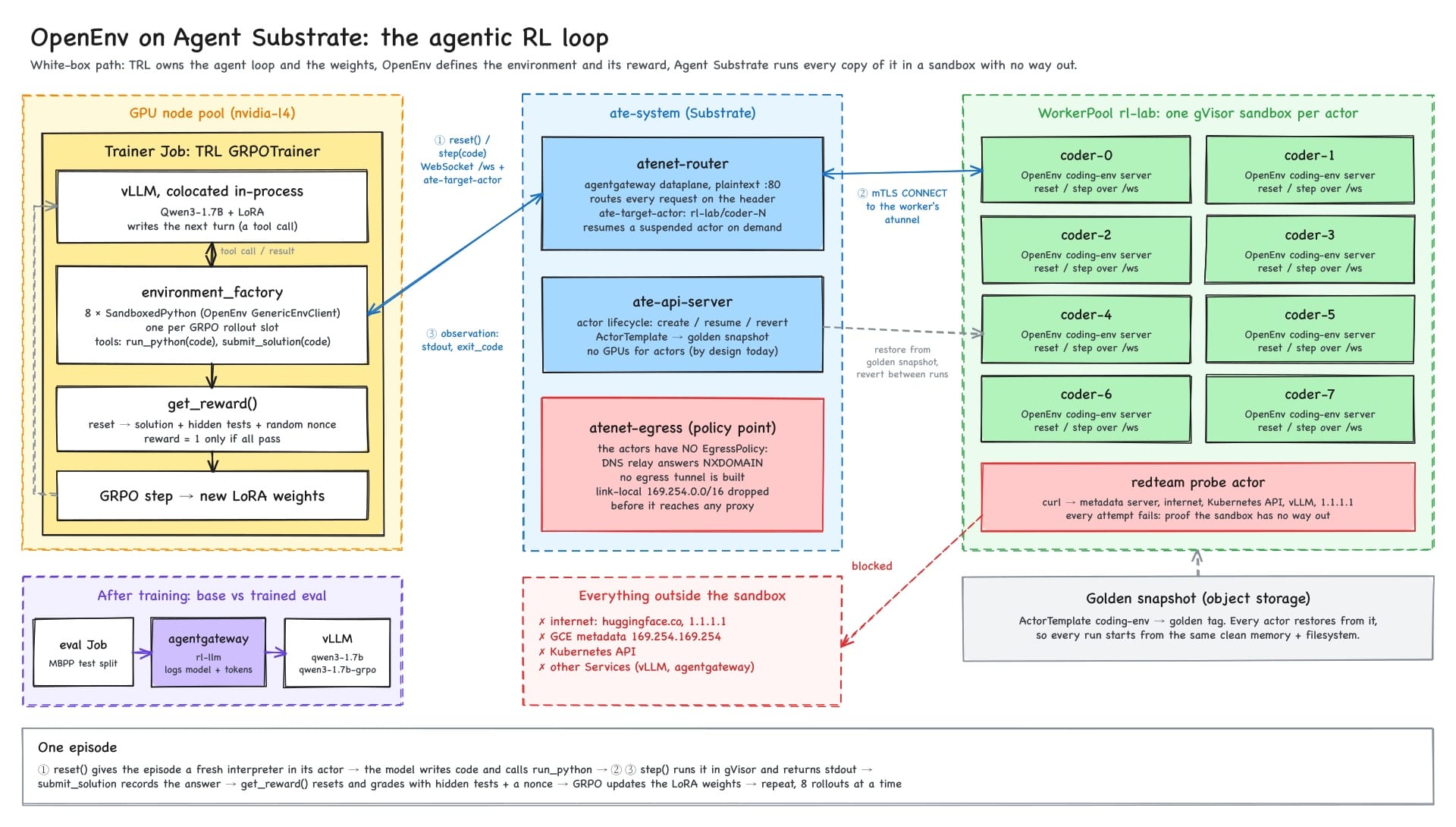
As far as what runs in Substrate, the environment itself will run within Agent Substrate. This includes the OpenEnv env servers (one per Actor), the Harness, and the Graders (keep the answer files/grading logic where the Agent can't reach). The Models, training, and GPU-intensive workloads will run outside of Agent Substrate.
The environment as a whole, however, runs directly on Kubernetes. Throughout this blog post, you will see a lot of technologies used, from agentgateway to vLLM to GPU-related tasks for the training and open-weight Models running, all within k8s.
Where Does Agentgateway Come Into Play?
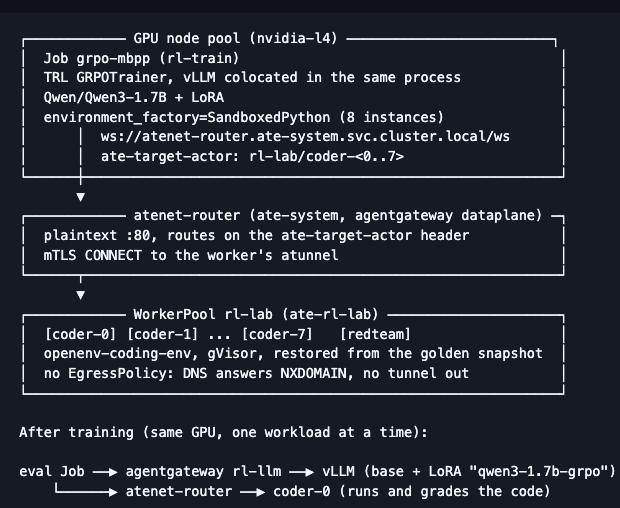
Agentgateway is at the evaluation stage where the LLM calls are real HTTP. The two primary reasons that the training loop doesn't go through agentgateway are:
- The run inside the training process never crosses the network, so there's no hop to a proxy.
- Substrate doesn't pass GPUs through to Actors, so the trainer and vLLM are ordinary GPU Pods next to Substrate, not inside of it.
Env Vars
For this blog post, you'll need to set a few environment variables within the terminals that you plan on working in.
export SUBSTRATE_DIR="${HOME}/gitrepos/substrate"   # checkout of the Substrate you installed

export PROJECT_ID=           # GCP project of the cluster
export CLUSTER_NAME=substrate
export CLUSTER_LOCATION=us-central1-a

export ATESPACE=rl-lab
export POOL_NS=ate-rl-lab
export TRAIN_NS=rl-train
export LLM_NS=agentgateway-system
export LLM_GW=rl-llm
export NUM_ACTORS=8          # one environment per GRPO rollout slot
export MODEL=Qwen/Qwen3-1.7B

export ROUTER_URL=http://atenet-router.ate-system.svc.cluster.local

export KO_DOCKER_REPO=       # registry your cluster pulls from
export KO_DEFAULTPLATFORMS="linux/amd64"

export CODING_ENV_IMAGE='ghcr.io/huggingface/openenv-coding-env@sha256:995ebc9b443c29a14882a0ad1b37ed26d5e9086bd85500e49e9d06c18295bda6'
export VLLM_IMAGE='vllm/vllm-openai:v0.31.0@sha256:c1c9f6fd5c109ba7f0546a59f5b2f15fb87f64c77782e90a27b648b42a8e67c3'
export PYTHON_IMAGE='python:3.12-slim@sha256:a0f57064cbdcd6285fa45f51237ab0b35ea8ebaed06a1f5973e89e19dfb86704'
export CURL_IMAGE='curlimages/curl:8.22.0@sha256:58adaa4e8dca9c988bae2aba4ab3434a0bb2da16bbe3f92dec39ec7785166777'
Worker Nodes and WorkerPool
With the theory of post-training known, along with where Agent Substrate comes into play, let's start the hands-on portion of setting up the Substrate environment for RL.
- Ensure everything is running as expected in the Substrate ecosystem:
kubectl -n ate-system get pods
kubectl -n ate-system get svc atenet-router \
-o jsonpath='{range .spec.ports[*]}{.name}={.port}{"\n"}{end}'- The trainer and vLLM need a GPU. The Substrate Workers stay on CPU as the Workers don't need GPUs due to the GPU workloads staying outside of Substrate. Add a node pool in your cluster for GPUs.
gcloud container node-pools create gpu-l4 \
  --cluster="${CLUSTER_NAME}" --location="${CLUSTER_LOCATION}" --project="${PROJECT_ID}" \
  --machine-type=g2-standard-8 \
  --accelerator=type=nvidia-l4,count=1,gpu-driver-version=latest \
  --num-nodes=1 \
--workload-metadata=GKE_METADATA- Create the
WorkerPool. The target environment is ten Workers and 8 env Actors.
cat <<EOF | hack/run-tool.sh ko apply -f -
apiVersion: v1
kind: Namespace
metadata:
  name: ${POOL_NS}
---
apiVersion: ate.dev/v1
kind: WorkerPool
metadata:
  name: rl-lab
  namespace: ${POOL_NS}
  labels:
    workload: rl-lab
spec:
  replicas: 10
  workerImage: ko://go.ate.dev/substrate/cmd/ateworker-gvisor
  sandboxClasses:
  - name: gvisor
  template:
    resources:
      limits:
        cpu: "1"
        memory: 1Gi
      requests:
        cpu: 250m
        memory: 1Gi
EOF
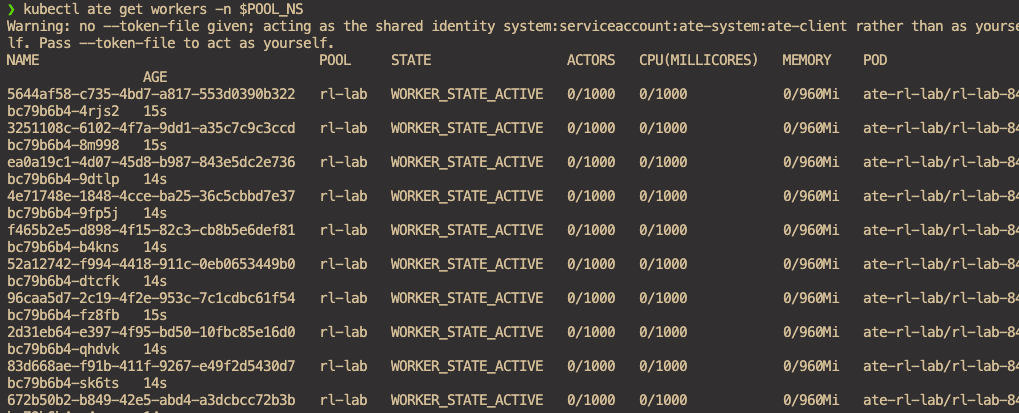
You should now see your Workers and Pools up and operational.
Router Identity
The atenet-router lets a client reach Actors only if the clients SPIFEE ID is on its allowList. Add the ServiceAccount that the trainer and the eval will run as so it can run against the Actor.
go run ./cmd/ate-setup deploy atenet \
  --config "${INSTALL_RECORD}" \
  --ingress-allowed-spiffe-ids="spiffe://cluster.local/ns/ate-system/sa/atenet-client,spiffe://cluster.local/ns/${TRAIN_NS}/sa/${ROUTER_CLIENT_SA}"
The env vars come from the section above when you're setting them in your terminal.
Actor Configuration
In the previous section, you deployed ten Workers, which means the goal is to run Actors. However, Actors don't actually run the training. Instead, they run the environment.
- Trainer Job (GPU pod, ordinary Kubernetes, outside Substrate): holds the Model, performs generation (vLLM co-located in the same process), computes the GRPO loss, and updates the LoRA weights.
- Eight actors (
coder-0..7, gVisor sandboxes on Substrate): each is an OpenEnv coding server. They receive the Python code the model wrote, execute it, and returnstdout,stderr, andexit_code.
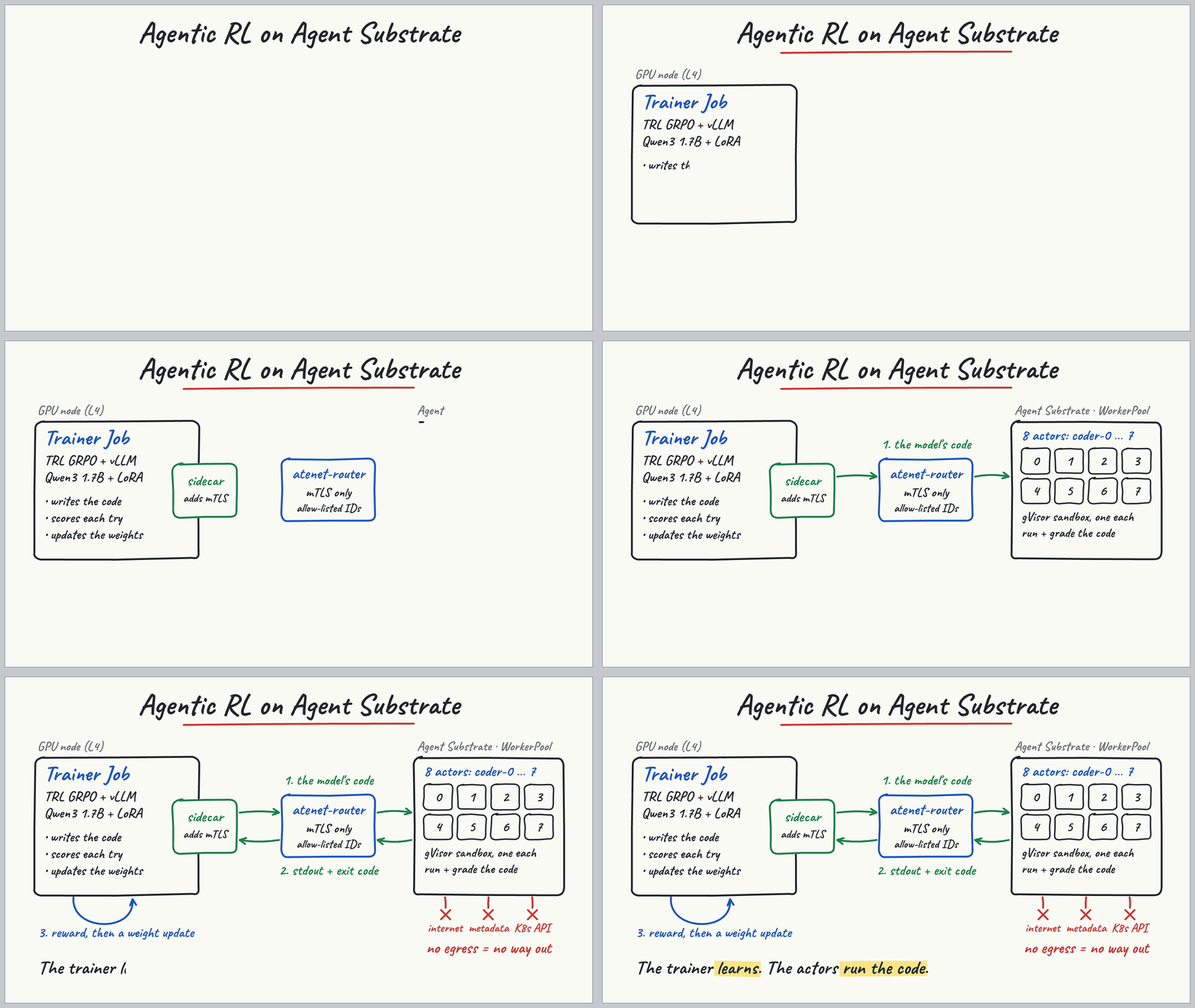
Tldr; the Actor executes the runs and grades them. The trainer learns.
- Create the Actor Template.
kubectl ate create atespace "${ATESPACE}"

sed \
  -e "s|@ATESPACE@|${ATESPACE}|g" \
  -e "s|@IMAGE@|${CODING_ENV_IMAGE}|g" \
  <<'EOF' | kubectl ate create actor-template -f -
metadata:
  atespace: @ATESPACE@
  name: coding-env
workerSelector:
  matchLabels:
    workload: rl-lab
containers:
- name: env
  image: @IMAGE@
  command: ["uvicorn", "coding_env.server.app:app", "--host", "0.0.0.0", "--port", "80"]
  env:
  - name: ENABLE_WEB_INTERFACE
    value: "false"
  - name: PYTHONUNBUFFERED
    value: "1"
  wakeupProbe:
    httpGet:
      path: /health
      port: 80
    timeoutSeconds: 60
resources:
  limits:
    cpuMillicores: 1000
    memoryBytes: 805306368 # 768Mi
snapshotConfig:
  preferredFidelity: SNAPSHOT_FIDELITY_MEMORY
EOF- Based on the template, create eight Actors (one per GRPO rollout slot). The OpenEnv coding server holds one session at a time, so each trainer slot needs its own Actor.
for i in $(seq 0 $((NUM_ACTORS - 1))); do
  kubectl ate create actor "coder-${i}" -a "${ATESPACE}" --template coding-env
done
for i in $(seq 0 $((NUM_ACTORS - 1))); do
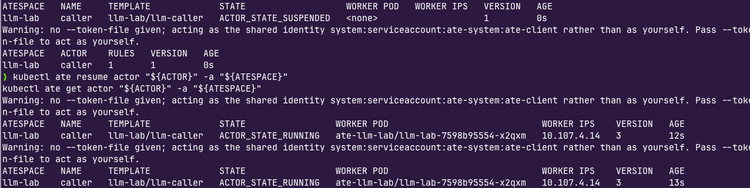
  kubectl ate resume actor "coder-${i}" -a "${ATESPACE}"
done
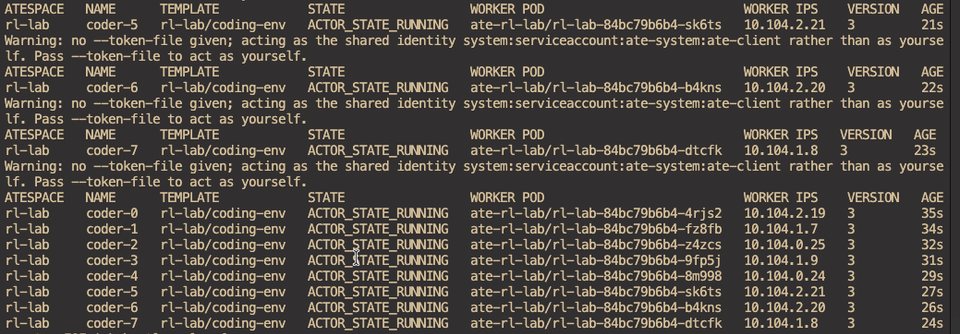
kubectl ate get actors -a "${ATESPACE}"- Create the
ServiceAccountthat you put on the routersAllowListin Router Identity section, along with a PVC that holds the Hugging Face Cache.
cat <<EOF | kubectl apply -f -
apiVersion: v1
kind: Namespace
metadata:
  name: ${TRAIN_NS}
---
apiVersion: v1
kind: ServiceAccount
metadata:
  name: ${ROUTER_CLIENT_SA}
  namespace: ${TRAIN_NS}
---
apiVersion: v1
kind: PersistentVolumeClaim
metadata:
  name: rl-data
  namespace: ${TRAIN_NS}
spec:
  accessModes: ["ReadWriteOnce"]
  storageClassName: standard-rwo
  resources:
    requests:
      storage: 50Gi
EOF
Training Job
With the environment, Workers, and Actors up and running, along with the router configs in place (specifying the ServiceAccount as the identity in the allowlist), you can now test out the training job.
- Create the config for the trainer's agentgateway sidecar. It listens on plain HTTP at
127.0.0.1:8080inside the Pod and forwards everything toatenet-routerover mTLS, using the Pods cert.
cat <<'EOF' | kubectl -n "${TRAIN_NS}" apply -f -
apiVersion: v1
kind: ConfigMap
metadata:
  name: router-client
data:
  config.yaml: |
    gateways:
      local:
        port: 8080
        bindAddress: 127.0.0.1
        protocol: HTTP
    backends:
    - name: atenet-router
      host: atenet-router.ate-system.svc:443
      policies:
        http:
          version: HTTP/1.1
        backendTLS:
          cert: /run/router-client/credential-bundle.pem
          key: /run/router-client/credential-bundle.pem
          root: /run/router-client/router-ca.pem
    routes:
    - name: to-router
      gateways:
      - local
      backends:
      - backend: /atenet-router
EOF- Store the training script (
train.py) in a `ConfigMap. The GRPO trainer +SandboxedPythonsends the Models code to the Actors and scores what comes back. The three env vars set in the script below tell the script where to send and which Actor to name.
cat <<'EOF' | kubectl -n "${TRAIN_NS}" apply -f -
apiVersion: v1
kind: ConfigMap
metadata:
  name: rl-scripts
data:
  train.py: |
    import itertools
    import os
    import secrets

    from datasets import load_dataset
    from openenv import GenericEnvClient
    from peft import LoraConfig
    from trl import GRPOConfig, GRPOTrainer

    ROUTER_URL = os.environ["ROUTER_URL"]
    ATESPACE = os.environ["ATESPACE"]
    NUM_ACTORS = int(os.environ["NUM_ACTORS"])

    PROMPT = """You are solving a Python programming task in a sandbox.

    Task: {task}

    Your function must pass this test:
    {example}

    Use the run_python tool to try code. When your function is correct, call submit_solution once with the complete function definition."""

    _slots = itertools.count()


    def to_example(row):
        return {
            "prompt": [{"role": "user", "content": PROMPT.format(task=row["prompt"], example=row["test_list"][0])}],
            "tests": row["test_list"],
        }


    class SandboxedPython:
        def __init__(self):
            self.actor = f"coder-{next(_slots) % NUM_ACTORS}"
            self._client = None
            self._tests = []
            self._solution = None

        def _env(self):
            if self._client is None:
                self._client = GenericEnvClient(
                    base_url=ROUTER_URL,
                    headers={"ate-target-actor": f"{ATESPACE}/{self.actor}"},
                ).sync()
                self._client.connect()
            return self._client

        def reset(self, **kwargs):
            self._tests = kwargs["tests"]
            self._solution = None
            self._env().reset()
            return None

        def run_python(self, code: str) -> str:
            """
            Run Python code in the sandbox and return what it printed.

            Args:
                code: The Python source code to run.

            Returns:
                The exit code, stdout and stderr of the run.
            """
            obs = self._env().step({"code": code}).observation
            return f"exit_code={obs.get('exit_code')}\nstdout:\n{obs.get('stdout', '')}\nstderr:\n{obs.get('stderr', '')}"

        def submit_solution(self, code: str) -> str:
            """
            Submit the final answer. Call this once, with the complete function definition.

            Args:
                code: The complete Python function definition.

            Returns:
                A confirmation that the answer was recorded.
            """
            self._solution = code
            return "Answer recorded."

        def get_reward(self) -> float:
            if not self._solution:
                return 0.0
            env = self._env()
            env.reset()
            nonce = secrets.token_hex(8)
            program = "\n".join([self._solution, *self._tests, f"print('{nonce}')"])
            obs = env.step({"code": program}).observation
            return 1.0 if obs.get("exit_code") == 0 and nonce in obs.get("stdout", "") else 0.0


    dataset = load_dataset("google-research-datasets/mbpp", "sanitized", split="train")
    dataset = dataset.filter(lambda row: not row["test_imports"])
    dataset = dataset.map(to_example, remove_columns=dataset.column_names)

    trainer = GRPOTrainer(
        model=os.environ["MODEL"],
        train_dataset=dataset,
        environment_factory=SandboxedPython,
        peft_config=LoraConfig(r=16, lora_alpha=32, target_modules="all-linear", task_type="CAUSAL_LM"),
        args=GRPOConfig(
            output_dir="/data/run",
            use_vllm=True,
            vllm_mode="colocate",
            vllm_gpu_memory_utilization=0.35,
            vllm_max_model_length=4096,
            chat_template_kwargs={"enable_thinking": False},
            num_generations=4,
            per_device_train_batch_size=NUM_ACTORS,
            gradient_accumulation_steps=1,
            max_completion_length=1536,
            max_tool_calling_iterations=6,
            learning_rate=5e-5,
            max_steps=int(os.environ.get("MAX_STEPS", "40")),
            bf16=True,
            gradient_checkpointing=True,
            logging_steps=1,
            log_completions=True,
            num_completions_to_print=1,
            save_strategy="no",
            report_to="none",
        ),
    )
    trainer.train()
    trainer.save_model("/data/adapter")
EOF- Run the training job. The
Jobcreates the GRPO job and that job is the training run. When you apply theJob, it does the following.- Pod schedules on the L4 GPU node, running as
rl-client. - Sidecar (agentgateway running as a small proxy) starts first and waits ready on
127.0.0.1:8080. It exists because OpenEnv's Python client can only open a plain WebSocket. It has no way to present a client certificate. The router only accepts mTLS, so the sidecar bridges the two. - Trainer container pip installs TRL, PEFT, OpenEnv, datasets.
- It runs
/opt/lab/train.py, downloadsQwen3-1.7B, starts vLLM in-process, then does 40 GRPO steps against the eight actors. - It saves the LoRA adapter to
/data/adapteron the PVC and the job completes.
- Pod schedules on the L4 GPU node, running as
cat <<EOF | kubectl apply -f -
apiVersion: batch/v1
kind: Job
metadata:
  name: grpo-mbpp
  namespace: ${TRAIN_NS}
spec:
  backoffLimit: 0
  template:
    spec:
      restartPolicy: Never
      serviceAccountName: ${ROUTER_CLIENT_SA}
      nodeSelector:
        cloud.google.com/gke-accelerator: nvidia-l4
      tolerations:
      - key: nvidia.com/gpu
        operator: Exists
        effect: NoSchedule
      initContainers:
      - name: router-client
        image: ${AGW_IMAGE}
        restartPolicy: Always
        args: ["-f", "/etc/agentgateway/config.yaml"]
        startupProbe:
          httpGet:
            path: /healthz/ready
            port: 15021
          periodSeconds: 1
          failureThreshold: 60
        resources:
          requests:
            cpu: 50m
            memory: 64Mi
        volumeMounts:
        - name: router-client-config
          mountPath: /etc/agentgateway
          readOnly: true
        - name: router-client
          mountPath: /run/router-client
          readOnly: true
      containers:
      - name: trainer
        image: ${VLLM_IMAGE}
        command: ["/bin/bash", "-c"]
        args:
        - |
          set -euo pipefail
          pip install --no-cache-dir "trl[peft]==1.16.0" "peft==0.21.2" "openenv==0.10.0" "datasets==5.1.0"
          python /opt/lab/train.py
        env:
        - name: MODEL
          value: "${MODEL}"
        - name: ROUTER_URL
          value: "${ROUTER_URL}"
        - name: ATESPACE
          value: "${ATESPACE}"
        - name: NUM_ACTORS
          value: "${NUM_ACTORS}"
        - name: MAX_STEPS
          value: "40"
        - name: HF_HOME
          value: /data/hf
        - name: PYTHONUNBUFFERED
          value: "1"
        resources:
          requests:
            cpu: "6"
            memory: 20Gi
          limits:
            memory: 26Gi
            nvidia.com/gpu: 1
        volumeMounts:
        - name: scripts
          mountPath: /opt/lab
        - name: data
          mountPath: /data
        - name: shm
          mountPath: /dev/shm
      volumes:
      - name: scripts
        configMap:
          name: rl-scripts
      - name: data
        persistentVolumeClaim:
          claimName: rl-data
      - name: shm
        emptyDir:
          medium: Memory
          sizeLimit: 8Gi
      - name: router-client-config
        configMap:
          name: router-client
      - name: router-client
        projected:
          sources:
          - podCertificate:
              signerName: podidentity.podcert.ate.dev/identity
              keyType: ECDSAP256
              credentialBundlePath: credential-bundle.pem
          - clusterTrustBundle:
              signerName: servicedns.podcert.ate.dev/identity
              labelSelector:
                matchLabels:
                  podcert.ate.dev/canarying: live
              path: router-ca.pem
EOF
You can see the Actors in action while they're running the test program.
kubectl ate logs actor coder-0 -a "${ATESPACE}" -f --source containers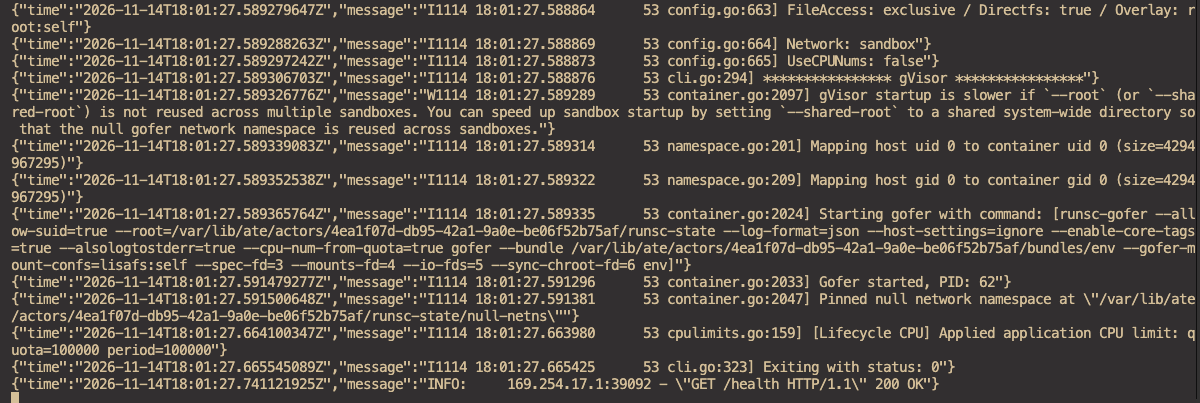
Wrapping Up
If you dove into the OpenAI/Hugging Face attack, this was actually done during an OpenAI RL and evaluation run. Agents faced tasks that seemed "impossible" during the eval run and broke out of the environment. This is why post-training and reinforcement learning are so important. A lot of people say when a new LLM comes out or gets worse, "oh, this one isn't as good as the other LLM" or "this LLM is so much better". In reality, it's not that the LLM got "worse", it's that the RL and post-training "got worse".
RL and post-training shape how the LLM will behave, reason, and solve problems. It doesn't matter how much information/data the LLM has if the post-training wasn't done properly.

Comments ()