Semantic Routing with Intent-Based CEL in Agentgateway
Think about this scenario: you're working on a complex application refactor, and after the initial stages of performing said refactor, you decide to run tests and see if the updates worked as expected or if there are regressions.
Those are two very different use cases. One is a complex task and the other is running a few lines of code/running scripts and seeing the output.
Why use the same expensive, inference-intensive LLM for both tasks?
That's where model-aware and intent-based routing comes into play, and you'll learn how to set it up for any agentic environment in this blog post using agentgateway.
Prerequisites
To follow along from a hands-on perspective, you need the following:
- An OpenAI API key.
- An Anthropic API key.
- A Kubernetes cluster.
- Agentgateway installed.
The Gateway Backends
One `AgentgatewayBackend` per model tier, plus one failover backend using priority groups. The tiers are as follows:
-
claude-opus-4-8: expensive and only used for requests that need it. -
gpt-5.5: expensive and only used for deep reasoning. claude-sonnet-5: cheaper default for everything else.gpt-5-mini: Cheap OpenAI tier. Used for weighted split and failover fallback.
The way that requests will be routed to a specific LLM is via the x-intent header, which you will see in the next section.
- Set env variables for your API keys.
export ANTHROPIC_API_KEY='<your-anthropic-key>'
export OPENAI_API_KEY='<your-openai-key>'- Create the secrets with your API keys for authentication.
kubectl create ns semantic-routing
kubectl create secret generic anthropic-secret -n semantic-routing \
  --from-literal=Authorization="$ANTHROPIC_API_KEY"
kubectl create secret generic openai-secret -n semantic-routing \
--from-literal=Authorization="$OPENAI_API_KEY"- Specify the available LLMs within the backends.
kubectl apply -f - <<EOF
apiVersion: agentgateway.dev/v1alpha1
kind: AgentgatewayBackend
metadata:
  name: claude-opus
  namespace: semantic-routing
spec:
  ai:
    provider:
      anthropic:
        model: claude-opus-4-8
  policies:
    auth:
      secretRef:
        name: anthropic-secret
---
apiVersion: agentgateway.dev/v1alpha1
kind: AgentgatewayBackend
metadata:
  name: claude-sonnet
  namespace: semantic-routing
spec:
  ai:
    provider:
      anthropic:
        model: claude-sonnet-5
  policies:
    auth:
      secretRef:
        name: anthropic-secret
---
apiVersion: agentgateway.dev/v1alpha1
kind: AgentgatewayBackend
metadata:
  name: gpt-5-5
  namespace: semantic-routing
spec:
  ai:
    provider:
      openai:
        model: gpt-5.5
  policies:
    auth:
      secretRef:
        name: openai-secret
---
apiVersion: agentgateway.dev/v1alpha1
kind: AgentgatewayBackend
metadata:
  name: gpt-5-mini
  namespace: semantic-routing
spec:
  ai:
    provider:
      openai:
        model: gpt-5-mini
  policies:
    auth:
      secretRef:
        name: openai-secret
EOF
With the backends set up, you'll need a way to route to them based on request, which is where the HTTPRoute object comes into play.
Configuring The Routes
There are two objects that you'll need to route traffic to an LLM successfully; the Gateway object, which provides you a full LLM and MCP Gateway using the agentgateway gateway class and the HTTPRoute, which specifies what path a user/machine can reach along with the target reference, which is a backend (like the ones you created in the previous section).
- Create a Gateway so your routes are reachable.
kubectl apply -f - <<EOF
apiVersion: gateway.networking.k8s.io/v1
kind: Gateway
metadata:
  name: semantic-routing
  namespace: semantic-routing
spec:
  gatewayClassName: agentgateway
  listeners:
  - name: http
    protocol: HTTP
    port: 8080
    allowedRoutes:
      namespaces:
        from: Same
EOF- Create two HTTPRoutes, one for advanced needs like coding, deep reasoning, etc. You'll see that the headers, for example, specify
codeas the value for thex-intentrequest. This falls under the "intent-based routing" category, which you'll see later in the tests. Then, the second is for quick/fast requests, which go to the cheap LLMs.
kubectl apply -f - <<EOF
apiVersion: gateway.networking.k8s.io/v1
kind: HTTPRoute
metadata:
  name: smart
  namespace: semantic-routing
spec:
  parentRefs:
  - name: semantic-routing
  hostnames:
  - smart.demo.internal
  rules:
  - matches:
    - path:
        type: PathPrefix
        value: /v1/chat/completions
      headers:
      - name: x-intent
        value: code
    backendRefs:
    - group: agentgateway.dev
      kind: AgentgatewayBackend
      name: claude-opus
  - matches:
    - path:
        type: PathPrefix
        value: /v1/chat/completions
      headers:
      - name: x-intent
        value: deep-reasoning
    backendRefs:
    - group: agentgateway.dev
      kind: AgentgatewayBackend
      name: gpt-5-5
  - matches:
    - path:
        type: PathPrefix
        value: /v1/chat/completions
    backendRefs:
    - group: agentgateway.dev
      kind: AgentgatewayBackend
      name: claude-sonnet
---
piVersion: gateway.networking.k8s.io/v1
kind: HTTPRoute
metadata:
  name: fast
  namespace: semantic-routing
spec:
  parentRefs:
  - name: semantic-routing
  hostnames:
  - fast.demo.internal
  rules:
  - matches:
    - path:
        type: PathPrefix
        value: /v1/chat/completions
    backendRefs:
    - group: agentgateway.dev
      kind: AgentgatewayBackend
      name: claude-sonnet
      weight: 80
    - group: agentgateway.dev
      kind: AgentgatewayBackend
      name: gpt-5-mini
      weight: 20
EOF
With the Gateway, Agentgatewaybackends, and HTTPRoutes configured, in the next section, you'll create the route-based policy.
The Policy
Below you'll find the configuration/policy that makes the configuration you've built thus far "semantic". phase: PreRouting runs the transformation before the HTTPRoute match, so the header it sets participates in routing. The CEL below respects a client-supplied x-intent and otherwise derives intent from the prompt content.
kubectl apply -f - <<EOF
apiVersion: agentgateway.dev/v1alpha1
kind: AgentgatewayPolicy
metadata:
  name: intent-classifier
  namespace: semantic-routing
spec:
  targetRefs:
  - group: gateway.networking.k8s.io
    kind: Gateway
    name: semantic-routing
  traffic:
    phase: PreRouting
    transformation:
      request:
        set:
        - name: x-intent
          value: >-
            "x-intent" in request.headers ? request.headers["x-intent"] :
            (json(request.body).messages.exists(m, m.content.contains("code") || m.content.contains("function")) ? "code" :
            (json(request.body).messages.exists(m, m.content.contains("prove") || m.content.contains("theorem")) ? "deep-reasoning" : "general"))
EOF
If you don't set this policy, you have to manually configure the header for each curl request. With the policy, if keywords like "code", "function", "prove", and "theorem" exist, it'll still route to the appropriate backend without a header.
Test The Semantic Routing
With the configurations in place to fully reach your LLMs via an LLM Gateway (agentgateway), you can now test routes via curl.
- Put your Gateways ALB IP into an env variables. If you don't have an ALB IP (e.g - you're running locally), instead of using
$INGRESS_GW_ADDRESSin step 2, uselocalhost.
export INGRESS_GW_ADDRESS=$(kubectl get svc -n semantic-routing semantic-routing -o jsonpath="{.status.loadBalancer.ingress[0]['hostname','ip']}")
echo $INGRESS_GW_ADDRESS
The following three tests are intent-based routing (same endpoint, different models).
- Explicit intent header: escalates to the expensive model -> claude-opus-4-8
- No header: the PreRouting CEL classifier detects "prove" -> gpt-5.5
- Generic prompt: stays on the cheaper default -> claude-sonnet-5
- Run the tests
curl -s http://$INGRESS_GW_ADDRESS:8080/v1/chat/completions \
  -H 'Host: smart.demo.internal' -H 'content-type: application/json' \
  -H 'x-intent: code' \
  -d '{"model":"any","messages":[{"role":"user","content":"write a binary search in Go"}]}' | jq -r .model

curl -s http://$INGRESS_GW_ADDRESS:8080/v1/chat/completions \
  -H 'Host: smart.demo.internal' -H 'content-type: application/json' \
  -d '{"model":"any","messages":[{"role":"user","content":"prove sqrt(2) is irrational"}]}' | jq -r .model

curl -s http://$INGRESS_GW_ADDRESS:8080/v1/chat/completions \
  -H 'Host: smart.demo.internal' -H 'content-type: application/json' \
  -d '{"model":"any","messages":[{"role":"user","content":"say hi"}]}' | jq -r .model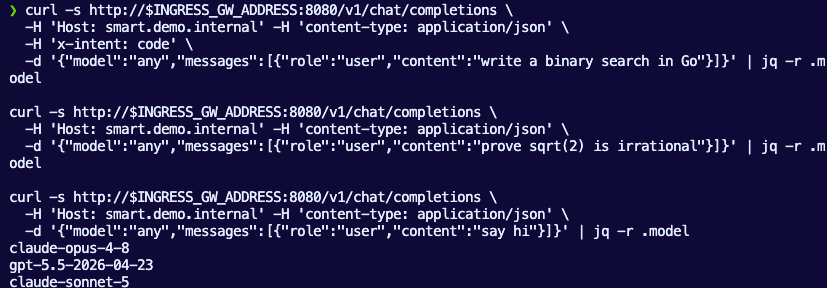
The response model field shows the model that served the request (the backend's model override wins regardless of what the client sent).
Here's a for loop to show a weighted split (~80/20 over 10 calls).
for i in $(seq 1 10); do
  curl -s http://$INGRESS_GW_ADDRESS:8080/v1/chat/completions \
    -H 'Host: fast.demo.internal' -H 'content-type: application/json' \
    -d '{"model":"any","messages":[{"role":"user","content":"hi"}]}' | jq -r .model
done | sort | uniq -c
Congrats! You've successfully set up and configured semantic/intent-based routing on agentgateway.

Comments ()