How To Implement the AgentgatewayModel Object In Agentgateway
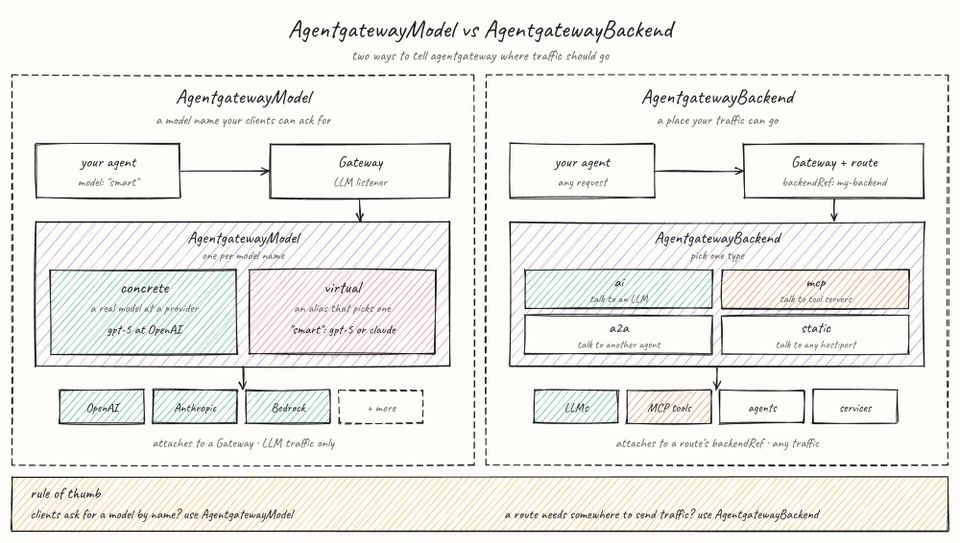
Knowing what LLM you're routing to, whether or not failover for more expensive tasks exists, what LLMs are available, and policy enforcement/implementation for the people accessing LLMs are critical pathways to properly implementing agentic workloads in production.
Luckily, there are a few key ways to do it in agentgateway. One with less YAML, and one with routing to everything from LLMs to MCP Servers and a2a endpoints.
In this blog post, you'll learn about the AgentgatewayBackend object, the AgentgatewayModel object, and how to implement the AgentgatewayModel object in agentgateway OSS.
Prerequisites
To follow along with this blog post from a hands-on perspective, you will need:
- A k8s cluster (local is fine).
- Agentgateway OSS installed, and you can learn how to do so here.
The hands-on portion uses Anthropic as the LLM provider, but if you prefer to use another, you can see the available providers via agentgateway here.
What Is AgentgatewayModel?
When using the AgentgatewayModel object, you have the ability to interact with the LLM directly. You don't have to set up separate routes for interacting with the LLM or use a policy oject to set policy enforcement for LLM requests (rate limits, failover, governance, etc.). Instead, you define it all at the AgentgatewayModel object level. Because of this, you have far less YAML/JSON to worry about when creating and configuring your path to LLMs.

Two other key implementations are the virtualModel parameter and how public Models are listed. With the Public component, Models are listed in discovery and can be requested directly. The Virtual Models component gives you weight/percentage splits between LLMs and failover for priority groups.
How Does It Differ from AgentgatewayBackend?
There are a few key differences between AgentgatewayBackend and AgentgatewayModel:
AgentgatewayModelis used to route traffic to an LLM (no other backends like static, a2a, mcp, etc.).- It has its own
parentRefs, which means it points straight to the Gateway (noHTTPRouteneeded). - Policies are set on the LLM itself (no
AgentgatewayPolicy).
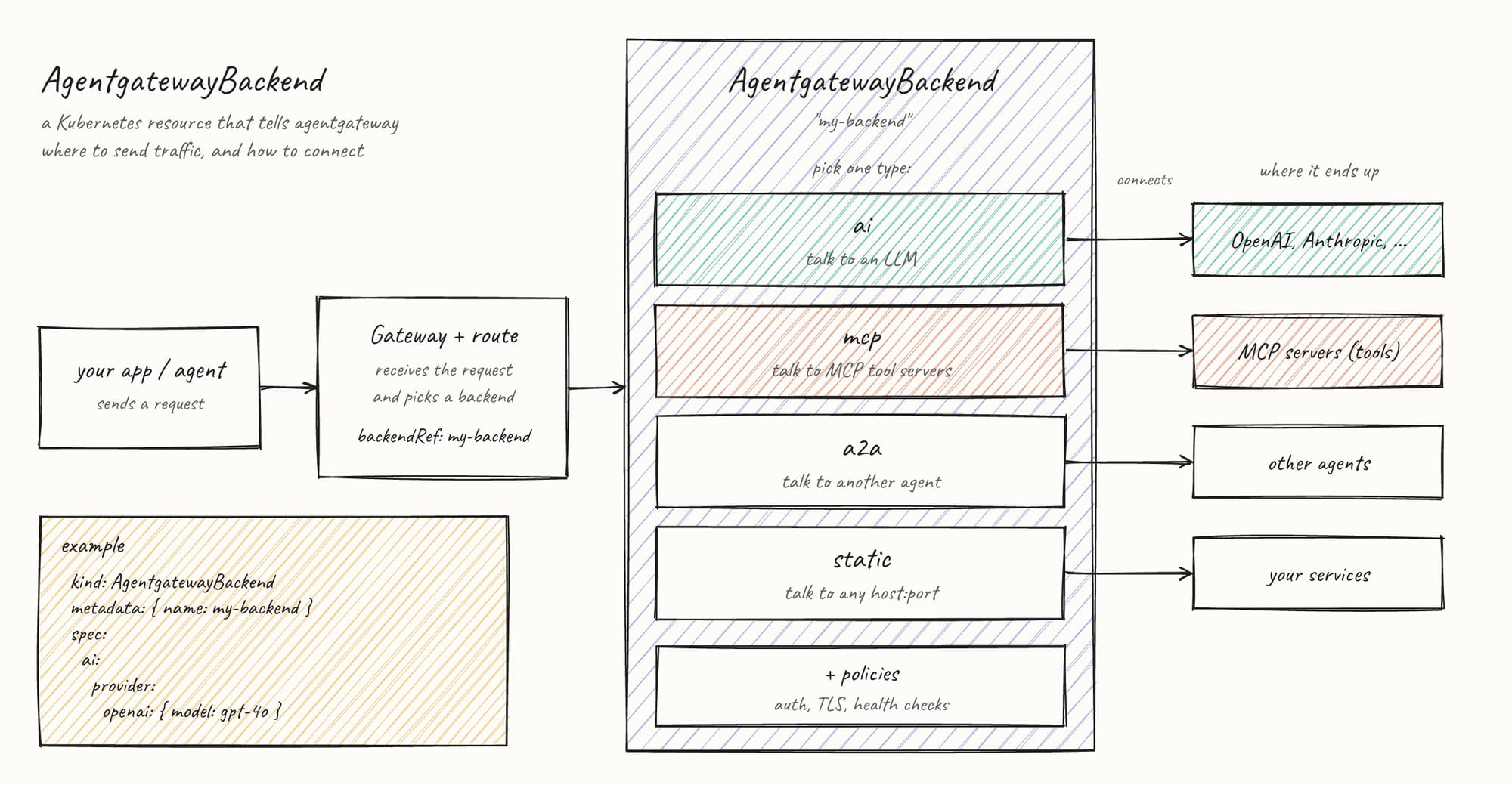
You still want to use an AgentgatewayBackend when you need to route to anything that isn't an LLM and path-based routing for things like header matching/filters.
Using AgentgatewayModel
Now that you know the "how" and "why" behind when to use AgentgatewayModel, let's see it in action. You will see three configs and put them to the test:
- A standard Gateway object to ensure it's working as expected.
- Failover/weighted routing
- Policies
Level 100 Config
The first configuration is just to see the LLM path/request via your gateway work in general. To do this, you will need:
- A new Namespace called
llm-models. - A Secret with your Anthropic API key in the
llm-modelsNamespace.
Create the following to have an object that calls to claude-haiku-4-5 and your new Gateway.
AgentgatewayModel, it's set via the metadata.name parameter.kubectl apply -f - <<EOF
apiVersion: agentgateway.dev/v1alpha1
kind: AgentgatewayModel
metadata:
name: claude-haiku-4-5
namespace: llm-models
spec:
parentRefs:
- group: gateway.networking.k8s.io
kind: Gateway
name: llm-gateway
sectionName: llm
provider: Anthropic
policies:
auth:
secretRef:
name: anthropic-key
---
apiVersion: gateway.networking.k8s.io/v1
kind: Gateway
metadata:
name: llm-gateway
namespace: llm-models
spec:
gatewayClassName: agentgateway
listeners:
- name: llm
protocol: HTTP
port: 80
allowedRoutes:
namespaces:
from: Same
kinds:
- group: agentgateway.dev
kind: AgentgatewayModel
EOFPort-forward the Gateway object so you can reach it.
kubectl port-forward -n llm-models svc/llm-gateway 8080:80Run the following to see the list of available LLMs. This alone is an important implementation as a lot of organizations want the ability to see what models are available within a gateway path.
curl -s localhost:8080/v1/models | jq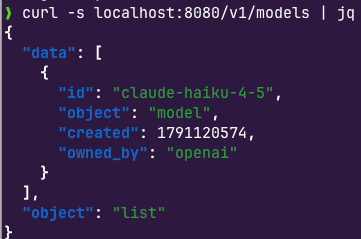
Next, prompt it to ensure its working as expected.
curl -s localhost:8080/v1/chat/completions -H 'Content-Type: application/json' -d '{"model":"claude-haiku-4-5","messages":[{"role":"user","content":"Say hi"}]}' | jq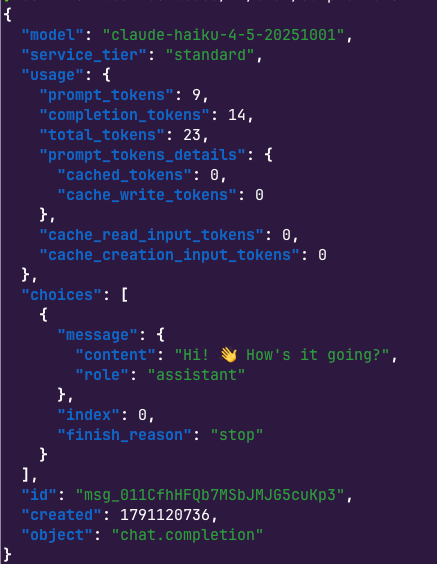
Failover
The below will prove out that:
- The first request returns a 401 due to a bad API key (the
secretRefpoints to a fake key). - Because of the failover, requests 2 and 3 will return a 200.
Create the bad key.
kubectl create secret generic bad-key -n llm-models --from-literal=Authorization=sk-ant-invalidApply the new AgentgatewayModel objects.
kubectl apply -f - <<EOF
apiVersion: agentgateway.dev/v1alpha1
kind: AgentgatewayModel
metadata:
  name: failover-primary
  namespace: llm-models
spec:
  parentRefs:
  - group: gateway.networking.k8s.io
    kind: Gateway
    name: llm-gateway
    sectionName: llm
  visibility: Internal
  provider: Anthropic
  policies:
    auth:
      secretRef:
        name: bad-key
    transformations:
    - field: model
      expression: '"claude-sonnet-4-5"'
    health:
      unhealthyCondition: 'response.code >= 400'
      eviction:
        consecutiveFailures: 1
        duration: 60s
---
apiVersion: agentgateway.dev/v1alpha1
kind: AgentgatewayModel
metadata:
  name: failover-fallback
  namespace: llm-models
spec:
  parentRefs:
  - group: gateway.networking.k8s.io
    kind: Gateway
    name: llm-gateway
    sectionName: llm
  visibility: Internal
  provider: Anthropic
  policies:
    auth:
      secretRef:
        name: anthropic-key
    transformations:
    - field: model
      expression: '"claude-haiku-4-5"'
---
apiVersion: agentgateway.dev/v1alpha1
kind: AgentgatewayModel
metadata:
  name: resilient-test
  namespace: llm-models
spec:
  parentRefs:
  - group: gateway.networking.k8s.io
    kind: Gateway
    name: llm-gateway
    sectionName: llm
  virtualModel:
    failover:
      targets:
      - modelRef:
          name: failover-primary
        priority: 0
      - modelRef:
          name: failover-fallback
        priority: 1
EOF
Run the following curl to test it:
for i in 1 2 3; do
  curl -s -w '  [%{http_code}]\n' localhost:8080/v1/chat/completions -H 'Content-Type: application/json' \
    -d '{"model":"resilient-test","max_tokens":10,"messages":[{"role":"user","content":"hi"}]}' | tail -c 200
done
You'll see that the first call gives you a 401.
{"event_id":null,"error":{"type":"invalid_request_error","message":"API key is invalid."}}  [401]
age":{"content":"Hello! How can I help you today?","role":"assistant"},"index":0,"finish_reason":"length"}],"id":"msg_011CfhHS8ey2oiRF4fUP9x8s","created":1791120881,"object":"chat.completion"}  [200]
{"message":{"content":"# Hello! 👋\n\nHow can I","role":"assistant"},"index":0,"finish_reason":"length"}],"id":"msg_011CfhHSB2qXibWjAoFZvwY7","created":1791120882,"object":"chat.completion"}  [200]
Policy
Implementing a policy within the AgentgatewayModel object, you have the ability to specify both CEL and prompt guards.
kubectl apply -f - <<EOF
apiVersion: agentgateway.dev/v1alpha1
kind: AgentgatewayModel
metadata:
  name: claude-haiku-4-5
  namespace: llm-models
spec:
  parentRefs:
  - group: gateway.networking.k8s.io
    kind: Gateway
    name: llm-gateway
    sectionName: llm
  provider: Anthropic
  policies:
    auth:
      secretRef:
        name: anthropic-key
    authorization:
      action: Allow
      policy:
        matchExpressions:
        - 'request.headers["x-team"] in ["platform", "data-science"]'
    promptGuard:
      request:
      - regex:
          builtins: [Ssn, CreditCard]
          action: Reject
        response:
          statusCode: 403
          message: "Request blocked: contains sensitive data (SSN/credit card)."
      response:
      - regex:
          builtins: [Email]
          action: Mask
    transformations:
    - field: max_tokens
      expression: '256'
    headers:
      response:
        add:
        - name: x-served-by-model
          value: claude-haiku-4-5
EOF
Run the following, which ensures the x-team header is passed for the CEL implementation via the curl:
curl -si localhost:8080/v1/chat/completions -H 'Content-Type: application/json' -H 'x-team: platform' \
  -d '{"model":"claude-haiku-4-5","messages":[{"role":"user","content":"Say hi"}]}' | grep -i 'x-served-by-model\|HTTP/'
You'll see that the request goes through and has a proper output.
HTTP/1.1 200 OK
x-served-by-model: claude-haiku-4-5
However, if you try to do a curl with an SSN, it'll fail.
curl -s localhost:8080/v1/chat/completions -H 'Content-Type: application/json' -H 'x-team: platform' \
  -d '{"model":"claude-haiku-4-5","messages":[{"role":"user","content":"My SSN is 123-45-6789"}]}'
Request blocked: contains sensitive data (SSN/credit card).%Wrapping Up
With how quickly AI moves and especially how traffic needs to be routed to LLMs, it's great to have options. If you want something that's "baked in" with policies, routing, and failover into one object, you have an option. If you need header-based routing, filters, and rewrites based on how you want to route said traffic, you have an option for that as well.

Comments ()