Virtual Keys in Agentgateway: Per-User Token Budgets for Your LLM Gateway
Cost in AI will vary per user and department. If an engineer is refactoring a codebase or observing an environment to fix anomalies, the token spend may differ from that of someone in finance modifying a quarterly spreadsheet. At times, the finance person will have more AI costs (e.g - at the end of the quarter) than the engineer observing an environment that's running as expected.
The point? AI spend is fluid, and with that, proper cost optimization, token budgets, and rate limiting need to be configured at the edge.
In this blog post, you'll learn what Virtual Keys are and how to set them up in agentgateway.
Prerequisites
To follow this blog in a hands-on fashion:
- Have a k8s cluster deployed.
- Agentgateway OSS k8s installed.
- Deploy the global rate limiter. You can learn how to do so here. Deploy the global rate limiter from the agentgateway docs, but when you get to the ratelimit-config
ConfigMap, use theConfigMapin this post instead of the sample one in the installation guide.
What Are Virtual Keys
When users/engineers/leadership/whoever else want to use Agents, you effectively have two choices:
- Assign them a subscription
- Send them an API key
But what if you want to manage that API key for them? Or set a token budget? Or manage cost tracking for the person?
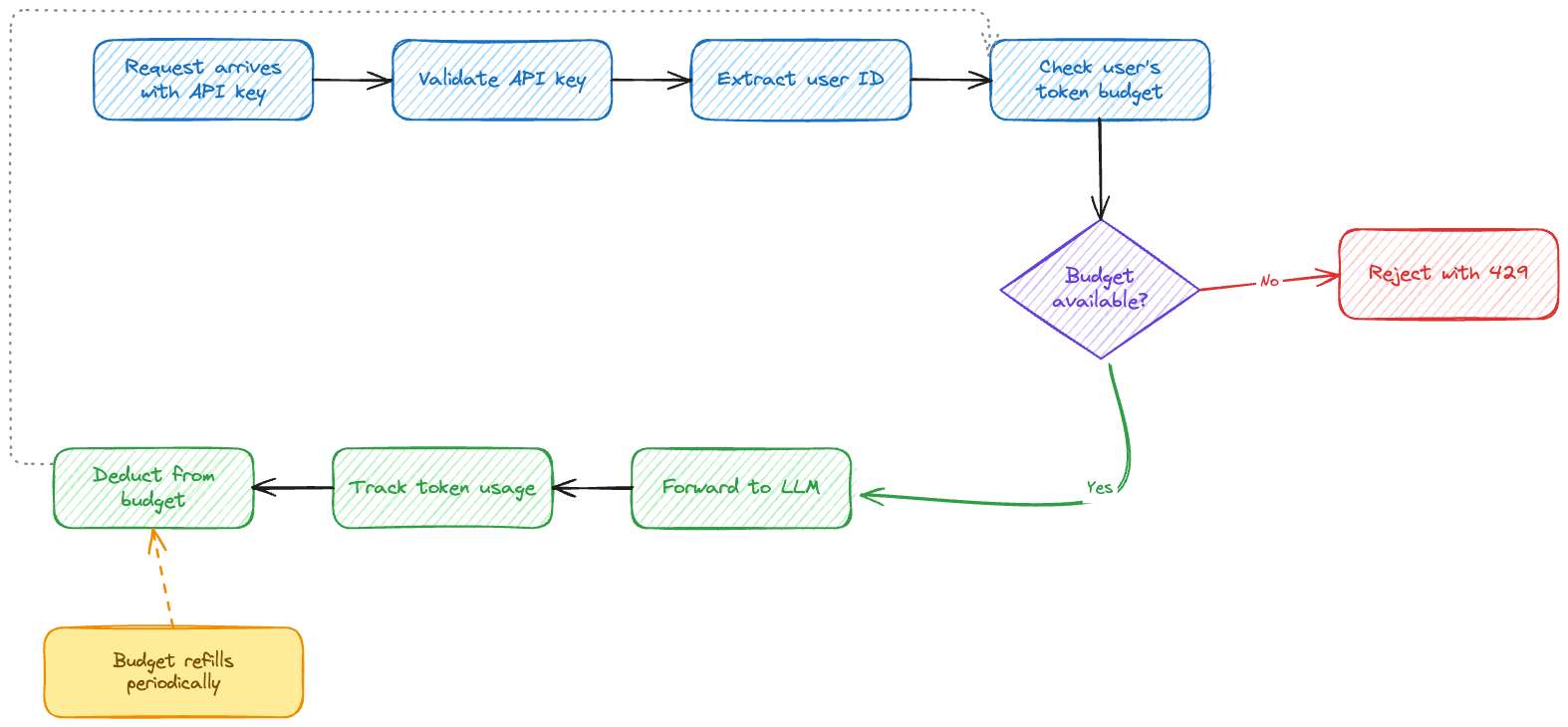
That's the goal of a Virtual Key: to generate a key via an AI Gateway to govern, control cost, and track AI usage. It's the intermediary security boundary between your LLM provider and remote environments.
This is especially important for governance and cost optimization.
Setup and Configuration
With the "know-how" of Virtual Keys understood, let's begin the setup process. You'll start off by defining a secret with an API key that's tied to a particular person along with the Gateway configuration to ensure traffic can be routed properly to an LLM.
Secret Creation
The first step is the Secret creation.
anthropic-secret is the upstream provider credential:
- Used by
AgentgatewayBackend.spec.policies.auth.secretRef - Let's agentgateway authenticate to Anthropic.
- The secret key must be
Authorization.
Clients should not know this key.
The anthropic-api-key is the downstream/client virtual key store:
- Used by
AgentgatewayPolicy.spec.traffic.apiKeyAuthentication.secretRef. - Authenticates callers to your gateway.
- Maps each client key to metadata like
user_id: mike. - Enables per-user rate limits, budgets, metrics, logs, etc.
export ANTHROPIC_API_KEY=

kubectl create secret generic anthropic-secret \
  -n agentgateway-system \
  --from-literal=Authorization="$ANTHROPIC_API_KEY" \
  --dry-run=client -o yaml | kubectl apply -f -
kubectl apply -f- <<EOF
apiVersion: v1
kind: Secret
metadata:
name: anthropic-api-key
namespace: agentgateway-system
type: Opaque
stringData:
mike: |
{
"key": "sk-mike-key",
"metadata": {
"user_id": "mike"
}
}
EOFGateway Configuration
With the secret created, you can create your LLM gateway via agentgateway to ensure traffic can be routed to your provider of choice.
kubectl apply -f- <<EOF
kind: Gateway
apiVersion: gateway.networking.k8s.io/v1
metadata:
  name: agentgateway-route
  namespace: agentgateway-system
spec:
  gatewayClassName: agentgateway
  listeners:
  - protocol: HTTP
    port: 8080
    name: http
    allowedRoutes:
      namespaces:
        from: All
---
apiVersion: agentgateway.dev/v1alpha1
kind: AgentgatewayBackend
metadata:
  name: anthropic
  namespace: agentgateway-system
spec:
  ai:
    provider:
        anthropic:
          model: "claude-sonnet-5"
  policies:
    auth:
      secretRef:
        name: anthropic-secret
---
apiVersion: gateway.networking.k8s.io/v1
kind: HTTPRoute
metadata:
  name: claude
  namespace: agentgateway-system
spec:
  parentRefs:
    - name: agentgateway-route
      namespace: agentgateway-system
  rules:
  - matches:
    - path:
        type: PathPrefix
        value: /anthropic
    filters:
    - type: URLRewrite
      urlRewrite:
        path:
          type: ReplaceFullPath
          replaceFullPath: /v1/chat/completions
    backendRefs:
    - name: anthropic
      namespace: agentgateway-system
      group: agentgateway.dev
      kind: AgentgatewayBackend
EOF
Once the Gateway is created, pull the IP of the Gateway and put it into an environment variable. If you're running k8s in a local cluster and don't have access to an IP, you can port-forward the Gateway.
export INGRESS_GW_ADDRESS=$(kubectl get svc -n agentgateway-system agentgateway-route -o jsonpath="{.status.loadBalancer.ingress[0]['hostname','ip']}")
echo $INGRESS_GW_ADDRESS
With the Gateway, Backend, Route, and the secret with your API key created, you can now start testing out the Virtual Key scenarios.
Scenario 1: Rate Limit Server
The rate limit server below specifies that mike only gets 100 tokens per day.
kubectl apply -f- <<EOF
apiVersion: v1
kind: ConfigMap
metadata:
  name: ratelimit-config
  namespace: ratelimit
data:
  config.yaml: |
    domain: token-budgets
    descriptors:
      - key: user_id
        value: mike
        rate_limit:
          unit: day
          requests_per_unit: 100
EOF
Scenario 2: Per-Key Token Budgets
The last step is to create a policy. This policy does two things:
- Ensures that API key authentication is required for all requests to the LLM Gateway.
- Rate limit tokens for the user ID
mike.
kubectl apply -f- <<EOF
apiVersion: agentgateway.dev/v1alpha1
kind: AgentgatewayPolicy
metadata:
  name: api-key-auth
  namespace: agentgateway-system
spec:
  targetRefs:
    - group: gateway.networking.k8s.io
      kind: Gateway
      name: agentgateway-route
  traffic:
    apiKeyAuthentication:
      mode: Strict
      secretRef:
        name: anthropic-api-key
    rateLimit:
      conditional:
        - condition: "apiKey.user_id == 'mike'"
          policy:
            global:
              domain: token-budgets
              backendRef:
                kind: Service
                name: ratelimit
                namespace: ratelimit
                port: 8081
              descriptors:
                - entries:
                    - name: user_id
                      expression: "apiKey.user_id"
                  unit: Tokens
EOF
This will ensure sk-mike-key authenticates, apiKey.user_id == "mike", token budget applies, other valid API keys authenticate, but skip this rate-limit policy, and invalid/missing API keys still get rejected by apiKeyAuthentication.
Testing
Test to ensure that you can reach the LLM provider
curl "$INGRESS_GW_ADDRESS:8080/anthropic" \
  -H "Authorization: Bearer sk-mike-key" \
  -H "content-type: application/json" \
  -d '{
    "model": "claude-sonnet-5",
    "messages": [
      {
        "role": "user",
        "content": "Write me a paragraph containing the best way to think about Istio Ambient Mesh"
      }
    ]
  }' | jq
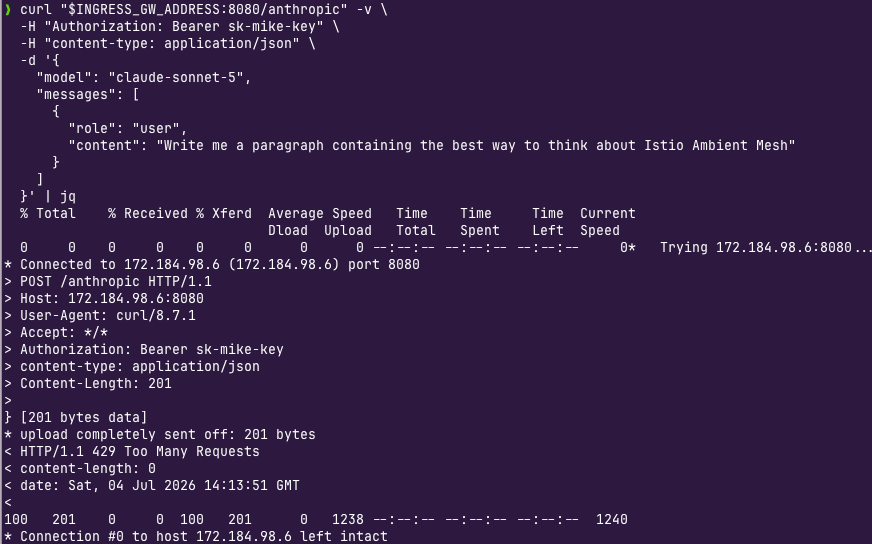
If you send another request, you'll notice that you hit the rate limit.
> POST /anthropic HTTP/1.1
> Host: 172.184.98.6:8080
> User-Agent: curl/8.7.1
> Accept: */*
> Authorization: Bearer sk-mike-key
> content-type: application/json
> Content-Length: 201
>
} [201 bytes data]
* upload completely sent off: 201 bytes
< HTTP/1.1 429 Too Many Requests
< content-length: 0
< date: Sat, 04 Jul 2026 14:13:51 GMT
Sidenote: if you try without specifying the header with the key, the request will fail with a 401.
curl "$INGRESS_GW_ADDRESS:8080/anthropic" -H content-type:application/json -H "anthropic-version: 2023-06-01" -d '{
  "messages": [
    {
      "role": "system",
      "content": "You are a skilled cloud-native network engineer."
    },
    {
      "role": "user",
      "content": "Write me a paragraph containing the best way to think about Istio Ambient Mesh"
    }
  ]
}' | jq
> POST /anthropic HTTP/1.1
> Host: 172.184.98.6:8080
> User-Agent: curl/8.7.1
> Accept: */*
> content-type:application/json
> anthropic-version: 2023-06-01
> Content-Length: 260
>
} [260 bytes data]
* upload completely sent off: 260 bytes
< HTTP/1.1 401 Unauthorized
< content-type: text/plain
< content-length: 48
< date: Sat, 04 Jul 2026 13:49:12 GMTIn Standalone
This blog was all about agentgateway within Kubernetes, but if you're running agentgateway standalone, you can create and manage Virtual Keys as well.
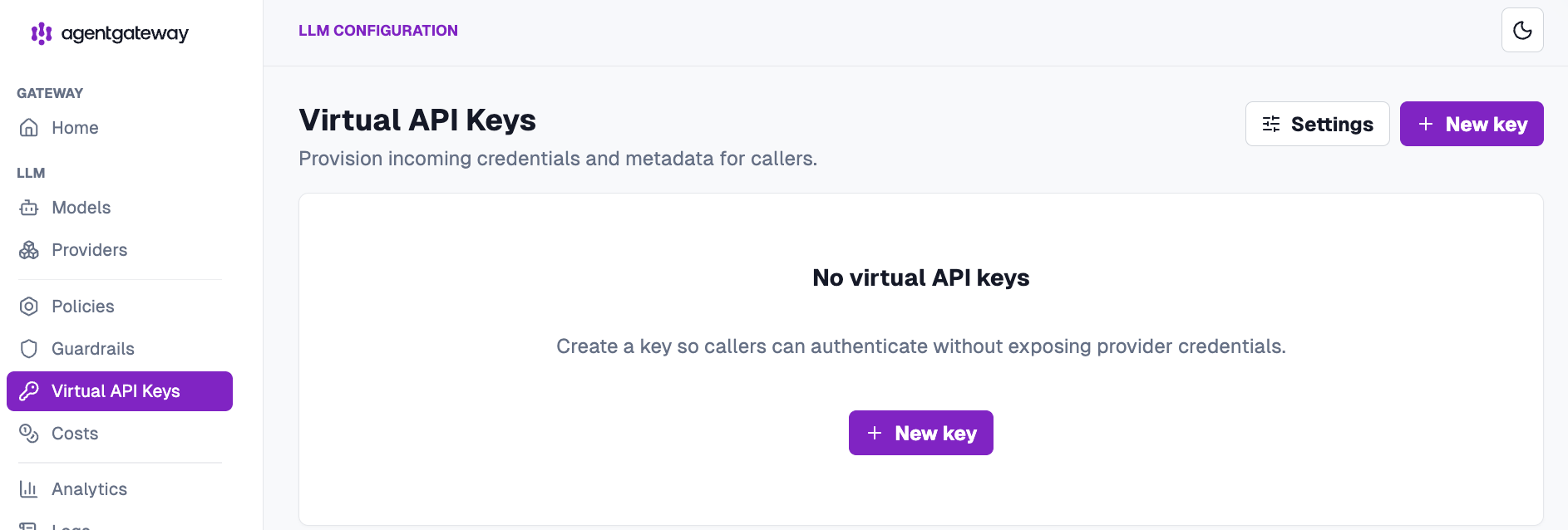
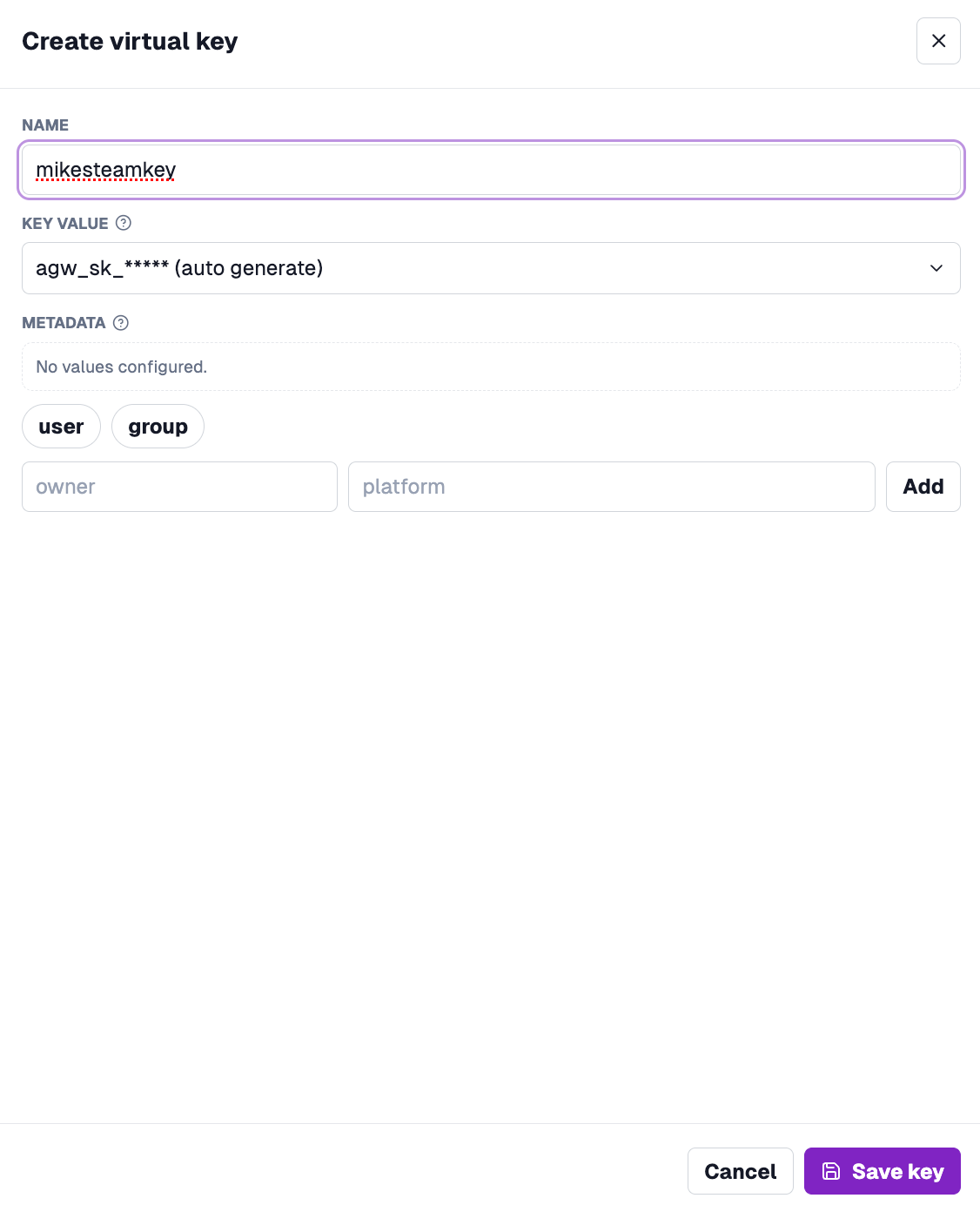
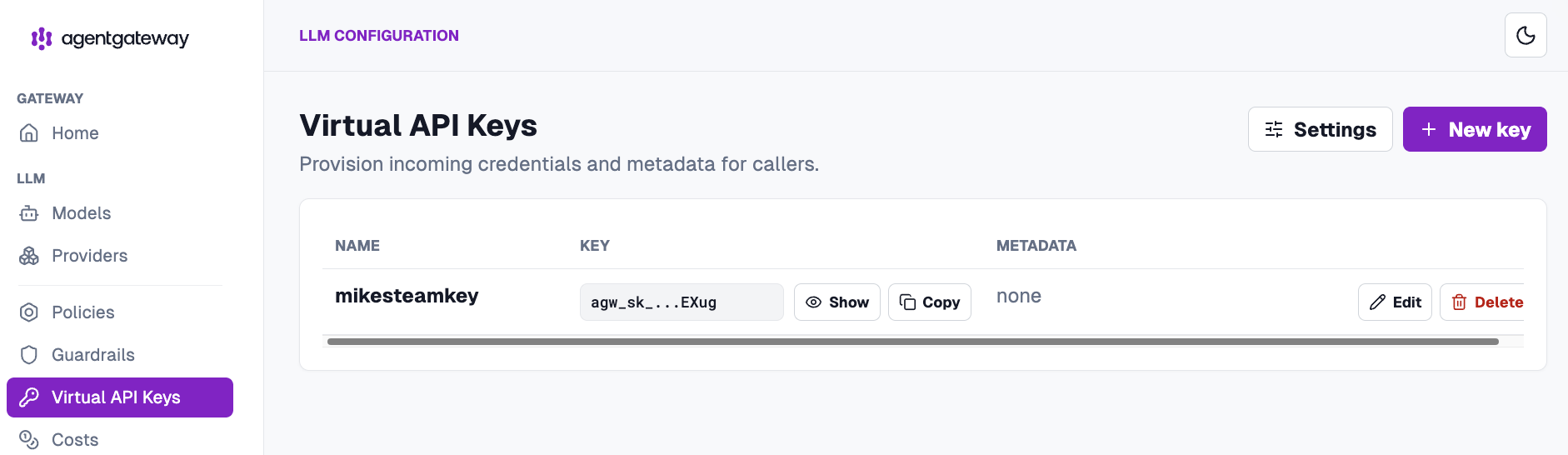
With this configuration, you now have everything you need to spin up rate limiting per user based on the Virtual Key.

Comments ()